
SEO prompt generator with live site data
Pick a workflow, pull real numbers from your site, and copy a prompt that can't invent them. Big jobs can run in rounds.
Choose a workflow
Start from your business type (optional)
Loading workflows.
Your site
We'll read your page and fill in what we can.
More context
Optional, but audience, goal and country make the answer more specific.
Workflow details
Lists stay lists: put one item per line. Anything you leave on its default isn't written into the prompt.
Add live data
Real numbers go into the prompt, so the AI works from facts instead of guesses. Each source runs only when you press its button.
How you'll use it
Resume a session
More settings
Deep and Expert add steps, and each one adds its own part to the output format.
- 25Search Engine Optimization (SEO) workflows
- 8live data sources
- 4AI layouts: Claude, ChatGPT, Gemini, Perplexity
- 0sign-ups or fees
How the SEO prompt generator works
The SEO prompt generator works in 4 steps: pick 1 of 25 workflows, enter your site, let it fetch live data, then copy a prompt that carries that data and the no-invention rules. The same steps make AI SEO prompts for ChatGPT, Claude, Gemini and Perplexity.
- Pick a workflow, such as keyword research or a traffic drop diagnosis. Starting from your business type picks a sensible one for you.
- Type your website. We read the page and fill in the brand, niche and language, and you can edit anything.
- Press a live data button to pull facts from your own pages, Google autocomplete, Wikipedia or PageSpeed Insights. To attach your data, drop in a Search Console or keyword export.
- Pick the AI and how you'll use it: one answer, rounds, a saved assistant or agent mode. Then copy the prompt or open it straight in ChatGPT, Claude, Gemini or Perplexity.
Your form is kept in this browser, so a refresh doesn't wipe it. Prompts you save or copy stay here too, and you can export them as a file.
Working in rounds
Rounds mean one task per round, and the answer feeds the next round: a chat AI doesn't loop by itself. In rounds mode you type next, and the AI does one cluster, section or audit area, checks that part, and prints a state card. To carry on in a new chat, paste the prompt and the last card and type resume. The Resume box builds that for you.
Rounds are offered on 13 workflows where the work is iterative. The other 12 work best as one answer. The AI's own check isn't proof, so type claims to see every claim and its source.
Where the live data comes from
The live data comes from 8 sources: your own pages, competitor pages, search autocomplete, Wikipedia, PageSpeed Insights, the Google Search Status Dashboard, a Search Console file and a keyword file. Each source runs only when you press its button, and each adds its own block to the Inputs. Live checks carry a fair-use limit of 40 requests in any 10 minutes.
| Source | What goes into the prompt |
|---|---|
| Site and page scan | Title, meta, headings, schema, links, images and security headers, plus robots.txt rules for AI crawlers, sitemap size and llms.txt. |
| Competitor outlines | Titles, heading outlines, word counts and schema of up to three competitor pages. |
| Live keyword ideas | Autocomplete from Google, Bing and YouTube, grouped into questions, comparisons and buying terms. |
| Entity research | The main entity, description and related topics from Wikipedia. |
| Core Web Vitals | Real-user Chrome User Experience Report (CrUX) data and lab metrics for mobile from Google PageSpeed Insights, with the top opportunities. |
| Google updates | Recent incidents and ranking updates from the Google Search Status Dashboard. |
| Search Console file | Striking-distance queries, click-through rate (CTR) gaps and top pages from your export, worked out in your browser. |
| Keyword export | Volume and difficulty from an Ahrefs or Semrush Comma-Separated Values (CSV) file, plus quick wins. |
Files you drop in are read in your browser and never uploaded. Page scans, PageSpeed and autocomplete go through our server, which fetches public pages only and keeps results for a few hours, so repeat requests are fast.
SEO prompt formula
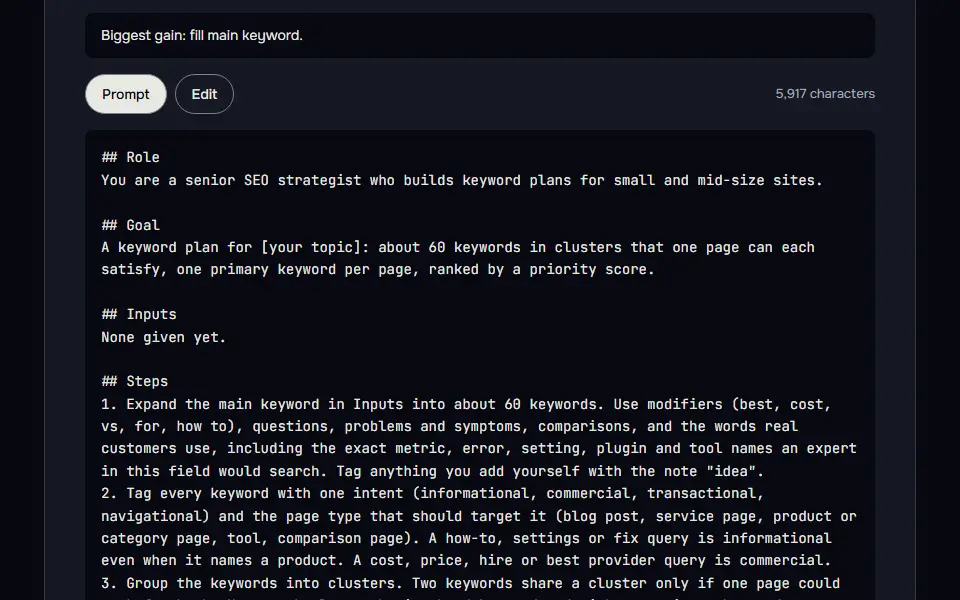
The SEO prompt formula is data plus task plus rules: the facts from your site, the one job the AI does with them, and the rules that stop it guessing. In short, workflow = data + task + rules. You don't write the task or the rules, since they're fixed for each workflow. The only part you supply is the data.
- DataThe Inputs block: a page scan, competitor outlines, keyword ideas and your files.
- TaskRole, goal, steps, output format and one example row.
- RulesA check before the answer, and a ban on invented numbers.
- SEO prompt
## Role
## Goal
## Inputs (the data goes here)
## Steps
## Output format
## Example
## Check before you answer
## RulesThe eight blocks of a workflow prompt, in order. The data fills Inputs, and the task and the rules are fixed for each workflow.
With no data in the Inputs block, the prompt says so and asks the AI to label every finding "to verify" and name the check that confirms it, so the AI doesn't print an empty table.
What the score measures
The score measures the prompt, not how many boxes you filled: 11 checks are each worth 2 points, scaled to 100. The checks are role, context, task, data, limits, format, example, self-check, model fit, length and deliverable scope (does the prompt ask for the whole job, with priorities and a plan, not just the analysis). The score stays at 40 or under when a key field is missing, since the prompt can only ask for it.
The 25 SEO workflows in one table
The 25 SEO workflows cover audits, keywords, content, links, local SEO and reporting, each listed with its group and the output it returns. They fall into 4 groups: Research (5), Content (6), Technical (8), and Local, AI and links (6). Each workflow has its own expert role, steps, output format, an example row and a short self-check the AI runs before it answers. The Technical SEO audit workflow is a ready-made prompt for an SEO audit, and its prioritised plan works as an SEO checklist you can tick off. The Search Engine Results Page (SERP) and intent analysis workflow works out what Google rewards for a query, and the Schema markup workflow writes valid JavaScript Object Notation (JSON) for Linked Data, called JSON-LD, that matches what is on the page.
| Workflow | Group | What you get |
|---|---|---|
| Keyword research | Research | Find the keywords worth a page, grouped by intent. |
| SERP and intent analysis | Research | Work out what Google rewards for a query and what to build. |
| Competitor gap analysis | Research | See what rivals rank for that you don't, and why. |
| Topical map | Research | Plan every page a site needs to own a topic. |
| Question research | Research | Collect and sort the questions people ask about a topic. |
| Content brief | Content | A writer-ready brief built from the SERP and the intent. |
| Article writer | Content | Draft a human-sounding, answer-first article from a brief. |
| Content refresh | Content | Update an ageing page that has slipped in rankings. |
| Titles and metas | Content | Write title tags and meta descriptions that earn the click. |
| FAQ section | Content | Write FAQs that answer real questions, with schema if it fits. |
| Product and category copy | Content | Write ecommerce copy that sells and satisfies search intent. |
| Technical SEO audit | Technical | A prioritised crawl, index and speed audit plan. |
| Search Console analysis | Technical | Find quick wins and problems in your Search Console data. |
| Traffic drop diagnosis | Technical | Work out why traffic fell and what to fix first. |
| Keyword cannibalization | Technical | Find pages competing for one query and pick a fix. |
| Internal linking plan | Technical | Plan internal links that pass authority to the right pages. |
| Schema markup | Technical | Write valid JSON-LD that matches what is on the page. |
| Site migration plan | Technical | A step-by-step plan to move a site without losing rankings. |
| Hreflang and international | Technical | Plan and check multi-language or multi-country targeting. |
| Local SEO | Local, AI and links | Location page and Google Business Profile plan. |
| AI search visibility | Local, AI and links | Get cited in AI Overviews, ChatGPT and Perplexity answers. |
| E-E-A-T audit | Local, AI and links | Check the trust and expertise signals on your key pages. |
| llms.txt plan | Local, AI and links | Draft an llms.txt file from your key pages, with no claim it can't back. |
| Link building plan | Local, AI and links | Earn links and mentions with tactics that suit your site. |
| YouTube SEO | Local, AI and links | Title, describe and structure a video so it can be found. |
How do you stop AI from inventing SEO numbers?
Stop AI from inventing SEO numbers by attaching your real exports and adding a rule that every figure must come from them, with "unknown" written where the data has no answer. AI is good at planning, writing and spotting patterns, and bad at knowing your rankings, traffic or competitors, so the generator does both jobs: it adds your data and writes the no-invention rule.
The Inputs block holds your data, the Rules block forbids invented numbers, prices and sources, and the AI may not state a figure that isn't in the attached data: a missing one is marked [needs data]. In a rounds session, type claims to list every claim with its source, and verify numbers before you use them.
Standard, Deep or Expert: which SEO prompt mode fits?
Standard fits a quick check, Deep fits a full page or site review, and Expert fits a consultant who wants every rule and output field. Standard gives a focused answer you can act on today, Deep adds checks and evidence, and Expert adds priorities, edge cases and how to measure the result. Each extra step adds its own part to the output format, so the AI doesn't drop the step. In workflows that allow it, Deep and Expert add an Impact, an Effort and an Owner column to every main table, and the answer ends with an action plan. Pick Standard for a quick answer, and pick Deep or Expert for a job you'll hand to a team.
What can't AI do for SEO?
What AI can't do for SEO is crawl your site, see your rankings or promise results on its own; it works only from the data you attach, so the generator fetches and attaches it.
- AI can't see your rankings or traffic unless you give it the data, so the generator adds your Search Console file and live data to the prompt.
- AI can't crawl your site in a normal chat, so the prompts turn those checks into tasks for you.
- AI can't promise results, so treat its plan as a draft and check each number against your own data.
The generator closes those gaps in 3 ways: it pulls live data from 8 sources, it marks any missing figure as [needs data] instead of guessing, and in rounds mode it lists every claim with its source when you type claims.
Which AI is best for SEO work?
The best AI for SEO work depends on the job: Claude and ChatGPT both do well on audits and plans built on data you paste in. For anything that needs current facts from the web, such as what ranks today or what Google announced, Perplexity is safer since it cites sources. Whatever AI you use, verify numbers that didn't come from your own data.
Any SEO prompt you edit by hand can be scored and tightened with the free prompt optimizer. Product and blog images need prompts too: describe one and the AI image-to-prompt generator writes it.
SEO prompt generator FAQ
Can ChatGPT do SEO?
Yes, ChatGPT can do SEO tasks such as audits, briefs and fix lists when you give it your real data; without data it guesses. It can't see your rankings or traffic, so this tool adds the data to the prompt.
Which exports should I attach to an SEO prompt?
Attach 3 exports to an SEO prompt: a Search Console performance export, a crawl export such as Screaming Frog, and the page's own HyperText Markup Language (HTML) or text. A keyword file from Ahrefs, Semrush, Ubersuggest or Keywords Everywhere works too when it has a Keyword column. Search Console and keyword files go in the live data step and are read in your browser; crawl rows and page text are pasted into the data box.
Can the SEO prompt generator work with Screaming Frog or Search Console data?
Yes, the SEO prompt generator works with Screaming Frog and Search Console data when you paste or attach the export alongside the prompt. It works out striking-distance queries, click-through gaps and top pages from a Search Console export in your browser; there's no Screaming Frog import, so paste the rows you'd like checked into the technical audit workflow.
Do you keep my site data from the SEO prompt generator?
No, the SEO prompt generator doesn't keep your site data: it fetches the data for the prompt, uploaded files never leave your browser, and page scans and PageSpeed results are cached on our server for a few hours, then dropped.
Is the SEO prompt generator free?
Yes, the SEO prompt generator is free: it needs no account and has no paid tier. Live data requests have a fair-use limit per visitor.
Does the AI work in rounds by itself?
No, the AI doesn't work in rounds by itself: you type next, and the prompt tells the AI to do one part per reply and print a state card. That card lets you carry on in a new chat when a long one gets slow.
Where are my saved prompts kept?
Your saved prompts are kept in your own browser's storage, and they aren't sent to us. Export them as a file if you want a copy, since clearing your browser data removes them.
Can I share a prompt setup?
Yes, you can share a prompt setup: "Copy share link" puts your answers, and the live data if you leave that ticked, inside the link itself, so nothing is stored on our side.