
Prompt guides: how to write prompts that work
Prompt hub
28
The short answer
A prompt guide teaches you how to ask an AI so you get useful answers. The core idea is six parts: a role, context, a task, constraints, an output format and an example or check. These guides cover that checklist, the prompting techniques, model-specific advice for ChatGPT, Claude and image tools, and developer topics like the Model Context Protocol (MCP).
Prompt guides: every guide
28 pages in 6 groups: each one is a full pack you can copy from, not a teaser.
Start here6 pages
What is a prompt in AI? It is the text or files you give an AI. See it in chat, image and…
State the task, add context, set limits, list the output, add a check. It fits ChatGPT, Claude…
Prompt engineering in before and after rewrites of a chat, image and video prompt: the 4…
Role, task, context, limits and format, in a block each. Fit it to each AI tool, and see if…
Prompt templates with blanks to fill in each time. Get ready ones for text, image and video, a…
Goal first, set limits, ask me first, critique, revise. Copy each in a tap; it fits most AI…
ChatGPT, Claude and other chat models3 pages
ChatGPT, Grok and Copilot prompts
The core that all chat tools like, then shifts for Copilot, Grok and DeepSeek, built on their…
Where to set it in the API, a 4 tag skeleton, what to put in it or the user turn, and 5 habits…
What fits in the field and what fits in files, a 6 part template, a state card for long jobs…
Prompting techniques12 pages
What each is, when it fits, how to pick it and how to stack it, from zero-shot to chain of…
Zero shot prompting asks for a result with no examples. See it next to one and few shot, tips…
Few shot prompting puts a few examples in a prompt first. See how many to use, in which order…
Role prompting gives an AI a persona that shifts its tone and point of view, yet a 2023 study…
Chain of thought prompting asks an AI to think in steps first. Get copy-paste prompts, a step…
Least to most prompting splits a hard task into small sub-questions, then solves each in turn…
Tree of thought prompting lets an AI test a few ideas, rate each, cut the weak ones, then go…
Self consistency prompting runs a prompt a few times, then keeps the most frequent result. Get…
ReAct prompting has an AI think, act and read the result in a loop. Get a copy-paste template…
Prompt chaining splits a big job into small prompts that feed into each other. Copy 3 full…
Draft, critique, revise. Get a loop prompt with a state card, a resume line, and a point to…
Meta prompting is when an AI writes or fixes a prompt for you. Get a meta prompt to paste, a 3…
For developers and builders2 pages
5 layers, what to keep or cut, a list to check first, why long chats drift, and how it is not…
Prompt engineering for developers
Which text fits in each role, 4 code prompts with a fixed output, rules for agents, and a test…
Image, video and music prompt guides3 pages
Put the subject first, then light, lens and style, plus tips just for Midjourney, Stable…
Edit a photo but keep the rest, lock a face to a ref photo, and get the exact text you list in…
Suno prompt guide for v5, v5.5 and v6: what to put in the style field, how lyrics and tags…
Writing and essay prompts2 pages
What is a writing prompt? It is a short start for a piece of writing, like a first line or a…
What is an essay prompt? It is the task your essay must fulfil. Learn its parts, what a…
The best prompt guides to start with
12 to try first. Switch the model once. Every card follows.
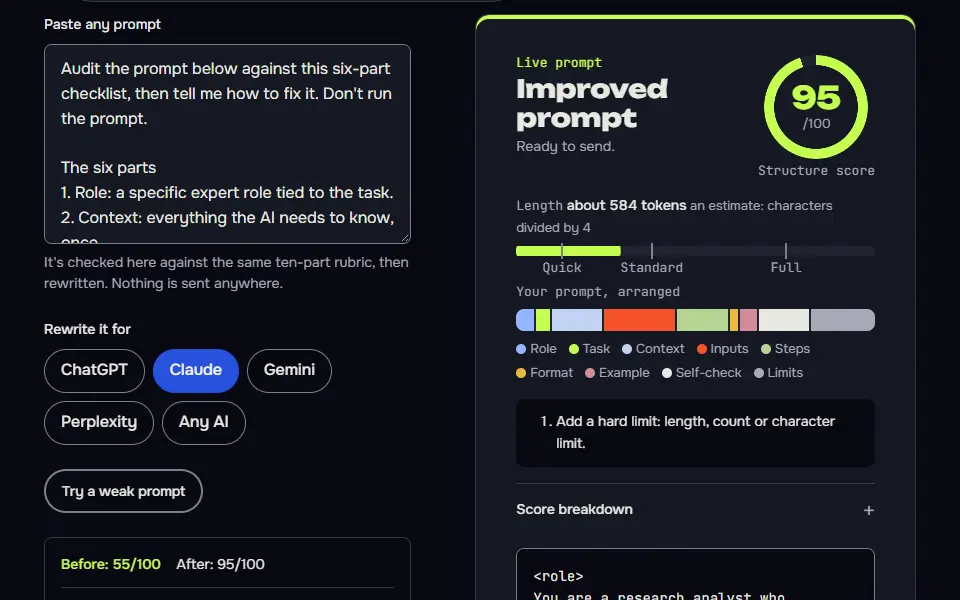
Audit my prompt against the six-part checklist
Quoting evidence for every verdict stops the audit from being flattery, and the contradiction hunt finds the most common cause of muddy output.
Audit the prompt below against this six-part checklist, then tell me how to fix it. Don't run the prompt.

The six parts
1. Role: a specific expert role tied to the task.
2. Context: everything the AI needs to know, once.
3. Task: one clear job with no instruction that cancels another.
4. Constraints: hard limits stated once and consistently.
5. Output format: a shape that matches the task.
6. Example or check: a sample row, or a checklist the AI runs before answering.

My prompt:
{{prompt}}

What I'm using it for and in which AI: {{use}}

For each part give: pass, partial or missing; a quote from my prompt as evidence; and the fix in one line. Then list any instructions that contradict each other. End with a rewritten prompt that fixes the problems, keeping my wording wherever it was fine. Don't invent requirements I didn't state; ask if something's unclear. Don't use em dashes or en dashes.
How to use
- Copy it with the button above.
- Fill the blanks in {{double braces}} with your own details.
- Paste it into ChatGPT, Claude or Gemini and send it.
- Then follow up: ask for one change at a time.
Before you run “Audit my prompt against the six-part checklist” for the first time, the lesson on how to use AI prompts walks through copying, filling and sending it.
Turn a vague request into a six-part prompt
Asking the questions first prevents the common failure of a long prompt full of guesses about your situation.
Here is a vague request I'd normally type: {{vague}}

Turn it into a strong prompt using these six parts: role, context, task, constraints, output format, and an example or check. Ask me up to five short questions first if you need facts to fill the parts. If you can reasonably assume something, assume it and list it in brackets.

After my answers, give me
1. The finished prompt in a code block, ready to paste, with [square brackets] around anything I should change each time.
2. A one-line note on what each of the six parts is doing.
3. The most likely way this prompt could still go wrong.

Don't answer the request yourself. Don't use em dashes or en dashes.Compare two prompts on the same inputs
Using real inputs and written criteria turns 'this feels better' into evidence, and the small-sample warning keeps you honest.
I want to test which of two prompts works better. Don't just pick one. Run a fair test.

Prompt A:
{{prompt_a}}

Prompt B:
{{prompt_b}}

Test inputs (use each input once with each prompt):
{{inputs}}

What a good result looks like: {{criteria}}

Do this
1. Run Prompt A on every input, then Prompt B on every input. Label each output clearly.
2. Score each output from 1 to 5 against my criteria in a table, with a one-line reason.
3. Say which prompt won on average, which input made them differ most and why.
4. Suggest one change to the losing prompt that might close the gap.

Be honest if the difference is too small to call from this few inputs. Don't use em dashes or en dashes.
Why did this prompt give a bad answer?
A fixed diagnostic list moves you from 'AI is bad at this' to a specific cause you can fix.
A prompt gave me a poor result. Diagnose it, don't defend it.

The prompt I used:
{{prompt}}

The answer I got:
{{answer}}

What I wanted instead: {{wanted}}

Work through these in order and quote the exact words you rely on
1. Was anything in my prompt ambiguous, missing or contradictory?
2. Did the answer ignore an instruction? Which one?
3. Did the answer include anything invented? Which parts?
4. Was the task too big for one reply?
5. Was the prompt asking for something this kind of AI can't do (browse, calculate precisely, remember earlier chats)?

Then give me the single most likely cause, a fix I can test, and a rewritten prompt. If more than one cause is plausible, rank them. Don't use em dashes or en dashes.
Turn a conversation that worked into a reusable template
Capturing the rules that the good answers followed, not just the questions asked, is what makes a template repeatable.
The conversation below worked well. Turn it into a reusable prompt template so I can repeat it with different inputs.

Conversation:
{{conversation}}

Do this
1. Identify what I supplied each time that would change next time (names, numbers, text) and what stayed the same.
2. Write a single template prompt that does the job in one go, with [square brackets] around each changing input and a short label for it.
3. Add the rules and the output format that the good answers followed, even if I never stated them.
4. List the fields as a table: name, what to put in, and an example.
5. Tell me what the template can't handle, so I know when to start from scratch.

Keep the template under 250 words. Don't use em dashes or en dashes.Write my custom instructions block
Interview first, then compress. Instructions that fit one box and apply to every chat are the ones that actually get used.
Help me write custom instructions for {{tool}} that apply to every chat. Interview me first. Ask these as a numbered list and wait for my answers: what I mainly use it for, who I am in a line, how I like answers to look (length, format, tone), what annoys me in AI replies, things it must never do, and what it should do when it's unsure.

After I answer, write the instructions in two parts, each under the {{limit}} character limit:
1. What the AI should know about me.
2. How the AI should respond.

Write them as direct instructions, not as a story about me. Include a rule to say "I don't know" when unsure. Leave out anything I only mentioned once or that would apply to a single task. Don't use em dashes or en dashes.
Find the edge cases that break my prompt
Thinking about failure inputs before they happen is the cheapest quality check a reused prompt can get.
Here is a prompt I plan to use repeatedly:
{{prompt}}

The normal input looks like this: {{normal_input}}

Think of ten unusual inputs that could make this prompt fail or behave badly, such as empty input, very long input, input in another language, conflicting information, input that tries to change the instructions, or input missing a field. For each, give me
- The input (short).
- What the prompt would probably do wrong.
- A one-line fix to add to the prompt.

Then rewrite the prompt with the three most valuable fixes included. Mark the lines you added. Don't use em dashes or en dashes.
Shorten a prompt without losing a requirement
The requirements map proves nothing was dropped, which is the fear that stops people trimming long prompts.
Shorten the prompt below by at least {{percent}} percent without losing any requirement.

Prompt:
{{prompt}}

First list every distinct requirement in it as a numbered list (instructions, constraints, format rules, examples). Then rewrite the prompt, merging duplicates and removing filler. Finally, show a table mapping each numbered requirement to the line in the new prompt that keeps it, and mark any I should confirm you removed deliberately.

Don't add requirements. Don't change the meaning of any rule. Keep any placeholders written in curly brackets exactly as they are. Don't use em dashes or en dashes.
Explain what each part of a prompt does
Reading a good prompt with its reasons attached is the quickest way to learn to write one.
Explain the prompt below to a beginner, part by part. I want to understand why it's built this way so I can write my own.

Prompt:
{{prompt}}

Split it into its parts. For each part, quote it, name what it is (for example role, context, task, constraint, format or example), say in one line what it does for the AI, and say what would happen if it were missing.

Then tell me which part is doing the most work, which part is weakest, and one small change I could try. Use plain language and no jargon without explaining it. Don't use em dashes or en dashes.Convert a prompt for another AI model
Changing structure but not the job keeps the comparison fair, and the capability warning stops silent failures.
Convert the prompt below from {{from_model}} to {{to_model}}, keeping the same job and the same output.

Prompt:
{{prompt}}

Adapt the style to the new model: use its preferred structure, such as XML-style tags for Claude, clear headings for ChatGPT or Gemini, or a citation rule for Perplexity. Don't add features the model may not have. If something in the original relies on a capability the new model may lack (browsing, file reading, image input), tell me and offer a workaround.

Give me
1. The converted prompt in a code block.
2. A short list of what you changed and why.
3. One thing I should test first when I run it.

Don't use em dashes or en dashes.
Check an AI answer for unsupported claims
Listing claims beats asking 'is this right?'. Models are far better at listing than at grading themselves.
Check the AI answer below for claims that aren't supported. Don't rewrite it.

The source material I gave the AI (if any):
{{source}}

The AI's answer:
{{answer}}

List every checkable claim in the answer (a number, date, name, quote, statistic or causal claim). For each, give a table row: the claim, whether it's supported by the source material (yes, no or not checkable), the exact supporting quote if yes, and how I could verify it if not.

Then say which three claims are riskiest if wrong and why. Don't add new facts from memory, and say so if you can't verify something. Don't use em dashes or en dashes.
Build a small test set for a prompt I use often
A written pass/fail set makes 'did my change help?' a two-minute check instead of a feeling.
I use this prompt often and want a small set of test inputs so I can check it after every change.

The prompt:
{{prompt}}

What it's for: {{purpose}}

Create ten test inputs: four typical, three tricky (ambiguous, messy or conflicting), two edge cases (empty or very long) and one that should be refused or redirected. For each, write
- The input.
- What a good output must contain.
- What would make the output a fail.

Put it in a table I can copy into a spreadsheet, with a column for pass or fail. Make the inputs realistic for {{purpose}} and don't use real people's private details. Don't use em dashes or en dashes.
Before you start
Most long prompt guides read like a textbook. These ones don't: each page is short, starts with an example and ends with prompts you can paste. They're sorted by the job you're doing, so you won't have to read a 40 minute manual to fix one weak answer.
What do these prompt guides cover?
These prompt guides cover four groups: prompt basics, prompting techniques, guides for ChatGPT, Claude and image models, and reliability and tool comparisons. Each group answers a different kind of question, and a guide never sits in two groups.
- Basics. Start with what is a prompt in AI, then the method in prompt best practices. The layout choices live in prompt framework, reusable fill-in blanks in prompt templates, and a one-page reference in the ChatGPT prompts cheat sheet.
- Techniques. Zero-shot, few-shot, chain of thought, ReAct and nine more methods are grouped under types of prompting, each with the failure it fixes.
- Model guides. Habits that differ by model are in the ChatGPT prompts guide and in AI image prompt tips for art tools, next to the Claude and Suno guides.
- Building with AI. The discipline as a whole is explained in prompt engineering, the wider job of feeding a model the right material in context engineering, and code-level prompting in ChatGPT prompt engineering for developers.
- Human writing prompts. Two guides cover the classroom sense of the word: what is a writing prompt and what is an essay prompt.
Reliability topics, such as tokens, signs of AI writing and sycophancy, and the tool comparisons join the hub as each article is released. Every card shows its read time, so you can pick a 5 minute guide when that's all the time you've got.
Which six parts does every prompt guide here teach?
Every prompt guide here teaches six parts: role, context, task, constraints, output format, and an example or check. Each part answers one question the AI would otherwise guess at, which is why the same six names show up on every page in this hub.
| Part | The question it answers for the AI | A short example |
|---|---|---|
| Role | Whose judgement should I use? | a careful copy editor |
| Context | What's the situation, and who's it for? | a newsletter for 2,000 bakery owners |
| Task | What single job am I doing? | cut this draft to 150 words |
| Constraints | What must I leave out, and what if I'm unsure? | no prices; ask if a date is missing |
| Output format | What shape should the answer take? | a table, a list or JavaScript Object Notation (JSON) |
| Example or check | What does good look like? | one sample row, or a 3-point checklist run before replying |
Weak prompts usually miss the last two rows, and they're the rows people skip when they're in a hurry. That's the first place to look when an answer comes back vague.
Which prompt guide should a beginner read first?
A beginner should read the what is a prompt guide first, then the how to write a prompt guide, then the types of prompting hub. That reading order goes from a definition to a method to the named techniques, and it's about 25 minutes of reading in total.
- Definition: what a prompt is, what the model does with it, and why wording changes the answer.
- Method: the six parts in use, with a weak prompt rewritten line by line.
- Techniques: one page that says which technique fixes which failure, so you'll know where to go next.
You don't need the developer guides at this stage. They assume you've already written a few prompts that worked.
Where do the prompt guides lead after the basics?
The prompt guides lead to the types of prompting hub, the ready-made prompt hubs for ChatGPT, Claude and images, and the free prompt course once you've covered the basics. Pick the route by what you want next: a technique, a prompt to copy, or practice with feedback.
Which prompt guides compare AI tools side by side?
The prompt guides that compare AI tools side by side are Claude vs ChatGPT, Codex vs Claude Code, Cursor vs Claude Code and n8n vs Zapier vs Make. Each pair compared gets the same treatment: one task at a time, then price, using each vendor's own pricing page, and they're added to this hub as they're released.
How do you turn a prompt guide into a working prompt?
To turn a prompt guide into a working prompt, open the AI prompt generator, pick your model and type the task the guide describes in one line. The free AI prompt generator fills in the six parts for you, and you can then check its draft against the guide you just read.
Read the result once before you run it. Change the role or the output format where it looks generic, since those are the two parts a generator can't know about your work. The target model matters too: the model guides list each one's layout preference, such as tags for Claude.
For practice, the free prompt engineering course walks through short lessons with a quiz and a practice box on each. People who came for stories, essays or journal ideas instead of AI work will find lists sorted by age and genre in creative writing prompts.
Prompt guides FAQ
Still stuck? Build it in Prompt Studio. It'll score each part as you go.
What are the 5 P's of prompting?
The 5 P's of prompting are not one official list; most versions read persona, purpose, plan, parameters and polish, and this site teaches a six-part checklist instead. The six parts map to failures you'll recognise, which a memory aid doesn't.
How do I write a prompt guide of my own?
Write a prompt guide of your own by starting with one task, showing a weak prompt and a strong one side by side, and naming what changed. Then add the exact prompt readers can paste and test it on someone who hasn't seen it.
What are the top 10 AI prompts?
The top 10 AI prompts are different for every job, so the most useful general ones explain a topic with a quiz, draft replies in set tones and summarise text into actions. Planning a week and reviewing a plan for risks round out most people's lists.
What are the 7 things in a prompt?
The 7 things in a prompt are role, context, task, constraints, format, examples and a check, and this site groups examples and checks into one part to make six. You won't need all of them for a short job.