
ChatGPT prompts for small business in 9 connected steps
ChatGPT can do 9 jobs for a local small business in this chain, including the Google Business Profile description, the homepage and service page copy, review requests and LocalBusiness schema.
Live prompt
Step 1 of 9: Google Business Profile
Fill in your details once. Step 1 of 9 builds here. Prompt Studio runs the rest.
0/100
The steps
- 1Google Business Profile
- 2Local keyword and competitor check
- 3Site plan
- 4Homepage copy
- 5Service page copy
- 6Area pages without doorway pages
- 7Reviews system
- 8Schema and citations
- 960 day local loop
Open the full Prompt Studio (Loop, Chain and Check).
What can ChatGPT do for a local small business?
ChatGPT can do 9 jobs for a local small business in this chain, including the Google Business Profile description, the homepage and service page copy, review requests and LocalBusiness schema. It can't see your map rankings, reviews or analytics, so you paste what you see and it marks every gap [needs data].
How to use it
Enter your business details
Enter your business and trade, city, services, the areas you really serve and the facts customers should know in the tool. Press Fill a sample if you'd like the coffee machine repair example first.
Pick how you'll run it
Start with Step by step, then move to Loop for the 60 day phase. Saved assistant turns the plan into standing instructions you can paste into a Gemini Gem, a Claude Project or a Custom GPT.
Paste each answer back
Copy the AI's answer into the box under that step. Its HANDOFF block fills the next step, so step 1's category reaches the keyword check in step 2.
Export or automate
Download the 9 steps as Markdown for your notes, or as JavaScript Object Notation (JSON), each {{variable}} kept in place, if you automate follow-ups in n8n, Make or Zapier.
Three steps from the local business sequence
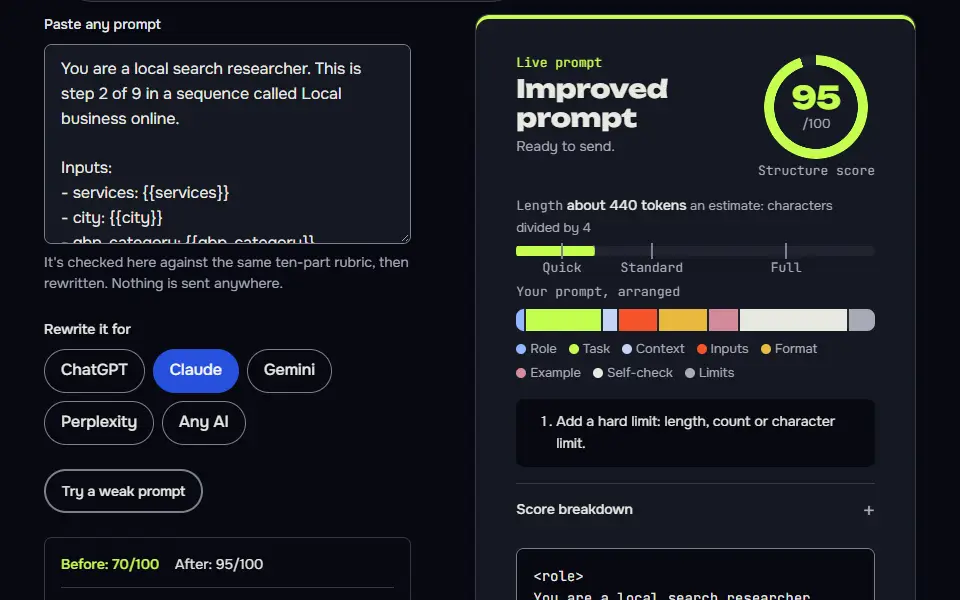
Step 2: Local keyword and competitor check
Part of the 9 step sequence: local searches per service and a map pack check. Its HANDOFF feeds local_keywords, top_service into later steps.
You are a local search researcher. This is step 2 of 9 in a sequence called Local business online.

Inputs:
- services: {{services}}
- city: {{city}}
- gbp_category: {{gbp_category}}

Data (Research you've done: map pack results, competitors' review counts, autocomplete):
{{data}}

Task:
1. For each service, write the searches a local customer types (service plus city, near me, area names).
2. Spell out the method: search each on Google from the city, note the 3 map results, their review counts and categories, autocomplete suggestions, and whether ads show.
3. Use my pasted data or mark [needs data]. Rank services by opportunity.

Output: A searches table: Service | Searches | What to check. A results table with evidence. Then the ranked services.

Check before you reply: No review counts I didn't paste. Any statement about what ranks or shows on page 1 now is marked [needs data] unless I pasted the results. Each service has local searches. A ranked list. Don't invent search volumes, prices, reviews or client names; write [needs data] in tables and plans, and list gaps under To strengthen, never inside copy. No em dashes.

End with this block:
HANDOFF | local-business | step 2
local_keywords: <one line>
top_service: <one line>
How to use
- Copy it with the button above.
- Fill the blanks in {{double braces}} with your own details.
- Paste it into ChatGPT, Claude or Gemini and send it.
- Then follow up: ask for one change at a time.
Before you run “Step 2: Local keyword and competitor check” for the first time, the lesson on how to run a prompt sequence walks through copying, filling and sending it.
Step 6: Area pages without doorway pages
Part of the 9 step sequence: which area pages to build or merge, with one example. Its HANDOFF feeds area_pages into later steps.
You are a local SEO who avoids thin pages. This is step 6 of 9 in a sequence called Local business online.

Inputs:
- service_area: {{service_area}}
- services: {{services}}
- local_sitemap: {{local_sitemap}}

Data (Per area: jobs you've done there, travel time and the building types you work on):
{{data}}

Task:
1. Explain the rule: an area page needs something true and specific to that area (jobs done there, travel time, local building types), or it's a doorway page Google may ignore.
2. For each area, decide Build or Merge from the jobs, travel times and building types under Data. If there's no data for an area, say Merge.
3. Write one area page as an example.

Output: Rule, Areas table: Area | Specific content | Build or merge, Example page.

Check before you reply: Every built page has area specific facts or [needs data]. No duplicated paragraphs across areas. Areas match the ones I serve. Don't invent search volumes, prices, reviews or client names; write [needs data] in tables and plans, and list gaps under To strengthen, never inside copy. No em dashes.

End with this block:
HANDOFF | local-business | step 6
area_pages: <one line>
Step 7: Reviews system
Part of the 9 step sequence: review asks, the policy limits and reply templates. Its HANDOFF feeds review_system into later steps.
You are a reputation coach. This is step 7 of 9 in a sequence called Local business online.

Inputs:
- business: {{business}}
- gbp_category: {{gbp_category}}

Task:
1. Write the ask: when to ask, a WhatsApp or SMS message and an email, each under 60 words, with the review link.
2. Say what's not allowed: Google's policy forbids offering anything in return for reviews and asking only happy customers.
3. Write reply templates for a 5 star, a 3 star and a 1 star review.

Output: Timing, Messages, Policy note, Reply templates.

Check before you reply: No incentive for reviews. Messages under 60 words. Replies don't share private details. Don't invent search volumes, prices, reviews or client names; write [needs data] in tables and plans, and list gaps under To strengthen, never inside copy. No em dashes.

End with this block:
HANDOFF | local-business | step 7
review_system: <one line>
Local business step map from profile to 60-day loop
The local business step map starts with the Google Business Profile (GBP) and ends with a 60 day loop, with site plan, copy, area pages, reviews and schema in between.
Each step reads the variables the earlier steps printed. Step 1 prints the GBP category and description. In step 2 the AI uses that category to list the searches a nearby customer types and a map pack check: the local results shown for your service and town. Step 3 turns your top service into a page list and one name, address and phone (NAP) line, and steps 4 to 6 write the homepage and the top service page, then decide which area pages to build. Step 9 plans the 60 day loop: a repeat plan for weekly posts, photos, review asks and page updates. A variable printed on the right of one step shows up on the left of a later one, so you aren't retyping anything. For example, local_sitemap is printed by step 3 and read by step 6.
Steps 1, 2 and 6 depend on research the AI can't do. With no browsing tool on, it turns each lookup into an exact search that you'll run from your city, such as the 3 map results for each service, and marks the answer [needs data] until you paste it.
Google Business Profile
Categories, a 750 character description, services and a photo plan. Passes on:
gbp_category,gbp_description.Local keyword and competitor check
Local searches per service and a map pack check. Passes on:
local_keywords,top_service.Site plan
Pages with Uniform Resource Locators (URLs) and searches, and one NAP format. Passes on:
local_sitemap,nap.Homepage copy
Local homepage copy with NAP and no invented reviews. Passes on:
home_h1.Service page copy
The top service page copy. Passes on:
service_page.Area pages without doorway pages
Which area pages to build or merge, with one example. Passes on:
area_pages.Reviews system
Review asks, the policy limits and reply templates. Passes on:
review_system.Schema and citations
LocalBusiness JSON-LD and the citations to claim. Passes on:
schema_ready.60 day local loop
60 day loop of posts, photos, reviews and a weekly review. Passes on:
plan_60.
Google Business Profile prompts and their limits
The Google Business Profile prompts write a description under Google's 750 character limit and keep links of any type out of it, since Google's guidelines don't allow them there.
Step 1 shows the character count, and it leaves out prices and offers and writes no phone number, rating or opening hours you didn't give it. It picks a primary category and up to 4 secondary ones, and marks every category "confirm in the dropdown", since Google's own list decides what exists. In my test run for a coffee machine repair shop in Karachi, the description came to 560 characters by my count, well under the limit, and the copy left years in business, warranty and response time out since I'd marked them [needs data].
The review step follows Google's policy: ask every customer the same way, and offer no incentives for reviews. It doesn't ask only your happy customers either, and you'll find that's the part owners most often skip.
Local SEO prompts formula
The local Search Engine Optimization (SEO) prompts formula is role + owner-supplied business facts + service area + one output + the Google rule it must keep + a HANDOFF block.
The role changes with the job: a local SEO specialist sets up the profile, a site architect plans the pages, a service copywriter writes the homepage and a reputation coach writes the review asks. The check keeps local copy honest: it bans an invented phone number, address, rating or opening hours and turns every unknown into [needs data]. The schema step is built the same way, with LocalBusiness values taken only from details you supply, and nothing invented. The HANDOFF block then prints 1 or 2 named variables, such as nap or area_pages, which the later steps read by name.
Variables in the local business chain
1. reads business, city, services, service_area, real_facts | prints gbp_category, gbp_description
2. reads services, city, gbp_category | prints local_keywords, top_service
3. reads services, service_area, local_keywords, top_service | prints local_sitemap, nap
4. reads business, city, services, real_facts, nap, top_service | prints home_h1
5. reads top_service, city, real_facts, local_keywords | prints service_page
6. reads service_area, services, local_sitemap | prints area_pages
7. reads business, gbp_category | prints review_system
8. reads nap, business, city, services, gbp_category | prints schema_ready
9. reads review_system, gbp_category, local_sitemap | prints plan_60
When does a local area page become a doorway page?
A local area page becomes a doorway page when it only swaps the town name on the same text; build one only when you have area-specific jobs, photos or facts to show.
Google's spam policies describe doorway abuse as pages made to rank for similar searches that lead people to a less useful page. So there's no safe number of area pages, and you shouldn't trust anyone who gives you one. What matters is whether each page says something true about its area. In step 6 the AI sets Build or Merge for each area from the jobs, travel time and building types you paste, and says Merge when there's no data. In my test run it built area pages for only 4 areas, the ones the shop really serves.
If you sell your own skills instead of a shop service, the Upwork profile prompt chain fits better. Local firms that film their work can grow a second channel with the YouTube channel prompts sequence.
ChatGPT prompts for small business FAQ
Still stuck? Build it in Prompt Studio. It'll score each part as you go.
Can ChatGPT write my Google Business Profile description?
Yes, ChatGPT can write your Google Business Profile description from facts you give it, kept under the 750 character limit and free of links, prices and offers. Anything unknown stays [needs data], so you fill in years in business or warranty yourself.
Should I let AI reply to my customer reviews?
Yes, let AI draft review replies, then edit each one before posting, so every reply names the real job and sounds like you. In step 7 the AI gives templates for a 5 star, a 3 star and a 1 star review that share no private details, and you personalise each one before it goes out.
Do I need a website if I have a Google Business Profile?
Yes, a website still helps if you have a Google Business Profile: it holds service pages, area details and schema that a profile can't, and the profile links to it. You can start with the profile alone, and the sequence plans a small site of a home page, service pages, about and contact, plus area pages only where you've got something real to say.
Does a service-area business need to show its address?
No, a service-area business can hide its address in Google Business Profile and list the areas it serves instead, as Google's guidelines allow for a business that doesn't serve customers at its address. Step 1 asks whether customers visit you, and step 3 still fixes one NAP line for your site and citations.