
Midjourney prompt generator with parameters
A Midjourney prompt is a short phrase list for the subject, setting, light, lens and mood, followed by parameters such as --ar.
Live prompt
Image
Fill in the first box. The prompt builds and scores live.
0/100
Open the full Prompt Studio (Loop, Chain and Check).
Parameter strip: what your Midjourney prompt sets now, read from the prompt it builds
No prompt yet: fill in the first box
- --arnot set yet
- --rawnot set yet
- --nonot set yet
- --stylizenot set, add it yourself
- --chaosnot set, add it yourself
- --weirdnot set, add it yourself
- --seednot set, add it yourself
The builder writes --ar, --raw for photographs and --no from the leave-out box. Add --stylize, --chaos, --weird and --seed yourself.
The short answer
A Midjourney prompt is a short phrase list for the subject, setting, light, lens and mood, followed by parameters such as --ar. This generator writes the phrase list, the aspect ratio, --raw for photographs and your --no list. Midjourney's default model is V8.2, so no version flag is needed. Add --stylize and --chaos yourself, using the parameters chart.
How to use it
Describe the picture
Open the builder, keep Midjourney selected, and write one clear subject with a setting.
Choose style, light, framing and shape
Pick from the lists, then add a palette and the things to leave out.
Check the shape and skip the face lock
Confirm --ar matches the shape you want, and leave the face lock off for Midjourney, since V8.x has no --oref.
Add flags and run it
Add --stylize or --chaos at the end if you want them, then run it in Midjourney and change one thing at a time.
Midjourney prompt generator examples
Potter's studio, documentary style
Documentary words plus --raw keep it looking like a real photo.
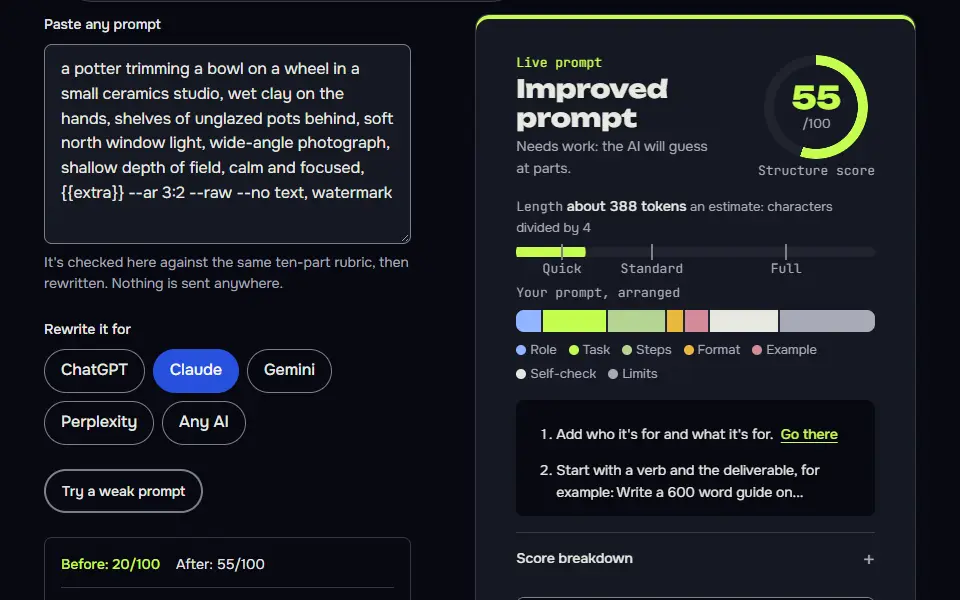
a potter trimming a bowl on a wheel in a small ceramics studio, wet clay on the hands, shelves of unglazed pots behind, soft north window light, wide-angle photograph, shallow depth of field, calm and focused, {{extra}} --ar 3:2 --raw --no text, watermarkHow to use
- Copy it with the button above.
- Fill the blanks in {{double braces}} with your own details.
- Paste it into Midjourney and generate. Chat AIs can't make the picture. Then change one thing per try.
Before you run “Potter's studio, documentary style” for the first time, the lesson on how to use AI image prompts walks through copying, filling and sending it.
Rainy bookshop window, painterly
A higher --stylize lets Midjourney lean into the painterly look when that's what you want.
a corner bookshop window on a rainy evening, warm lamplight on stacked books, reflections of streetlights in the glass, a sleeping cat on a velvet cushion, loose oil painting with visible brushstrokes, muted green and amber palette, cosy mood, {{extra}} --ar 4:5 --stylize 400 --no text, letters, watermarkNight train crossing a desert, widescreen
A small --chaos value varies the four results a little without breaking the scene.
a lone night train crossing a desert plateau under a vast starry sky, warm lit windows, a faint trail of dust, distant mesa silhouettes, long exposure, wide-angle cinematic photograph, quiet and vast, {{extra}} --ar 21:9 --chaos 12 --no people, textHow the Midjourney prompt generator works
The Midjourney prompt generator works by turning your form fields into a phrase list and adding --ar, --raw for photographs and your --no list, ready to paste into Midjourney. You describe the picture and pick a style, light, framing and shape. The builder then runs five steps:
- Phrase list.Subject, setting, style, light, camera, framing and colour palette join in that order. Empty fields are skipped, and a repeated phrase isn't written twice.
- Third person.Wording such as "of me" becomes "of the person", since Midjourney reads descriptions, not instructions.
- Shape.
--arcarries your choice of 1:1, 4:5, 9:16, 16:9 or 3:2. - Raw mode.The photograph style adds
--raw. The other 7 styles leave it off: Midjourney's house look still applies to them. - Leave-outs.Whatever you type in the leave-out box becomes the
--nolist, Midjourney's negative prompt.
The builder doesn't write --stylize or --chaos, and it adds no version flag, so Midjourney runs its default model. Everything runs in your browser, so your idea isn't sent to this site, and you'll paste the finished prompt into Midjourney on the website or in Discord.
Midjourney prompt formula
The Midjourney prompt formula is subject, setting, style, light, lens, framing and colours, then parameters, as in "lighthouse keeper, storm coast, low dusk light, 35mm, quiet mood --ar 3:2 --raw". The phrases describe the picture and the parameters set how Midjourney draws it, so the parameters always come last.
[subject], [setting], [style], [light], [camera and lens], [framing], [colours] colour palette --ar [W:H] --raw --no [leave out]Here's the formula filled in with the builder's own output for a photograph, with a 35mm lens (about 1.4 in) in the camera slot:
a barista pouring latte art in a small cafe, early morning, rain on the window, photograph, soft natural window light, 35mm, shallow depth of field, close-up, warm browns and cream colour palette --ar 4:5 --raw --no text, watermarkKeep each slot to one short phrase, so the prompt stays a short phrase list. A mood word such as quiet or moody fits in the setting or style slot. One idea per slot leaves you one detail to change when a result misses. Don't put 2 ideas in one slot: split them, and you'll see what each change did.
Midjourney parameters chart
The Midjourney parameters chart covers 6 flags: --ar, --stylize, --chaos, --raw, --no and --seed, with each flag's range as two independent guides state it and its default left for Midjourney's own documentation.
| Parameter | Range | Builder writes it? | Use it to |
|---|---|---|---|
--ar W:H | Whole-number ratios only, such as 3:2. Write 139:100, not 1.39:1. | Yes (always) | Set the aspect ratio. |
--raw | On or off. | Yes (for the photograph style) | Get less default styling, so a photograph reads as a plain photograph. |
--stylize or --s | 0 to 1000 | No | Stay closer to your words (low) or add Midjourney's own look (high). |
--chaos or --c | 0 to 100 | No | Make the 4 results differ more. |
--no | A comma list of items | Yes (from the leave-out box) | Exclude the listed items, such as --no text, logo. |
--seed | 0 to 4,294,967,295 | No | Start a new run from the same seed as a previous run. |
Sources: the evolink.ai V8.2 prompt guide and the gradually.ai parameter guide of 31 October 2026 give the same range for --ar, --stylize, --chaos and --seed. Midjourney's own Parameter List blocks automated checks, so this chart doesn't quote the default values: they stay out until Midjourney's official docs confirm them, and you shouldn't rely on an edge value you haven't checked there.
Which Midjourney flags should you check before you run a prompt?
Check 2 Midjourney flags by hand before you run a prompt: --stylize and --chaos, since the generator doesn't write either one; leave the version flag off to use the default model.
- Set
--stylize(0 to 1000). A low value stays closer to your words, and a high one adds more of Midjourney's own look. Add it at the end and change one value at a time. - Set
--chaos(0 to 100). A higher value makes the 4 results in the grid differ more from each other. Keep it low if you'd like 4 takes on the same idea. - Leave the version flag and the face lock off. The builder doesn't write an identity flag, since
--oref(Omni Reference) belongs to V7. It always writes--ar, and it adds--rawfor the photograph style only.
Custom Midjourney prompt or a ready-made one?
Build a custom Midjourney prompt here when your subject is specific, and copy a ready-made one from the Midjourney prompts page when a style list already matches. The builder suits a picture you've already pictured, such as your own product, place or scene, since every slot takes your wording. The Midjourney prompts page holds 12 full examples and lists to copy as they are, so it's the faster start when you only need a look. Once you've copied one, bring it back here, you'll swap in your subject and set the ratio.
Midjourney prompt generator FAQ
Still stuck? Build it in Prompt Studio. It'll score each part as you go.
Is there a free Midjourney prompt generator?
Yes, this Midjourney prompt generator is free, and it needs no account, though you still need a Midjourney plan to render the image. It runs in your browser and builds the phrase list, the aspect ratio, --raw for photographs and your --no list.
What is the difference between --stylize and --chaos in Midjourney?
The difference between --stylize and --chaos in Midjourney is that --stylize sets how much Midjourney's own style shows, and --chaos sets how different the 4 results in a grid are from each other. Two guides give --stylize a range of 0 to 1000 and --chaos a range of 0 to 100: lower stylize stays closer to your words, and higher chaos gives a more varied grid. Add either by hand at the end.
Why does --no work better than writing "no" in a Midjourney prompt?
--no works better since Midjourney reads every word in the text as something to include, so "no cars" can add cars, while "--no cars" removes them. The flag takes a comma list of items and is built for leaving them out, so put "text, watermark" there.
Can I use decimals in Midjourney's --ar?
No, you can't use decimals in Midjourney's --ar, and it takes whole numbers only, so write 4:3 or 16:9 instead of 1.33:1. Two guides, evolink.ai and gradually.ai, give the same rule. Pick a nearby whole-number ratio such as 3:2 or 4:5 if you don't need that exact shape.
Does the Midjourney generator add --raw to every style?
No, the Midjourney generator adds --raw only to photographic styles; illustration and painting styles keep Midjourney's default look. Add --raw by hand and compare the results if you'd like a plainer finish on an illustration.