
AI prompt tools for every task
aiprompts.si has 15 free prompt tools: Prompt Studio for any prompt, a Search Engine Optimization (SEO) prompt generator with live data, and generators for chat, image, video and music. Each one asks plain questions and builds the prompt in your browser, so you'll paste it straight into ChatGPT, Claude or Gemini.
Which AI prompt tool should you start with?
Start with Prompt Studio when your task isn't listed, and pick a task tool when one matches your job, since a task tool asks only the questions that job needs, and you'll finish faster. Prompt Studio, on the home page, builds and scores a prompt for any task from 0 to 100. Tools are grouped by job, and the 8 prompt sequences come last.
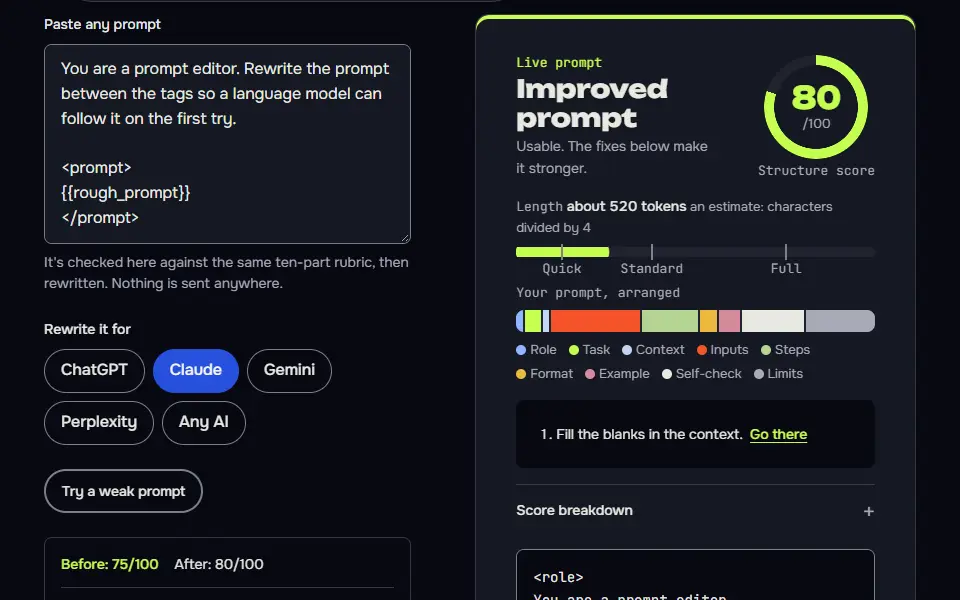
Prompt Studio and the SEO generator
Text and chat prompt generators
There are 5 text and chat prompt generators, and they're all free: the system prompt generator, the Claude prompt generator, the custom instructions generator, the prompt optimizer and the writing prompt generator. They're the ones you'll reuse most.
Paste a rough prompt into the prompt optimizer and you'll get a scored rewrite with a line diff. Standing instructions for an Application Programming Interface (API) app or agent come from the system prompt generator, while the two settings fields ChatGPT reads before every chat are filled by the ChatGPT custom instructions generator. Story, essay and journal starters built to genre and word count are made by the writing prompt generator.
- System prompt generatorStanding rules for a bot, an app or an agent.
- Claude prompt generatorTagged sections Claude reads cleanly.
- Custom instructions generatorThe two ChatGPT settings boxes, filled for you.
- Prompt optimizerPaste a draft, get a scored rewrite and a diff.
- Writing prompt generatorStarters sized to a genre and a word count.
Image, video and music prompt generators
There are 6 image, video and music prompt generators: AI art, image to prompt, Midjourney, Nano Banana, video and Suno, each written to its own model's rules, so you won't waste a render. They don't share one template, since a Midjourney prompt isn't a Suno prompt.
Pick a medium, a style and a light, and the AI art prompt generator writes the image prompt. Describe a picture in 7 details and the image to prompt generator writes the matching prompt. A shot plan with a camera move and sound for Veo or Kling is written by the video prompt generator.
- AI art prompt generatorPick the medium, style and light for any image model.
- Image to prompt generatorTurn a picture you describe into a reusable prompt.
- Midjourney prompt generatorSubject, lens and the current parameters.
- Nano Banana prompt builderEdits to your own photo that keep the face.
- Video prompt generatorA shot plan with camera move, length and sound.
- Suno prompt generatorStyle line, tagged lyrics and the sounds to leave out.
SEO, report and saved-prompt tools
There are 3 SEO, report and saved-prompt tools: the SEO prompt generator with live site data, the report maker that turns an AI answer into a Portable Document Format (PDF) file, and the prompt library.
Site audits, keyword plans and fixes with your own live data run through the SEO prompt generator. A branded PDF from any AI answer, with a cover and contents, is what ChatGPT to PDF does here, and it doesn't need an account.
Reports and saved prompts
Prompt tools or prompt sequences: which fits your job?
A prompt tool fits a job that one prompt can finish, and a prompt sequence fits a project that needs 2 or more steps in order, such as a launch plan or a brand kit. A tool writes one prompt for one job; a sequence chains 2 or more prompts, and each step's answer feeds the next, so a project doesn't lose its thread.
Prompts you build here can be saved in a GitHub-style prompt library that keeps every version, like a code repo. Ready task prompts you don't need to build, sorted by job, are under best ChatGPT prompts.
Prompt sequences for whole projects
- All prompt sequencesEvery chain on one page.
- Niche to websiteFrom niche to a live site in 17 steps.
- Brand kit8 connected prompts for a brand.
- Content engineA weekly loop from topic to repurpose.
- YouTube channel launchChannel ideas and a 30-day plan.
- Freelancer on Upwork and FiverrProfile, gigs and proposals.
- Local business online9 steps for a small business.
- Product launchA launch checklist from 9 prompts.
- SEO audit to fixesStarts from real crawl exports.
AI prompt tools FAQ
Can't find the tool you're after? Ask for it.
Are the AI prompt tools on aiprompts.si free?
Yes, every AI prompt tool on aiprompts.si is free: none of them needs an account or sets a daily cap. Live data checks in the SEO prompt generator are held to 40 per 10-minute window for fair use. Nothing on this page has a paid tier.
Do the aiprompts.si tools send my prompt anywhere?
No, the aiprompts.si tools don't send your prompt anywhere: it's built in your browser and leaves only when you send it to a chat service through the Open in menu, which hands it over in a new tab.
Can I ask for a new prompt tool?
Yes, you can ask for a new prompt tool through the contact page, and new tools appear in this list as soon as they're built. Say which job it's for and which AI you'd paste the prompt into.