
AI brand kit generator in 8 connected prompts
This AI brand kit generator produces a one page brand sheet with a name, a story and voice, 3 logo concepts, a checked colour palette, a font pair and social templates, built by 8 prompts you run in order.
Live prompt
Step 1 of 8: Name
Fill in your details once. Step 1 of 8 builds here. Prompt Studio runs the rest.
0/100
The steps
- 1Name
- 2Brand story
- 3Voice and tagline
- 4Logo concepts and image prompts
- 5Colours with contrast checks
- 6Fonts
- 7Social templates
- 8One page brand sheet
Open the full Prompt Studio (Loop, Chain and Check).
What does this AI brand kit generator produce?
This AI brand kit generator produces a one page brand sheet with a name, a story and voice, 3 logo concepts, a checked colour palette, a font pair and social templates, built by 8 prompts you run in order. You run them in ChatGPT, Claude or Gemini, and each prompt reads the decisions printed by the one before it.
How to use it
Enter your brand brief
Enter what you sell, who buys it, 3 words for how it should feel, like calm, expert and warm, whether you have a name and where the brand will show up in the tool. Want a finished brief to compare against? Press Fill a sample.
Pick how you'll run it
Choose Step by step for the first pass, and Loop when you revise one step with revise or back.
Paste each answer back
Drop the AI's reply into the answer box for that step. The HANDOFF block carries the brand name, voice and colours forward, and the studio tells you if a reply has no block.
Export or automate
Download the prompts as a Markdown file for your brand folder, or send them to the OpenAI or Anthropic Application Programming Interface (API) as a messages array.
Three steps from the brand kit sequence
Step 2: Brand story
Part of the 8 step sequence: the story in 3 lengths, a mission and 3 values with behaviours. Its HANDOFF feeds story_short, values into later steps.
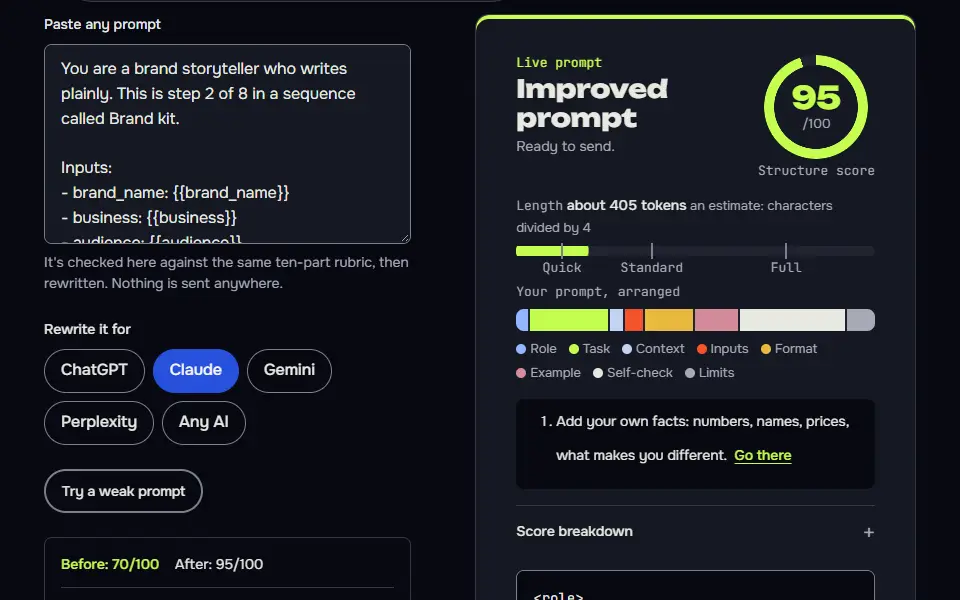
You are a brand storyteller who writes plainly. This is step 2 of 8 in a sequence called Brand kit.

Inputs:
- brand_name: {{brand_name}}
- business: {{business}}
- audience: {{audience}}

Task:
1. Write the story in 3 lengths: one line, 50 words and 150 words. Problem first, then why this business exists, then what changes for the customer.
2. Write a mission in one sentence and 3 values, each with a behaviour a customer would notice.
3. Leave any personal fact you don't know as [your detail] instead of making one up.

Output: Headed sections: One line, 50 words, 150 words, Mission, Values (table: Value | What the customer sees).

Check before you reply: No invented founding year, awards or client counts. Each value has an observable behaviour. The 50 word version is 45 to 55 words. Don't invent search volumes, prices, reviews or client names; write [needs data] in tables and plans, and list gaps under To strengthen, never inside copy. No em dashes.

End with this block:
HANDOFF | brand-kit | step 2
story_short: <one line>
values: <one line>
How to use
- Copy it with the button above.
- Fill the blanks in {{double braces}} with your own details.
- Paste it into ChatGPT, Claude or Gemini and send it.
- Then follow up: ask for one change at a time.
Before you run “Step 2: Brand story” for the first time, the lesson on how to run a prompt sequence walks through copying, filling and sending it.
Step 4: Logo concepts and image prompts
Part of the 8 step sequence: 3 logo briefs with Midjourney, Nano Banana and GPT image prompts. Its HANDOFF feeds logo_direction into later steps.
You are a logo designer who briefs image models and knows their limits. This is step 4 of 8 in a sequence called Brand kit.

Inputs:
- brand_name: {{brand_name}}
- voice: {{voice}}
- business: {{business}}

Task:
1. Write 3 logo concepts as text briefs: idea, mark type, symbol, type direction and why it fits.
2. For each concept write a Midjourney prompt (V8 syntax: end with --ar 1:1 --raw --stylize 100 --no gradients, shadows, mockup), a Nano Banana prompt for Gemini and a GPT image prompt for ChatGPT (both in plain sentences, flat vector, white background, the exact name in quotes).
3. Add a note that image models often misspell words, so set the name in the brand font yourself and trace the symbol as a vector.
4. Pick one concept and say why in 2 sentences.

Output: For each concept: the brief, then 3 prompts in code blocks. Then the note and your pick.

Check before you reply: 3 concepts with 3 prompts each. Midjourney prompts use only --ar, --raw, --stylize and --no. The misspelling note is present. Don't invent search volumes, prices, reviews or client names; write [needs data] in tables and plans, and list gaps under To strengthen, never inside copy. No em dashes.

End with this block:
HANDOFF | brand-kit | step 4
logo_direction: <one line>
Step 7: Social templates
Part of the 8 step sequence: 5 social templates with sizes, layout, copy pattern and image prompts. Its HANDOFF feeds social_templates into later steps.
You are a social media designer who builds reusable templates. This is step 7 of 8 in a sequence called Brand kit.

Inputs:
- brand_name: {{brand_name}}
- colours: {{colours}}
- fonts: {{fonts}}
- voice: {{voice}}
- where_used: {{where_used}}

Task:
1. Design 5 reusable templates: a tip post, a quote or insight card, an announcement, a proof post with a [real result] placeholder and a behind the scenes post.
2. For each give: platform and size (Instagram feed 1080 x 1350, Story 1080 x 1920, LinkedIn image 1200 x 627), layout zones, which colour and font goes where, a copy pattern with a sample, and how to build it in Canva or Figma.
3. Write one background image prompt per template for Nano Banana or GPT image, with no text in the image.

Output: For each template: Name, Size, Layout, Colours and fonts, Copy pattern and sample, Build note, Image prompt.

Check before you reply: Every template uses colours by their hex and role. No invented testimonials or numbers. Image prompts ask for no text in the image. Don't invent search volumes, prices, reviews or client names; write [needs data] in tables and plans, and list gaps under To strengthen, never inside copy. No em dashes.

End with this block:
HANDOFF | brand-kit | step 7
social_templates: <one line>
Brand kit step map: 8 prompts and what each hands on
The brand kit step map has 8 prompts, and each one passes a named decision to the next: the name feeds the story, the voice feeds the logo brief and the palette feeds the social templates.
Step 1 tests or creates the name and lists the trademark search and the domain availability lookup that the AI can't run, so those two checks stay on your list. Step 2 writes the story in 3 lengths (one line, 50 words and 150 words), then a mission and 3 values, each with a behaviour a customer would notice. Step 3 turns your feel words into a voice chart and taglines. Step 4 gives 3 written logo concepts plus an image prompt for each, and step 6 sets the typography by pairing Google Fonts: one heading face and one body face, with fallbacks for email and documents. Step 7 writes 5 social templates with sizes, and step 8 gathers everything on one page with the files to export.
Name
Test or create a name and shortlist it with the checks to run. Passes on:
brand_name,name_backups.Brand story
The story in 3 lengths (one line, 50 words and 150 words), a mission and 3 values with behaviours. Passes on:
story_short,values.Voice and tagline
3 traits (each with a sample line), a voice chart and taglines. Passes on:
voice,tagline.Logo concepts and image prompts
3 logo briefs with Midjourney, Nano Banana and GPT image prompts. Passes on:
logo_direction.Colours with contrast checks
Palette with hex codes and contrast ratios. Passes on:
colours.Fonts
Google Fonts pairing with fallbacks and a type scale. Passes on:
fonts.Social templates
5 social templates with sizes, layout, copy pattern and image prompts. Passes on:
social_templates.One page brand sheet
A one page brand sheet and the files to make. Passes on:
brand_sheet.
To run the map, pick Step by step for a new brand, 1 go for a full draft from one master prompt, or Loop for a rebrand. Step by step is safest: the name shapes the logo brief in step 4 and the colours in step 5, and a weak name is cheapest to fix before those exist. The saved assistant option keeps your voice chart as standing instructions for later posts.
Brand identity prompt formula
The brand identity prompt formula is role + business facts + audience + one decision + its check + a HANDOFF block, and every step of the kit reuses that order.
The business facts are the 5 details you enter once: what you sell, who buys it, 3 words for how it should feel, whether you have a name and where the brand will show up. The HANDOFF block at the end of each answer carries the name, voice and palette decisions from one step to the next, so you don't retype them. Every decision has a named line, so you can change one and rerun only the steps after it. That's why you won't retype a decision, and it's why a weak step isn't costly to redo. From step 3 on, the voice travels with the name, so the logo briefs describe a brand that's got traits, not a bare word.
Variables in the brand kit chain
1. reads business, audience, personality, name_status | prints brand_name, name_backups
2. reads brand_name, business, audience | prints story_short, values
3. reads brand_name, personality, audience, values | prints voice, tagline
4. reads brand_name, voice, business | prints logo_direction
5. reads brand_name, voice, logo_direction | prints colours
6. reads brand_name, voice, where_used | prints fonts
7. reads brand_name, colours, fonts, voice, where_used | prints social_templates
8. reads brand_name, story_short, values, voice, tagline, logo_direction, colours, fonts, social_templates | prints brand_sheet
How does the palette step check colour contrast?
The palette step checks colour contrast against the Web Content Accessibility Guidelines (WCAG) 2 AA ratios: 4.5:1 for normal text and 3:1 for large text, and Prompt Studio computes each pair in your browser from the hex codes.
Large text means 18 point, or 14 point bold. In step 5 the AI reports a ratio and an AA pass or fail for every text and background pair, then swaps any failing colour for a new hex code. AIs often get these ratios slightly wrong, so the studio recomputes each one and flags a pair that's off. It's a pass mark you can check yourself, and you'll see each result before you pick a colour. The thresholds come from the W3C page on Success Criterion 1.4.3, Contrast (Minimum).
Brand kit sequence or a one-click brand kit tool?
Use the brand kit sequence when you want the reason and the check behind each choice, and a one-click tool when you only want a fast visual draft; the sequence costs nothing beyond your AI chat plan.
The sequence doesn't draw the logo itself; it's the plan and the checks around it, and you'll still want a designer's eye for the final mark.
| What you get | Brand kit sequence | One-click brand kit tool |
|---|---|---|
| Reasons shown | Each step explains why it chose the name, voice, colours and fonts | Depends on the tool |
| Checks run | Contrast ratios recomputed in your browser, plus a trademark and domain checklist for you to run | Depends on the tool, so check each colour pair yourself |
| Cost | The prompts are free; you pay only for your own AI plan | Set by the tool |
| Editable output | Plain text you can change, then rerun from that step | Depends on the export |
For logo images on their own, see the logo design prompts.
What did the brand kit test run produce?
The brand kit test run produced a shortlist of 4 names, including Steady Pour, Roastwise, Beanlift and Roaster Speed Lab, a short story and a voice chart with 2 taglines to test first, from one business description. I ran the first 3 steps through Claude Sonnet with no tools, for the sample business: WordPress speed fixes for small online coffee roasters. In step 1 the AI wrote 12 names and dropped 8 with a reason each, such as Slow Pour (it promises slow, the opposite of a speed fix) and Cremaflow (it's easy to misspell when you hear it). The AI said plainly that it couldn't confirm any of them were free, and listed the domain, United States Patent and Trademark Office (USPTO), World Intellectual Property Organization (WIPO) and local trademark checks to run.
In step 3 the AI turned calm, expert and warm into sample lines that sound different from each other, such as "Roast day's busy enough. Leave the site to us." It wanted 2 taglines tested first: "Fast shops. Calm owners." and "Speed fixes for small roasters." One sells relief and the other sells clarity. That's the honest result: the AI didn't pretend to know which one wins, and it's your call.
Once the kit is done and the brand is ready to sell, the product launch prompt sequence plans the release around these same colours and voice. The voice chart from step 3 carries straight into a weekly posting rhythm with the content calendar prompt sequence.
AI brand kit generator FAQ
Still stuck? Build it in Prompt Studio. It'll score each part as you go.
What should a brand kit include?
A brand kit should include a name, a logo, a colour palette, a font pair, a brand voice and social templates, collected on one sheet so anyone who makes content uses the same choices. A useful kit adds the story, the values and a short list of do and don't rules. Step 8 of this sequence puts all of it on one page.
Does the brand kit sequence check that a name is free to use?
No, the brand kit sequence can't check that a name is free to use, since it can't search a registrar or a trademark register. In step 1 the AI lists the checks to run yourself: a domain search, the USPTO and WIPO databases and your local trademark office, and it marks every name as not confirmed until you've done them. A name that clears those searches still isn't legal advice, so ask a trademark attorney before you print anything.
Why do AI logo images misspell the brand name?
AI logo images misspell the brand name since image models draw letters as shapes, not as spelled text. The sequence doesn't trust the image model with the spelling: step 4 writes logo briefs and image prompts for the symbol, then tells you to set the name in your chosen font in a design tool and trace the symbol as a vector before you use it anywhere.
Can I run only the colour step of the brand kit?
Yes, you can run only the colour step, which is step 5, if you paste the brand name, voice and logo direction it expects at the top. The HANDOFF block tells you which lines to fill, and later steps read the colours from its HANDOFF block, so keep that block if you plan to run the fonts and social templates afterwards.
Is this brand kit generator free?
Yes, this brand kit generator is free, with prompts you can copy and run in the free tiers of ChatGPT, Claude or Gemini. It runs in Prompt Studio in your browser with no sign-up, and the only costs are your own AI plan and any image model you choose for the logo concepts, which may need a paid plan.
Can I use the brand kit sequence in Claude or Gemini?
Yes, you can use the brand kit sequence in Claude or Gemini: the prompts are plain text, so they paste into ChatGPT, Claude or Gemini alike. Step 4 writes the logo image prompts in 3 forms, for Midjourney, Nano Banana and GPT image models, and each model's limits change, so check the current ones before you generate.