
Prompt to make ChatGPT write like a human
The prompt that makes ChatGPT write like a human gives it your draft and a sample of your own writing, then asks it to match your sentence length, word choice and tone without adding facts.
Task prompt
1+3
- ChatGPT
- Claude
- Gemini
The prompt
Fill in the fields and the prompt updates as you type.
Edit my own draft so it sounds like me
A voice sample gives the editor something real to match, and flagging vague spots makes you add the detail only you have.
Your details
Type in any field. The prompt fills in as you go. Leave one empty? It stays a highlighted blank.
Your prompt
Any model
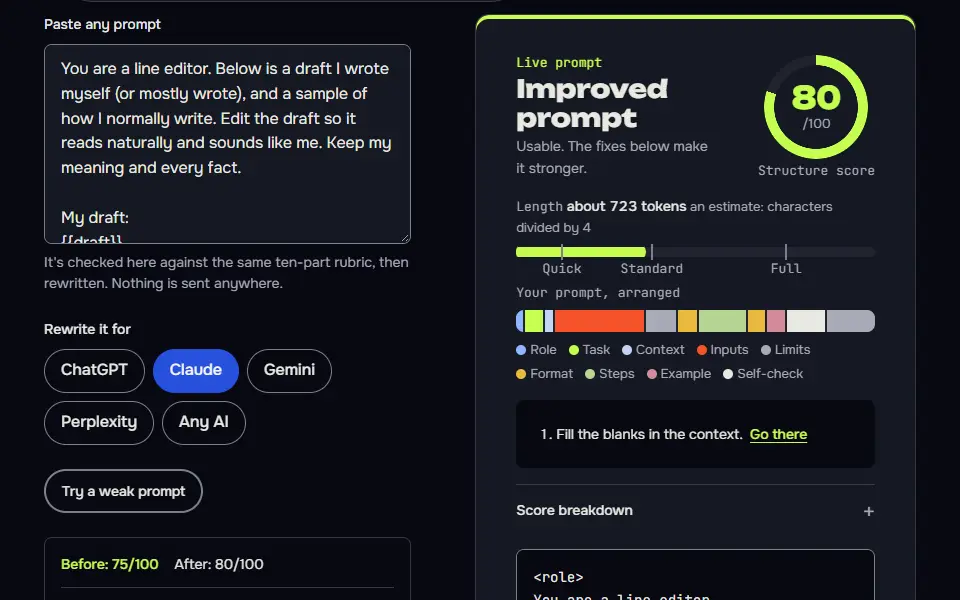
You are a line editor. Below is a draft I wrote myself (or mostly wrote), and a sample of how I normally write. Edit the draft so it reads naturally and sounds like me. Keep my meaning and every fact.

My draft:
{{draft}}

A sample of my normal writing (two or three paragraphs):
{{voice_sample}}

Audience and purpose: {{audience}}

Look for these tells, in this order
1. Filler openers and closers, such as "In today's world", "In conclusion" and "It's important to note".
2. Vague claims with no detail. Don't invent a specific. Mark the spot [needs a real example] and ask me for one.
3. Runs of sentences that are all the same length. Mix short and long the way my sample does.
4. Stock transitions (Moreover, Furthermore, Additionally) and lists of three that exist only for rhythm.
5. Words that never appear in my sample. Swap them for words I do use.
6. Anything stiffer than I'd say out loud.

Rules
- Don't add facts, numbers, quotes or sources, and don't remove any.
- Keep my paragraph order unless something is clearly out of place. If you move it, tell me.
- Use contractions where my sample does.
- Don't use em dashes or en dashes.

Output
1. The edited draft.
2. A short list of what you changed, grouped under the six tells.
3. The [needs a real example] spots, written as questions to me.
Claude
<role>You are a line editor.</role>
<draft>
{{draft}}
</draft>
<voice_sample>
{{voice_sample}}
</voice_sample>
<context>Audience and purpose: {{audience}}</context>
<task>
Edit the draft so it reads naturally and sounds like the writer in the voice sample. Keep the meaning and every fact. Look for, in order: filler openers and closers; vague claims (mark them [needs a real example] and ask me, never invent a specific); runs of same-length sentences; stock transitions and lists of three used for rhythm; words that never appear in the sample; anything stiffer than spoken language.
</task>
<rules>
Add no facts, numbers, quotes or sources and remove none. Keep paragraph order unless something is clearly misplaced, and say so if you move it. Use contractions where the sample does. No em dashes or en dashes.
</rules>
<output>The edited draft; a short list of changes grouped by the six tells; the [needs a real example] spots as questions to me.</output>
How to use
- Copy it with the button above.
- Fill the blanks in {{double braces}} with your own details.
- Paste it into ChatGPT, Claude or Gemini and send it.
- Then follow up: ask for one change at a time.
Before you run “Edit my own draft so it sounds like me” for the first time, the lesson on how to use ChatGPT prompts walks through copying, filling and sending it.
Check your draft for stock phrases and flat rhythm
A draft sounds stiff when it leans on stock phrases, keeps every sentence the same length and never uses a contraction. Paste your draft and the meter counts all three, in your browser. It isn't an AI detector, and it can't tell you who wrote the text.
Stock phrases found
- Paste text to scan it.
Sentence length, one bar per sentence
Contractions
No text yet.
Paste a draft to count its stock phrases, sentence lengths and contractions.
Use this on writing that is yours. This meter counts wording and rhythm. It doesn't predict what any AI detector would say, and it doesn't help anyone pass one. Follow your school's, publisher's or employer's rules on AI help.
What prompt makes ChatGPT write like a human?
The prompt that makes ChatGPT write like a human gives it your draft and a sample of your own writing, then asks it to match your sentence length, word choice and tone without adding facts. The sample should run 150 to 300 words, our recommendation. The pack has 4 prompts: the main edit prompt plus 3 variations.
These prompts are for editing writing that is yours. Follow your school, publisher or employer's rules on AI use, and say where AI helped if they ask. This page doesn't help anyone dodge AI detectors.
Prompt to make ChatGPT write like a human variations
Build a reusable voice card from your writing
A voice card turns a vague 'sound like me' into rules you can reuse in every later prompt.
Read the three samples of my writing below and build a voice card I can reuse. Describe how I write. Don't flatter me and don't copy long phrases from the samples.

Sample 1:
{{sample_1}}

Sample 2:
{{sample_2}}

Sample 3:
{{sample_3}}

Write the voice card as ten short rules in these groups:
- Sentences: typical length, how I vary it, how I open and close paragraphs.
- Words: a dozen words and phrases I use often, and a dozen things I clearly avoid.
- Habits: punctuation, contractions, questions, humour, asides, and whether I address the reader as "you".
- What I never do: three or four things that would sound wrong coming from me.

Then give me a four-sentence summary of the card that I can paste into custom instructions or the top of any prompt. Base every rule on something visible in the samples, and say "not enough evidence" where the samples don't show it. Don't use em dashes or en dashes.
Audit only: find the stiff parts, change nothing
Questions beat rewrites here: your answers supply the specific detail that makes writing sound like a person.
Don't rewrite this text. Audit it for passages that read as stiff, generic or machine-made, so I can fix them myself.

Text:
{{text}}

Who it's for: {{audience}}

Give me a table with these columns: Quote (the exact words), Problem (filler, vague claim, same-length rhythm, stock transition, abstract noun pile-up, or hedging), Why it reads stiff (one line), and Question for me (a question whose answer would make it specific, such as "What happened on that day?").

After the table, give me three overall observations about the draft, each with one quoted example. If a passage is fine, leave it out of the table. Don't suggest replacement wording, don't invent facts, and don't use em dashes or en dashes.
Edit a long piece one section at a time
A state card holds your voice rules and open questions across a long edit, so section 9 gets the same treatment as section 1.
You are a careful line editor. We'll edit one long piece together over several rounds, one section per round, and you keep a state card so nothing gets lost.

Rounds
Piece: {{piece_name}}. Audience: {{audience}}. My voice rules: {{voice_rules}}.
1. My full draft is below. If no draft is below, reply with one line only: Paste your full draft to start. Don't show the check or state card until I do. Otherwise split it into sections, list them with IDs S1, S2 and so on, and note the three most common stiff patterns you see. Don't edit yet.
2 and later. Edit one section per round. Show the edited section, then a list of the changes. List vague claims after the section under To strengthen and ask me for a real example instead of inventing a detail.
Final round (when I type assemble): the full edited piece in order, with a final read for repeated words across sections.

Commands (I'll type these)
next: approve this round and do the next one.
revise: <note>: redo the last round with my note. revise N: <note>: redo round N only. Change nothing else.
status: show the state card only.
facts: show two lists, the facts in the original section and the facts in your edit, and flag any difference.
assemble: run the final round.
stop: show the state card and stop.

Every reply, in this order
1. This round's work.
2. Check, one line, pass or fail per item: no fact added or removed; voice rules followed; no filler openers or closers; contractions match my voice.
3. The state card, in this shape:
```
STATE | edit in rounds | round N
Goal: <piece and audience>
Sections: <S1 done, S2 done, S3 next ...>
Patterns to watch: <list>
Voice rules: <list>
Decisions: <D1, D2 ...>
Needs from me: <examples or facts you asked for>
```
4. One line telling me what to type next.

Rules
Never add a fact. If a section needs a detail you don't have, ask for it and wait. Don't use em dashes or en dashes. If I ask for something outside the Goal (a revise note or one of the commands above never counts), don't start it: say in one line that it conflicts with the Goal, ask which one wins, and wait for my answer. Never change an approved round unless I type revise with its number. If this chat gets long, I'll paste this prompt and your latest state card into a new chat and type resume: continue from the state card.

My draft:
{{draft}}
What a good answer looks like
A good answer to “Edit my own draft so it sounds like me” looks like a finished piece in the format that prompt asks for, built only from your details. Yours will follow your own details.
1. Which communication channels did you set up or rely on (for example, a specific chat setup, a standing meeting, a shared doc), and what went wrong or right because of them? 2. Which tools did you use, and what got better with them (faster handoffs, fewer missed messages, something measurable)? Hiring managers will want to see that.
Notes for each model
ChatGPT
paste your draft and sample in the same message. For a long piece, use the section loop so the voice rules don't fade.
Claude
the tagged version in the Claude tab keeps your sample separate from the draft. Claude tends to follow the six-tells list closely.
Gemini
works as pasted. Ask it to show changes as a table if you want to scan them fast.
All models
they can drift back to stock phrases in long chats. Paste the voice card again, or start a fresh chat for each piece.
Before you use it
The common advice is a one-line instruction that says to write like a person. It rarely works, since the model has no idea what your voice is. The fix is evidence: your draft, a real sample of your style and a list of the specific habits to remove. That's what the prompt asks you for.
Why does ChatGPT writing sound robotic?
ChatGPT writing sounds robotic for 5 reasons: stock transitions, sentences of the same length, lists of three, hedged claims and heavy dash use. The model picks the most likely next word every time, so the text isn't wrong so much as average. Phrases such as "In today's world" and "At the end of the day" give it away, and so does a run of sentences that all take the same breath.
Specific details are what make writing sound like a person, and only you have them. That's why the main prompt asks for a voice sample and marks vague spots with [needs a real example] instead of letting the AI invent one.
How do you humanize ChatGPT content you already have?
To humanize ChatGPT content you already have, run the tells audit first, fix the flagged lines yourself or with the edit prompt, then read it aloud once.
- Run the audit prompt on the text. It returns a list of flagged lines with the problem and a question for you, and it rewrites nothing, so you stay in control.
- Fix the flagged lines in your own words, or paste the draft and your voice sample into the edit prompt and answer every question it asks.
- Read the result out loud and put back any phrase you'd really say.
Write the draft yourself first when you can: the edit prompt edits and doesn't create. Post-specific versions are on the LinkedIn post and Instagram post pages, and the rest of the task prompts are in the ChatGPT prompts hub.
Style rules for human-sounding first drafts
Human-sounding first drafts come from 6 style rules in the prompt: vary sentence length, use contractions, name concrete things, cut stock transitions, keep one idea per paragraph and never invent facts.
Paste the rules as a short style block into Custom Instructions or the top of a chat, so the AI's own drafts come out less stiff:
Write plainly, like a knowledgeable person talking to a colleague.
Mix short and long sentences, and use contractions.
Name concrete things and real examples, not abstract ones.
Cut filler openers, closing summaries and stock transitions.
Keep one idea per paragraph.
Ask me for a specific example if you don't have one. Never invent facts.
The second prompt in the pack builds a voice card from three samples of your writing: your typical sentence length, the words you use, the words you never use and your tone. Paste its four-sentence summary above any prompt. A style block helps with style, but it can't supply facts or experience, and it won't make borrowed text yours.
Make Claude and Gemini write like a human too
The same write-like-a-human prompt runs in Claude and Gemini: Claude takes the draft and the sample inside tags, and Gemini takes them as two labelled paragraphs.
Claude tends to follow the six-tells list closely, and the tagged version in the Claude tab keeps your sample apart from the draft. Gemini works as pasted, and you can ask it to show the changes as a table to scan them fast. Long chats drift back to stock phrases in every model, so paste the voice card again or start a fresh chat for each piece.
Can a humanize prompt beat AI detectors?
No, a humanize prompt can't beat AI detectors, and this page doesn't try to promise a pass. It edits for readers, and detector scores vary from tool to tool, in both directions. It doesn't guarantee passing any AI detector, and it's an editing aid, not a trick.
Use it on your own work, check your school, journal or employer's rules on AI help first, and keep your notes and drafts as a record. You own the facts: the prompt forbids adding or removing any, but read the result against your original.
Admissions essays need extra care, so the personal statement prompt interviews you instead of drafting for you. Dialogue that sounds like a person talking is the job of the AI roleplay prompt template.
Prompt to make ChatGPT write like a human FAQ
Still stuck? Build it in Prompt Studio. It'll score each part as you go.
Can I use the write-like-a-human prompts for school assignments?
No, you can't use the write-like-a-human prompts for school assignments where your school bans AI help. Check your course's AI policy first, some schools want you to say how you used it, and use the tells audit only on writing that's yours.
Will the humanize prompt add facts to my draft?
No, the humanize prompt won't add facts to your draft: it bans new facts and changes only wording and rhythm. It lists any line it couldn't fix without new information as a question for you.
How long should my voice sample be for the humanize prompt?
A voice sample of 150 to 300 words is enough for the prompt to copy your sentence length and word choice. That's our recommendation, not a limit, so use writing from before you used AI on a similar topic.
Is there a free prompt to humanize AI text?
Yes, there is a free prompt to humanize AI text: every prompt in this pack is free to copy into ChatGPT, Claude or Gemini, with no sign-up.