
Iterative prompting: how to run the follow-up loop
Free prompt courseLesson 19 of 229 minVideoGo to the lesson
Guide
4 min
- Plain English
The short answer
Iterative prompting means improving an answer over several turns: get a draft, say exactly what's wrong, and ask for a targeted revision. For longer jobs, run it as a loop. You type next or revise, and a STATE card closing each reply keeps the job on track, even if you move to a new chat.
What is the iterative prompting loop?
The iterative prompting loop is three moves: get a draft, say exactly what's wrong and ask for a targeted revision. Draft, critique, revise, then repeat until a stop rule says you're done. The research version is called Self-Refine: the model drafts, critiques its own draft, then revises it (Madaan et al., 2023).
By hand, the critique step is a follow-up prompt, a targeted revision request that names one problem. It comes in 4 kinds:
- Critique first: "List the three weakest parts of your answer. Don't fix them yet."
- Targeted fix: "Revise only the second paragraph. Make it half the length and keep the numbers."
- Constraint check: "Check your answer against my brief. Which requirement did you miss?"
- Alternative: "Give me two other openings in a different tone."
Be specific; it's the biggest lever here. "Make it better" gives the model nothing to aim at, and "shorter, plainer, keep the numbers" does.
How does iterative prompting work on longer jobs?
Iterative prompting works on longer jobs when you drive the loop with short commands and the model closes every reply with a STATE card. For a single tidy-up pass before the loop starts, the prompt refiner is a prompt optimizer that rewrites your kickoff prompt in one revision pass, so round 1 starts from a clear brief. Chat apps don't loop on their own, so 5 parts make it reliable:
- A kickoff. Say it's a multi-round session and describe the work in round 1.
- Commands.
next(approve and continue),revise: <note>(redo the last round only),status(print the card),stop. - A fixed reply shape. Work, then a check of pass or fail items, then the STATE card, then a one-line next step.
- A STATE card closing each reply, listing the goal, what's done, what's queued, decisions and the last command.
- Stop rules. A maximum number of rounds, a pause when data's missing, and no reopening approved work unless you type
revisewith its ID.
Models grade themselves too kindly on vague ratings, so the checks are binary pass or fail items, not a score out of 10. The first worked prompt is a complete loop prompt for editing a draft.
How do you resume iterative prompting in a new chat?
Resume iterative prompting in a new chat by pasting the original prompt, your latest STATE card and any approved work, then typing resume. Long chats get slower and less reliable, and that's the moment for a clean start.
The loop prompt's resume rule tells the model to trust the card over anything else and to continue from the first queued item. The second worked prompt writes that continuation prompt for you from a card. The home Prompt Studio has the same idea built in: its Loop mode has a Resume box that takes your last STATE card and returns a continuation prompt.
What does ChatGPT memory keep during iterative prompting?
ChatGPT memory keeps saved facts and preferences across chats, not the full drafts and decisions of a job, so the STATE card carries those. OpenAI's memory help page describes saved memories you can view and delete in Settings, and an option to reference past chats; a Temporary Chat doesn't use memory at all (Memory FAQ).
Memory helps with who you are and what you usually want, such as your tone or your job; that's what it carries. What it can't carry is the exact state of a draft: which sections you've approved, what's queued, which wording you rejected. Keep your own card for that, and check your account's memory settings, since they vary by plan and change often.
When should you stop iterative prompting?
Stop iterative prompting when every check passes, when each revision changes less, or when the model starts undoing earlier fixes. Past that point you're trading one wording for another.
- Checks pass. Every item on your brief's checklist is a pass.
- Changes shrink. Two rounds in a row, say rounds 4 and 5, change very little.
- Fixes come undone. The model reverses a fix you approved, which means the context is cluttered. Start a fresh thread from the STATE card (see context engineering).
Iterative prompting before and after
The same request, asked two ways. Read the second one slowly. Each line does a job.
Make it better.
Revise only the opening paragraph. Cut it to 40 words, lead with the customer benefit, keep the figure 'saves 3 hours a week', and remove the word 'solution'. Show the new paragraph only.
Why it works
The after version names the part, the length, the angle and what to keep, so the revision is aimed instead of random.
Iterative prompting examples
A complete edit loop with next, revise and a STATE card
It combines a ranked plan, one fix per round, binary checks and a state card, so you stay in control and can resume anywhere.
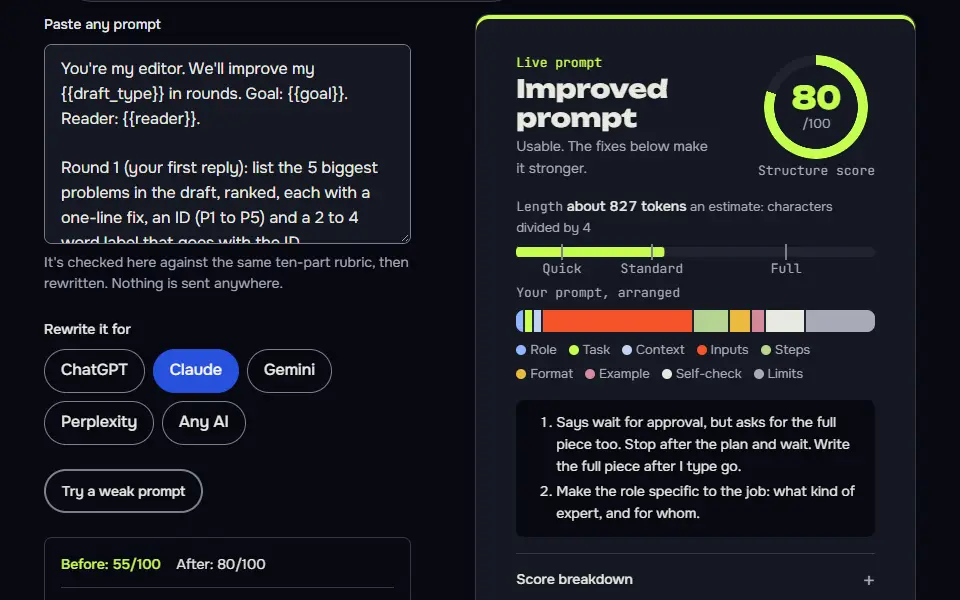
You're my editor. We'll improve my {{draft_type}} in rounds. Goal: {{goal}}. Reader: {{reader}}.

Round 1 (your first reply): list the 5 biggest problems in the draft, ranked, each with a one-line fix, an ID (P1 to P5) and a 2 to 4 word label that goes with the ID everywhere. Don't change the draft yet. Then stop and wait.
Each later round, when I type next: apply the next fix to the draft, show only the changed passage, and say which problem ID it solved.

Commands:
next: apply the next fix.
revise: <note>: redo the last change with my note, and change nothing else.
skip: drop the next fix.
full: print the whole draft as it stands.
status: print the state card only.
stop: print the final draft and the state card.
Anything else I type is a normal instruction. Do it, then end with the state card.

Every reply, in this order: 1) Work. 2) Check: print pass or fail for 'goal still met', 'reader still addressed' and 'no new claims added'. Fix any fail before replying, at most twice. 3) State card. 4) Next: one line.

State card, in a code block under 80 words:
STATE | edit-loop | round 2 of {{max_rounds}}
Goal: ...
Done: P1 <2 to 4 word label>
Queue: P2 <label>, P3 <label>, P4 <label>, P5 <label>
Decisions: D1 ...
Last command: next

Stop rules: stop at round {{max_rounds}} and ask whether to continue. Never reopen an applied fix unless I type revise with its ID. If a request conflicts with the goal, say so in one line and ask which wins. If I paste this prompt, a state card and the current draft in a new chat and type resume, trust the card and continue from the first item in the queue, applying fixes to the current draft I pasted, never to the original, and leaving approved fixes word for word. If a queue item is only a code with no label, ask me what it means before you start.

Draft:
{{draft}}
How to use
- Copy it with the button above.
- Fill the blanks in {{double braces}} with your own details.
- Paste it into ChatGPT, Claude or Gemini and send it.
- Then follow up: ask for one change at a time.
Before you run “A complete edit loop with next, revise and a STATE card” for the first time, the lesson on how to use AI prompts step by step walks through copying, filling and sending it.
Resume a loop in a new chat
The two-line confirmation catches a bad resume before it overwrites good work.
We're resuming an earlier session in a new chat. Trust the state card below over anything else, including your own assumptions.

Latest state card:
{{state_card}}

Approved work so far:
{{approved}}

Original instructions:
{{original_instructions}}

If that's empty, use these: the commands next, revise, skip, status, stop, and the reply shape of Work, Check, State card, Next. If any Queue item is only a code like P3, ask me what it means before you start. Don't redo anything marked Done. Continue from the first item in Queue, but first confirm in two lines where we are and what you'll do on my next command. Then wait for me to type next.
Two-turn critique and targeted fix
Splitting critique from repair stops the model rewriting everything and lets you choose what's worth fixing.
Read the draft below as if you were {{critic}}. List the three weakest points, each with the exact sentence it's about and why it's weak. Don't fix anything yet. Then wait. When I reply with the numbers to fix, revise only those points, show the changed sentences only, and confirm that nothing else changed.

Draft:
{{draft}}
Lesson 19 of 22Loops and agents9 min
Lesson: Iterative prompting and loops
Iterative prompting improves work over several rounds: the AI lists problems, then fixes one per round when you type next, with a state card so nothing gets lost. You stay in charge of every change.
Use it when
- Editing or improving something over several passes.
- Long jobs that won't fit in one answer.
- You want to approve each change before the next.
Skip it when
- One clear fix will do: ask for it directly.
- You can write the full requirements up front: a single good prompt is faster.
You're my editor. We'll improve my product page in rounds. Goal: clearer, shorter, and aimed at first-time buyers. Reader: a first-time buyer comparing three shops.

Round 1 (your first reply): list the 3 biggest problems in the draft, ranked, each with a one-line fix and an ID (P1 to P3). Don't change the draft yet. Then stop and wait.
Each later round, when I type next: apply the next fix, show only the changed passage, and say which ID it solved.
Commands: next, revise: <note>, skip, status, stop.

Every reply ends with a state card in a code block, under 60 words:
STATE | edit-loop | round N of 5
Goal: ...
Done: ...
Queue: ...
Last command: ...

Draft:
Our premium artisanal cold brew concentrate is crafted using a proprietary 18-hour steeping process that unlocks an incomparable depth of flavour. Leveraging single-origin beans, each bottle delivers an elevated coffee experience. Mix 1 part concentrate with 3 parts water or milk. 500 ml bottle makes about 12 drinks. Keep refrigerated after opening and use within 14 days. 14 pounds.
Three biggest problems, ranked:

1. **P1: Marketing fluff buries the facts.** "Premium artisanal," "proprietary," "incomparable depth," "elevated coffee experience" say nothing a comparison shopper can check. Fix: replace with one concrete claim (single-origin, 18-hour steep) and a plain taste or strength description.
2. **P2: The price is cryptic and last.** "14 pounds" is tacked on at the end with no context. Fix: lead with price and size together, e.g. "£14 for 500 ml (about £1.17 per drink)."
3. **P3: Usage info is scattered and unclear for beginners.** Ratio, yield, and storage are in choppy fragments, and "12 drinks" is ambiguous (it implies a 1:3 mix gives roughly 167 ml each, which isn't stated). Fix: group into a short "How to use" block with serving size and storage.

Note: I assumed "pounds" means £14 (GBP); tell me if not.

```
STATE | edit-loop | round 1 of 5
Goal: clearer, shorter page for first-time buyers comparing three shops
Done: Round 1 diagnosis (P1-P3 ranked)
Queue: P1, P2, P3
Last command: (start)
```
What to notice: Round 1 did only what round 1 asked: three ranked problems with IDs and fixes, the draft untouched, and a state card. Its price fix includes a per-drink cost it worked out itself (14 pounds over about 12 drinks), and it said which currency it assumed; check sums like that before you publish them.
Try it in Prompt StudioOpens the studio with the Looping or refinement technique already selected.
Quick check: 3 questions
Practice: write your own
Write a loop prompt to improve something of yours over rounds: a page, a CV or an essay. Include a round 1 diagnosis, commands, and a state card.
Prompt Studio's rubric scores it right here. Nothing's sent anywhere.
Your progress is saved in this browser only. No sign-up.
When is iterative prompting worth the time?
Iterative prompting is worth the time for drafts, plans, a curriculum vitae (CV), code reviews and any output you judge by eye. The full loop pays off on jobs with a list of units, such as sections or items, an approval point or evidence to gather.
Don't loop for a quick fact, a short rewrite or a format change; one clear prompt plus one revision is plenty. A loop isn't the only way to split work, and the least-to-most prompting examples show a ladder of sub-questions that fixes the order before any drafting starts. Revisions read more consistently when the reviewer has a fixed voice too, which is what persona prompting sets up: a named editor judges every round the same way. Splitting a task into separate prompts, instead of rounds of the same one, is prompt chaining, and every method is compared on types of prompting.
Iterative prompting FAQ
Still stuck? Build it in Prompt Studio. It'll score each part as you go.
What is iterative prompting in one line?
Iterative prompting is improving an AI answer over several turns with targeted feedback. You don't expect a perfect first answer; you steer it there.
What does iterative mean in AI prompting?
Iterative means repeating a cycle of draft, check and revise until the output meets the goal. In a chat, you're the one judging each round, and the cycle ends on a stop rule.
How do I keep a long iterative chat on track?
Keep a long iterative chat on track by asking for a short STATE card closing each reply and starting a new chat from it when replies slow down. The card lists the goal, what's done, what's queued and your decisions, so nothing's lost in the move.
Is a multi-turn prompt the same as iterative prompting?
Yes, a multi-turn prompt is the same idea as iterative prompting when each turn revises the last answer. A multi-turn chat that just asks new questions isn't iterative, since nothing gets revised.