
Zero-shot prompting explained
Free prompt courseLesson 3 of 227 minVideoGo to the lesson
Guide
3 min
- Plain English
The short answer
Zero-shot prompting means giving an AI an instruction with no examples of the answer you want. It works well for common tasks like summarising, translating and simple classification, since modern models already know the patterns. Add examples only if the output format drifts or the labels are your own.
What does zero-shot prompting mean?
Zero-shot prompting means giving a model the instruction with no examples of the answer you want. The prompt holds the task and nothing to copy, and it covers 3 common jobs well: summarising, translating and classifying. A "shot" is an example, so zero shots means zero examples. Google's docs put it plainly: "prompts that provide no examples are called zero-shot prompts".
It works since models've trained on huge amounts of text and instructions, so a clear request for a familiar task is often all you'll need. Most of us use it all day without noticing: you type a request and the model does it, and there's no setup. The 2022 paper Large Language Models are Zero-Shot Reasoners showed how far a plain instruction could go on reasoning tasks, too.
How do zero-shot, one-shot and few-shot prompting compare?
Zero-shot, one-shot and few-shot prompting compare by the number of worked examples: none, one, or 3 to 5 (2 can work for a simple format). Everything else follows from that count, and it's the count you'll change first:
| Zero-shot | One-shot | Few-shot | |
|---|---|---|---|
| Prompt contains | Instruction only | Instruction plus 1 example | Instruction plus 3 to 5 examples |
| Writing effort | Low | Low to medium | Medium |
| Best use | Common tasks, quick drafts | Fixing one format or tone | Strict formats such as JavaScript Object Notation (JSON), your own labels, house style |
| Main risk | Format or labels drift | Model copies the one example too closely | Model copies example wording |
Can't tell the zero-shot and few-shot outputs apart? Then you've saved time by staying zero-shot. How to choose and order examples is covered in few-shot prompting.
How do you make a zero-shot prompt reliable?
Make a zero-shot prompt reliable with 3 habits: define each label, name the exact output format and give a rule for unclear cases. With no examples to lean on, the instruction carries everything. Don't want to write it from scratch? The free prompt maker is an AI prompt generator that turns a one-line goal into a prompt with these parts filled in.
- Define each label. A label definition says what you'd mean by "urgent", so the model isn't left guessing.
- Name the output format. "Return one word" or "Return a two-column table".
- Give a rule for unclear cases. A line such as "Answer unclear if no label fits" stops forced wrong answers.
These lines don't take long, and you'll see the difference straight away. A wrong answer usually points to a vague instruction, not a broken model, and the diagnosis prompt in the worked prompts checks which one you've got. The general recipe: how to write a good AI prompt.
Zero shot prompting before and after
The same request, asked two ways. Read the second one slowly. Each line does a job.
What's the sentiment of this review? "Arrived late but the quality is great."
Classify the sentiment of the review as positive, negative, mixed or neutral. Answer with one word, then a reason in under 15 words. If you can't tell, answer unclear.

Review: "Arrived late but the quality is great."
Why it works
Still zero-shot, with no examples, but the allowed labels, answer shape and escape hatch are now spelled out.
Zero shot prompting examples
Zero-shot classification with defined labels
Definitions replace examples, so the instruction carries the meaning of each label.
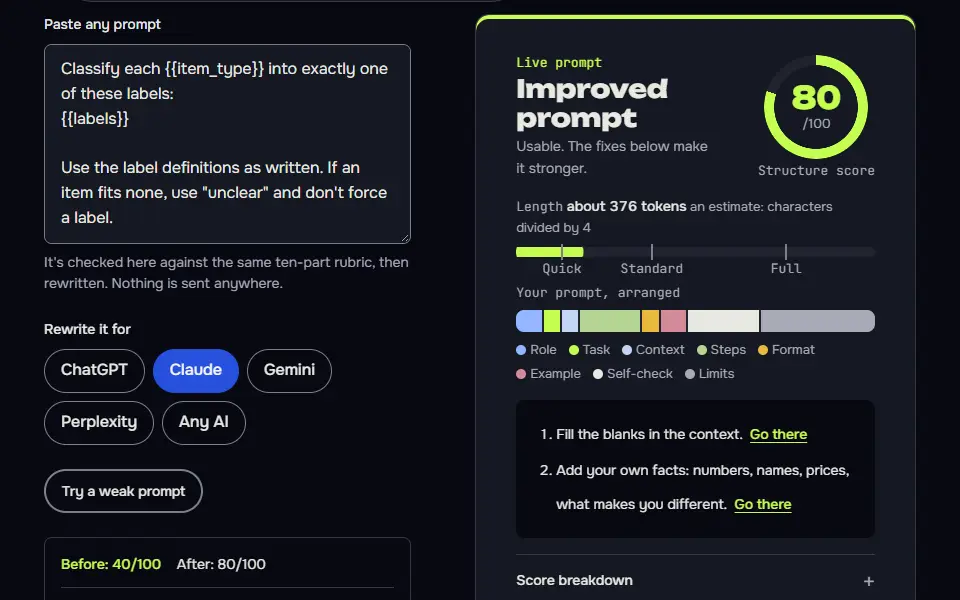
Classify each {{item_type}} into exactly one of these labels:
{{labels}}

Use the label definitions as written. If an item fits none, use "unclear" and don't force a label.

Return a table with columns: Number, Label, Reason (under 12 words).

{{items}}
How to use
- Copy it with the button above.
- Fill the blanks in {{double braces}} with your own details.
- Paste it into ChatGPT, Claude or Gemini and send it.
- Then follow up: ask for one change at a time.
Before you run “Zero-shot classification with defined labels” for the first time, the lesson on how to use AI prompts step by step walks through copying, filling and sending it.
Zero-shot summary with a fixed shape
The output shape is the only 'example' it needs, so no sample summary is required.
Summarise the text below for {{reader}}. Give: one sentence stating the main point, then exactly three bullets of supporting detail, then one line starting "Open question:" with the biggest thing the text leaves unanswered. Use plain words and keep the whole summary under {{words}} words. Don't add facts that aren't in the text.

Text:
{{text}}
Test whether you need examples at all
It stops you adding examples to fix a problem that's really just a vague instruction.
Here is a zero-shot prompt I used and the answer I got.

Prompt:
{{prompt}}

Answer:
{{answer}}

What I wanted instead: {{wanted}}

Decide whether the gap is caused by (a) an unclear instruction, (b) a missing format, or (c) a task where examples would genuinely help. Give your verdict in one line. If it's (a) or (b), rewrite the prompt without examples. If it's (c), write two short examples I can add. Keep the rewrite under {{words}} words.
Lesson 3 of 22Basics7 min
Lesson: Zero-shot prompting
Zero-shot means asking with clear instructions and no examples. It's how most people prompt, and it works for jobs the model already knows well, as long as you define your labels, limits and format.
Use it when
- The job is common: summarise, classify, translate, rewrite.
- You can describe the output exactly in words.
- You want a quick first answer before deciding whether examples are needed.
Skip it when
- The style or format is easier to show than describe: use few-shot.
- Earlier answers keep coming back in the wrong shape.
Classify each customer email into exactly one of these labels:
urgent: service is down or money is lost
normal: a question or request with no deadline
low: praise, feedback or chit-chat

Use the label definitions as written. If an item fits none, use "unclear" and don't force a label.

Return a table with columns: Number, Label, Reason (under 12 words).

1. Our checkout page shows an error.
2. Can you resend last month's invoice?
3. Thanks, the new dashboard is great.
| Number | Label | Reason |
|--------|-------|--------|
| 1 | urgent | Checkout error likely blocks purchases, so revenue is being lost. |
| 2 | normal | Routine request with no deadline stated. |
| 3 | low | Praise for the new dashboard. |

Item 1 doesn't say whether checkout is fully broken or only partly, so I read it as a likely outage. If the error is minor or intermittent, "unclear" would fit better.
What to notice: No examples, yet all 3 labels follow the written definitions: urgent, normal and low. The "unclear" escape hatch kept it from forcing a label. It added a paragraph the prompt didn't ask for: item 1 sat between urgent and unclear, and the table had no place to say so. A Confidence column would have given it one.
Try it in Prompt StudioOpens the studio with the Zero-shot technique already selected.
Quick check: 3 questions
Practice: write your own
Write a zero-shot prompt that classifies or summarises something from your own work. No examples. Use 3 steps: define the labels or the output in words, set a limit and fix the format.
Prompt Studio's rubric scores it right here. Nothing's sent anywhere.
Your progress is saved in this browser only. No sign-up.
Is zero-shot prompting enough for most tasks?
Yes, zero-shot prompting is enough for most common tasks, so start there and add examples only when the format drifts. It's the cheapest first test, and you're done once the answer's right. Per OpenAI, reasoning models often don't need examples, so a reasoning model works zero-shot as a sensible default.
Move on once you see wrong formats, inconsistent labels or the wrong tone. That's when you'd add examples, or for logic problems try chain of thought. A task that's really several jobs in one won't get fixed by examples; split it, as the prompt chaining examples show. A task that needs lookups or tool calls mid-answer suits a ReAct prompt instead. The full list is on types of prompting.
Zero shot prompting FAQ
Still stuck? Build it in Prompt Studio. It'll score each part as you go.
What is zero-shot prompting in simple words?
Zero-shot prompting is asking a model to do a task without showing it any example answers. It leans on what the model learned in training, and it's how most people use chatbots every day.
What separates zero-shot prompting from one-shot prompting?
Zero-shot prompting is separated from one-shot prompting by one worked example: one-shot includes it, and zero-shot doesn't. That single example can fix a format or tone, though the model may copy it too closely.
What is a zero-shot prompt example for classification?
A zero-shot prompt example for classification is 'Label this support email as billing, bug or other, and reply with the label only'. Add one line on what each label means, and it'll hold up on most inboxes.
Do reasoning models work well zero-shot?
Yes, reasoning models work well zero-shot on most reasoning tasks, which is why vendors suggest starting without examples. OpenAI's reasoning guide says they often don't need few-shot examples, so test the bare instruction first.