
Prompt format and framework guide
Free prompt courseLesson 5 of 228 minVideoGo to the lesson
Guide
4 min
- Plain English
The short answer
A good prompt format separates its parts so the model can't confuse them: role, task, context, constraints and output format, each under a clear label. Use Markdown headings or Extensible Markup Language (XML) tags, pick one style and stick to it. Ask for JavaScript Object Notation (JSON) only when code will read the answer.
What is a prompt framework?
A prompt framework is a fixed layout that puts the role, task, context, constraints and output format of a prompt into labelled blocks, so the model can tell instructions from content. The block order and the labels are the whole idea. A named acronym (CREATE, RISEN) is just a memorable name for one block order, and none of them is official. That's worth knowing before you learn three of them.
The format question is about where things go, not what to say. A framework doesn't make a vague task clear; it makes a clear task easy for the model to read, and it's easy for you to check later. You won't need a new layout for every job.
What is the four-block prompt format layout?
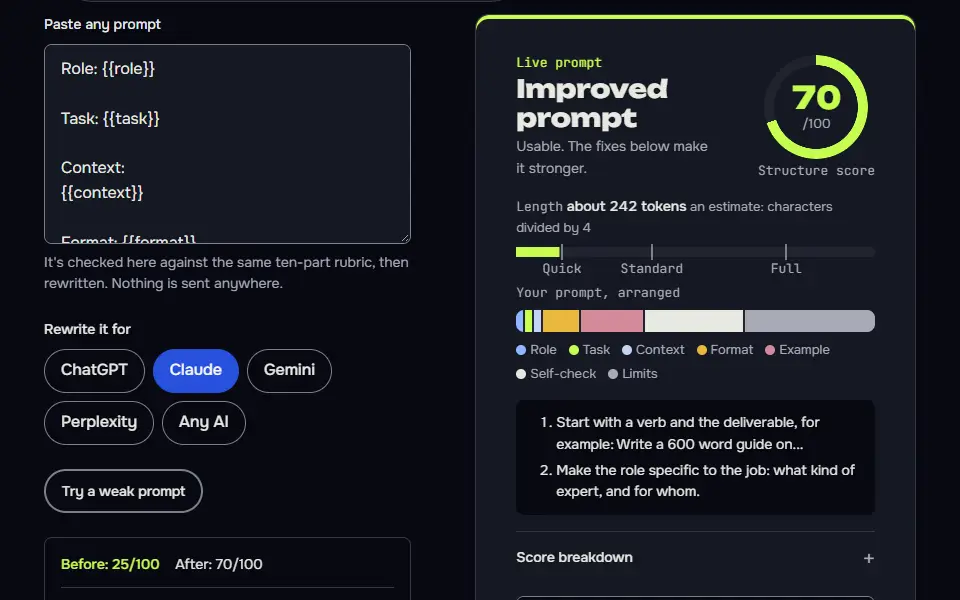
The four-block prompt format layout is role, task, context and format, each in its own labelled block, with pasted material kept inside the context block. It's the layout most everyday prompts need, and it works on every major chatbot. Instead of retyping it for every model, you can let the AI prompt builder lay out the same task in the shape each model reads best:
Copy layout
Role: who the model is, in one line
Task: the one job, starting with a verb
Context: facts, audience, pasted material (labelled)
Format: length, structure, tone, what to do if unsure
Put limits such as word count and what to leave out in the format block. That fifth component, constraints, is the one people forget, and it's where most rewrites come from. Leave it unstated and the model won't guess it right.
How do the named prompt frameworks compare?
The named prompt frameworks compare as different labels for the same five components, so CREATE and RISEN map onto role, task, context, constraints and output format. CREATE stands for Character, Request, Examples, Adjustments, Type of output and Extras. RISEN stands for Role, Instructions, Steps, End goal and Narrowing.
Framework table
| Shared component | Four-block layout | CREATE | RISEN |
|---|---|---|---|
| Role | Role | Character | Role |
| Task | Task | Request | Instructions, Steps |
| Context | Context | Examples, Extras | End goal |
| Constraints | Format (limits) | Adjustments | Narrowing |
| Output format | Format | Type of output | End goal (shape) |
Read across a row and the overlap is plain: each acronym renames the same parts and changes the order a little. Don't spend long choosing. You'll get much the same result from any of them, since it's the separation that counts, not the acronym. CREATE leans on a sample to follow, so it suits writing; RISEN spells out steps, so it suits multi-step jobs.
When should a prompt ask for JSON format?
A prompt should ask for JavaScript Object Notation (JSON) format only when code will read the answer, and it should name every key the code expects. For anything a person reads, a table or short paragraphs are easier. Four rules keep the JSON clean:
- List the fixed keys and the value type each one holds, like a small schema.
- Say what to put when a value is missing: null, not a guess.
- Say "only the JSON object, nothing before or after".
- Don't ask for an explanation outside the object. "JSON only" and "explain your reasoning" contradict each other, and the model has to break one. To get both, add a
noteskey inside the JSON, so the explanation lives where the code won't choke on it.
The second worked prompt is a full fixed-key example you can copy.
Which prompt format does each AI model prefer?
Each AI model prefers a slightly different prompt format: Markdown headers for ChatGPT, tagged blocks in Extensible Markup Language (XML) for Claude, and plain labelled sentences for Gemini, going by each vendor's own prompting guide. That's a model-specific layout, and you don't have to memorise it.
Per-model notes
- ChatGPT. OpenAI's guide says Markdown headers and lists can mark distinct sections, and XML tags can show where a piece of content starts and ends.
- Claude. Anthropic recommends consistent, descriptive XML tags such as
<context>and<input>, with long documents at the top and the question at the end. - Gemini. Google says XML-style tags or Markdown headings both work, and to "choose one format and use it consistently within a single prompt". For long inputs it puts the context first and the question last.
- Other chatbots (Copilot, Grok, DeepSeek, Perplexity). I haven't found vendor rules that differ, so the same labelled-block layout applies. A format that seems ignored is usually a quirk of that app, and the app's help page is where you'll find it.
Prompt framework before and after
The same request, asked two ways. Read the second one slowly. Each line does a job.
Here are my meeting notes: Sam to check budget, Dana sends quote Friday, launch maybe June. Turn them into something useful and make it a list, but explain what you decided too and send it as JSON.
Role: You are an assistant who turns meeting notes into action items.
Task: Extract every action item from the notes.
Context: Notes are between the notes tags.
Format: A table with columns Owner, Action, Due. Write "unknown" if a due date isn't stated. No JSON, no commentary.

<notes>
Sam to check budget, Dana sends quote Friday, launch maybe June.
</notes>
Why it works
The before prompt asks for a list, an explanation and JSON at once. The after version labels the parts and picks a single output format.
Prompt framework examples
Role, task, context, format template
Four labelled blocks and a single missing-information rule make the prompt easy to scan and reuse.
Role: {{role}}

Task: {{task}}

Context:
{{context}}

Format: {{format}}
If any information you need is missing, ask me one question before you start.
How to use
- Copy it with the button above.
- Fill the blanks in {{double braces}} with your own details.
- Paste it into ChatGPT, Claude or Gemini and send it.
- Then follow up: ask for one change at a time.
Before you run “Role, task, context, format template” for the first time, the lesson on how to use AI prompts step by step walks through copying, filling and sending it.
Ask for JSON that code can read
Fixed keys, a null rule and a notes key remove the clash between 'JSON only' and wanting commentary.
Extract the details from the support email between the email tags.

Return only a JSON object with exactly these keys: customer_name (string), order_number (string or null), issue_type (one of "billing", "shipping", "product", "other"), urgent (true or false), notes (string, one short sentence). Use null for anything not stated. Do not guess an order number. Write nothing before or after the JSON, and put anything you want to say inside the notes key.

<email>
{{email}}
</email>The same notes task in each model's preferred layout
Only the layout changes between models: headings, tags, or context first and the instruction last.
Any model
Turn these meeting notes into action items for {{team}}: a table of Owner, Action and Due, with unknown where a date is missing. Copy dates exactly as written in the notes and don't add a year.

Notes:
{{notes}}
ChatGPT
## Task
Turn the notes into action items for {{team}}.

## Output
A table with columns Owner, Action and Due. Use "unknown" where a date is missing. Copy dates exactly as written in the notes and don't add a year.

## Notes
{{notes}}
Claude
<task>Turn the notes into action items for {{team}}.</task>
<output>A table with columns Owner, Action and Due. Use "unknown" where a date is missing. Copy dates exactly as written in the notes and don't add a year.</output>
<notes>
{{notes}}
</notes>
Gemini
Turn meeting notes into action items for {{team}}. Output a table with columns Owner, Action and Due, and use "unknown" where a date is missing. Copy dates exactly as written in the notes and don't add a year.

Notes:
{{notes}}

Produce the action items table now.
Lesson 5 of 22Structure8 min
Lesson: Prompt format and locked output
Format has two halves: laying your prompt out in clear blocks, and locking the answer's shape, such as exact JSON keys or table columns. A locked format is what makes an AI's output safe to paste into a spreadsheet or code.
Use it when
- The output goes into a spreadsheet, database, form or code.
- You'll compare answers side by side.
- Long prompts where the AI keeps missing a section.
Skip it when
- You want free-flowing prose, like a story or a letter.
- You haven't decided what you need yet: brainstorm first, lock later.
Extract the details from the support email between the email tags.

Return only a JSON object with exactly these keys: customer_name (string), order_number (string or null), issue_type (one of "billing", "shipping", "product", "other"), urgent (true or false), notes (string, one short sentence). Use null for anything not stated. Don't guess an order number. Write nothing before or after the JSON, and put anything you want to say inside the notes key.

<email>
Hi, it's Dana Price. My parcel was meant to arrive on Monday for my daughter's birthday party on Saturday and the tracking hasn't moved in four days. I can't find my order confirmation. Can someone tell me where it is?
</email>
{"customer_name": "Dana Price", "order_number": null, "issue_type": "shipping", "urgent": true, "notes": "Parcel tracking has not updated in four days and it is needed for a birthday party on Saturday; customer also cannot find their order confirmation."}What to notice: Exactly the five keys, nothing before or after the JSON. It didn't guess an order number, and it judged the birthday deadline urgent from the text. One thing to watch: the prompt asked for one short sentence in notes, and it wrote a long one with a semicolon.
Try it in Prompt StudioOpens the studio with the Format locked technique already selected.
Quick check: 3 questions
Practice: write your own
Write a prompt that extracts details from a message of your own into an exact format: JSON keys or table columns. Say what to do with missing values and forbid anything outside the format.
Prompt Studio's rubric scores it right here. Nothing's sent anywhere.
Your progress is saved in this browser only. No sign-up.
When is a careful prompt format worth it?
A careful prompt format is worth it for long prompts, prompts with pasted material and prompts you'll reuse, and a one-line question doesn't need one. Structure keeps instructions from blurring into data, and you'll thank yourself when you reopen the prompt in a month.
Headings on a ten-word question just add noise, so skip them there; you'd be formatting for nobody. Layout is only half the job: what goes inside each block is the subject of how to write a good AI prompt. The word "prompt" means something else in a classroom, and that sense is explained in what a writing prompt is.
Prompt framework FAQ
Still stuck? Build it in Prompt Studio. It'll score each part as you go.
What are the four components of a prompt framework?
The four components of a prompt framework are role, task, context and output format, and constraints are often added as a fifth. The point is to separate who the model is, what it should do, what it needs to know and how the answer should look.
What is the prompt format for JSON output?
The prompt format for JSON output is a short instruction plus the exact keys and value types you expect, with a line that says to return JSON only. Give the allowed values for fields with a fixed set, and say null is the answer for anything missing.
Do prompt frameworks like CREATE work in every chatbot?
Yes, prompt frameworks like CREATE work in every chatbot, since they only order the same parts of a prompt. No model needs the acronym itself; it's the parts, present and clearly separated, that it reads.