
Free prompt engineering course in 22 short lessons
Prompts
22
- Quizzes
- Practice scorer
- Real outputs
The short answer
This free prompt engineering course has 22 short lessons: the parts of a prompt, structure (including JavaScript Object Notation (JSON) formats), reasoning techniques, then loops and agents. Every lesson shows a tested prompt and output, a two or three question quiz, and a practice box that scores your prompt. There's no sign-up, and progress saves in your browser.
What does the free prompt engineering course cover?
The free prompt engineering course covers 22 lessons in four stages: the parts of a prompt, structure and formats, reasoning techniques, then loops and agents. The stages run from what a prompt is made of to prompts that run over several rounds, and each stage builds on the one before it. The price is zero: there's no paid tier, and you don't need an account. Before lesson one, the how to use our prompts page shows how to copy, fill the blanks and follow up.
Everyone should begin with anatomy of a prompt, which labels eight parts on one tested prompt. In the structure stage, prompt engineering to reduce hallucinations shows how to make the AI answer only from text you paste. The technique stage has two lessons of its own: a plan before the work and a check after it make up plan and solve prompting, and in the flipped interaction pattern the AI interviews you before it writes a word. The last stage covers self-critique prompting, where the model grades its own draft against yes or no checks, and batch prompting, which runs one fixed instruction over a long list with a count check at the end.
Your progress
0 of 22 lessons done
Saved in this browser only. No account, no sign-up and no certificate: just the skills.
Part 1 Basics
What a prompt is made of and how to use a ready-made one. Start here even if you've used ChatGPT for a while.
A prompt is a short brief. Name the job, say who it's for, hand over your facts and fix the length and shape, and the…
How to use the prompts on this site
Every prompt here is a template: copy it, fill the blanks in double braces, paste it into your AI and follow up one…
Zero-shot means asking with clear instructions and no examples. It's how most people prompt, and it works for jobs the…
A role line tells the AI whose standards and viewpoint to write from. It changes tone, level and what gets noticed far…
Part 2 Structure
How to shape the answer you get back: formats, examples, reusable templates, grounding in your own facts and standing instructions.
Prompt format and locked output
Format has two halves: laying your prompt out in clear blocks, and locking the answer's shape, such as exact JSON keys…
Few-shot prompting shows the AI 3 to 5 worked examples (Anthropic's range) before your real request, so it copies the…
A prompt template is a prompt that worked, with the parts that change swapped for blanks like {{client}}. You fill the…
Prevent hallucinations with grounding
A grounded prompt answers only from text you supply, quotes the line it used and says "Not in the document" when the…
System prompts and custom instructions
A system prompt is a set of standing instructions that applies to every message in a chat: who the assistant is, what…
An image prompt describes a picture: subject, setting, style, light, lens, framing and shape, plus what to leave out…
Part 3 Techniques
Ways to make the AI reason better: visible steps, smaller sub-problems, a plan, several options, questions first, practice partners and prompts that write prompts.
Chain of thought prompting asks the AI to show its working as steps before the answer. You get an answer you can check…
Least-to-most prompting breaks a hard problem into sub-questions, from easiest to the full problem, and answers them…
Ask for a plan first, with what done means for each part, then the work, then a check of the work against the plan…
Compare options (tree of thought)
Instead of taking the first idea, ask for different approaches, score them against your criteria, then keep the best…
Flipped interaction: the AI interviews you
Ask the AI to question you before it works. Cap the number of questions, ask for the most important first and tell it…
In a roleplay prompt the AI plays a character so you can practise or explore: a sceptical client, an interviewer, a…
A meta prompt asks the AI to write the prompt for you. Done well, it interviews you first, then drafts a reusable…
Part 4 Loops and agents
Work that runs over several steps or rounds: self-critique, the follow-up loop, chains, batches and AI that uses tools.
Self-critique: draft, score, rewrite
Ask for a draft, a pass or fail scorecard against your checklist, and a rewrite that fixes every fail. It's the…
Iterative prompting improves work over several rounds: the AI lists problems, then fixes one per round when you type…
Prompt chaining splits a job into separate prompts that run in order, each using the last one's output: collect, then…
Give one set of instructions and a numbered list, and ask the AI to process every item the same way, in order, with a…
ReAct is a loop of Thought, Action and Observation: the AI says what it needs, takes or requests an action, reads the…
How does each prompt engineering lesson work?
Each prompt engineering lesson works in 5 steps: a plain explanation, a tested prompt with its real output, a Prompt Studio button, a short quiz and a practice box that scores your prompt. You'll always know what comes next, and you won't need to sign in for any of it. Once a lesson clicks, put it to work on a real job: the free AI prompt generator takes a target model and a one-line task and drafts the full prompt for you.
- A plain explanation of the technique, with when to use it and when to skip it.
- One tested prompt you can copy, next to the answer it really got. Claude Sonnet 5.5 is the model used for the tested outputs, and each output is quoted word for word, mistakes included, with the date label on it.
- A button that opens Prompt Studio with that technique preselected, so you can build your own version. Your draft is kept in the browser.
- A quiz of two or three questions, each with the reason behind the right answer.
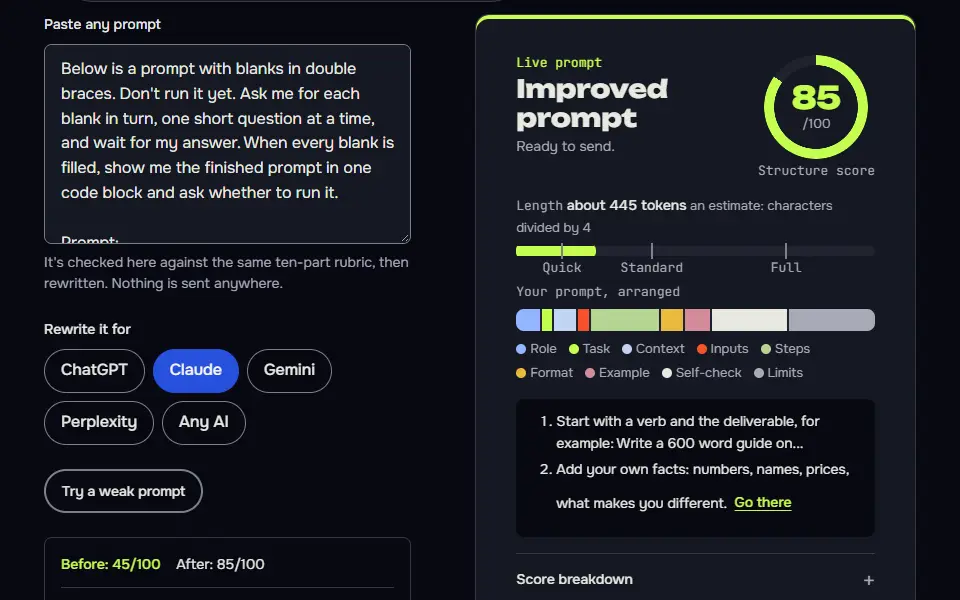
- A practice box that scores what you write against 10 structure parts, with a fix for each part that's missing.
Most lessons sit on an existing guide, so it's the full guide that comes first and the hands-on part follows it.
How long does the prompt engineering course take?
The prompt engineering course takes about 3 hours in total, with most of the 22 lessons running 6 to 10 minutes. Each lesson shows its own time estimate on its card.
You don't have to finish in one sitting, and it isn't a race. The course page keeps a continue link that takes you back to the lesson you last opened, and you can mark each lesson as done so the progress bar fills in.
Who is the prompt engineering course for?
The prompt engineering course is for anyone who uses ChatGPT, Claude or Gemini for real work and wants more reliable answers, with no coding needed. The later lessons help people who build tools, but they're written so you won't need to read code, and they don't assume you've written a script before.
Which prompt engineering lesson should you take first?
The prompt engineering lesson to take first is the anatomy of a prompt, followed by how to use the prompts on this site. Together they're a 13-minute quick start (8 and 5 minutes) for readers who won't take the whole course, and they'll change how you read every prompt on the site.
What does the free prompt engineering course leave out?
The free prompt engineering course leaves out an account, a certificate and a fact checker: progress lives in your browser and the scorer checks structure only. Clear your site data or switch devices and the progress starts again.
The prompt scorer runs in the browser, so nothing you type in a practice box is sent anywhere. It checks role, context, task, inputs, limits, format, example, self-check, model fit and length, and it can't tell you whether your facts are right, so read the AI's answer as carefully as you'd read a colleague's.
On days when you'd prefer to practise on your own writing, the daily writing prompts give you a fresh starter each day, and they're sorted by type so you won't have to hunt.
Free prompt engineering course FAQ
Still stuck? Build it in Prompt Studio. It'll score each part as you go.
Is this prompt engineering course really free?
Yes, this prompt engineering course is free: every lesson, quiz and practice box, with no sign-up and no paid tier. Progress is kept in your own browser, so nothing about you is stored on a server.
Do you get a prompt engineering certificate at the end of the course?
No, you don't get a certificate at the end of the course; you leave with tested prompts you can copy and a quiz result per lesson. The site doesn't claim a certificate, and it won't sell you one.
Which AI model runs the prompt engineering lesson examples?
The prompt engineering lesson examples run on Claude Sonnet 5.5, and each output carries the model name and the date. The techniques work in ChatGPT and Gemini too.
Can you learn prompt engineering without coding?
Yes, you can learn prompt engineering without coding; the later lessons on batch prompting and ReAct are written for people who don't code. You'll only need a chat model and a browser.