
Claude Project instructions: what prompt to put in them
Guide
3 min
- Plain English
The short answer
Claude Project instructions are standing rules that apply to every chat in a Project: who Claude is for you, how it should answer, and what to do when unsure. Put reference material in the knowledge files instead. Instructions say how to behave, and knowledge says what to know.
What are Claude Project instructions?
Claude Project instructions are standing rules that Claude applies to every chat inside that Project. A Claude Project is a workspace of chats with its own knowledge files. Anthropic's help centre puts the project knowledge base on the right side of the Project's main page; you click "Set project instructions", type the rules and click "Save instructions", and Claude uses them in all chats within the Project (source).
The instructions are the app's stand-in for an Application Programming Interface (API) system prompt, which you can't set in claude.ai yourself. They're what you'll use when you don't work through code.
What goes in Claude Project instructions versus knowledge files?
Claude Project instructions hold behaviour (who Claude is for you, how it answers, what to do when unsure), and knowledge files hold the reference material. Instructions say how to behave; knowledge says what to know, and they don't overlap.
| In the instructions | In the knowledge files |
|---|---|
| Role and who you are to Claude | Brand guide, style guide |
| Tone and standing rules | Product specs, price lists, policies |
| Output formats you always want | Past work to learn from, templates |
| What to do when information is missing | Research, transcripts, data |
| Short list of do and don't | Anything long or likely to change |
Anthropic notes that on paid plans, once project knowledge nears the context window limit, Claude switches on retrieval-augmented generation (RAG) mode to stretch the Project's capacity. The help article gives no window size, so don't count on a number; it isn't published. Keep the instructions short and put long material in files; you'll thank yourself later.
What does a Claude Project instructions template include?
A Claude Project instructions template includes 6 parts: role and audience, purpose, rules, output defaults, a missing-information line and where the facts live. For the task prompts you'll run inside the Project, the Claude prompt improver turns a rough request into a Claude-ready one.
Template (copy)
- Role and audience. Two sentences at most: who you are and who the output is for.
- Purpose. The recurring job this Project exists for.
- Rules. Five or six, each starting with a verb.
- Output defaults. Length, structure, tone.
- Missing information. Ask, or say what's missing. Never guess facts.
- Where the facts live. "Use the uploaded price list for any number."
The first worked prompt is a fill-in version and the second a finished example. The layout reasoning is in prompt format.
How do you run long jobs across chats in a Claude Project?
Run long jobs across chats in a Claude Project by keeping a short STATE card as a knowledge file and updating it at the end of each session. Chats in a Project don't share memory, and the help article says context doesn't carry across chats unless it's added to the knowledge base, so the card's the handoff between chats. Without it, you'd re-explain the job every time.
STATE card example
Goal: a 12-part newsletter series. Done: parts 1 to 4. Next: part 5 on pricing. Decisions: plain tone, 600 words each, no stock photos. Start the next chat with "Read the state card and continue". Iterative prompting explains the loop behind this, and the home Prompt Studio Loop mode has a Saved assistant option that writes Project instructions for you. If the Project is for code, keep the repo's rules in a CLAUDE.md file as well, since Claude Code reads that file at the start of each session.
How do ChatGPT project instructions compare with Claude's?
ChatGPT project instructions compare closely: they sit under Project settings and apply only inside that project, the same scope as Claude's. OpenAI's help centre says they override your global custom instructions, and a project can use default memory or project-only memory (source: the OpenAI Help Center article on projects in ChatGPT).
The split carries over: behaviour in instructions, reference material in files. Limits and plan differences change, so check the current help page before you rely on one; they've changed before.
Claude project instructions before and after
The same request, asked two ways. Read the second one slowly. Each line does a job.
Be a good writing assistant and help me with my blog.
You help me, a freelance bookkeeper, write posts for small business owners. Rules: write in plain British English, use short paragraphs and contractions, lead each section with the answer, never invent statistics, and mark any claim that needs a source with [source needed]. Default length is 700 words unless I say otherwise. If you're missing a fact, ask one question before drafting. Use the uploaded style guide for voice and the price list for any figures.
Why it works
The after version holds standing rules and defaults, and points at knowledge files for facts, so every new chat starts informed.
Claude project instructions examples
Project instructions template
Role, purpose, rules, defaults, a missing-information rule and a pointer to the files cover the six parts that matter.
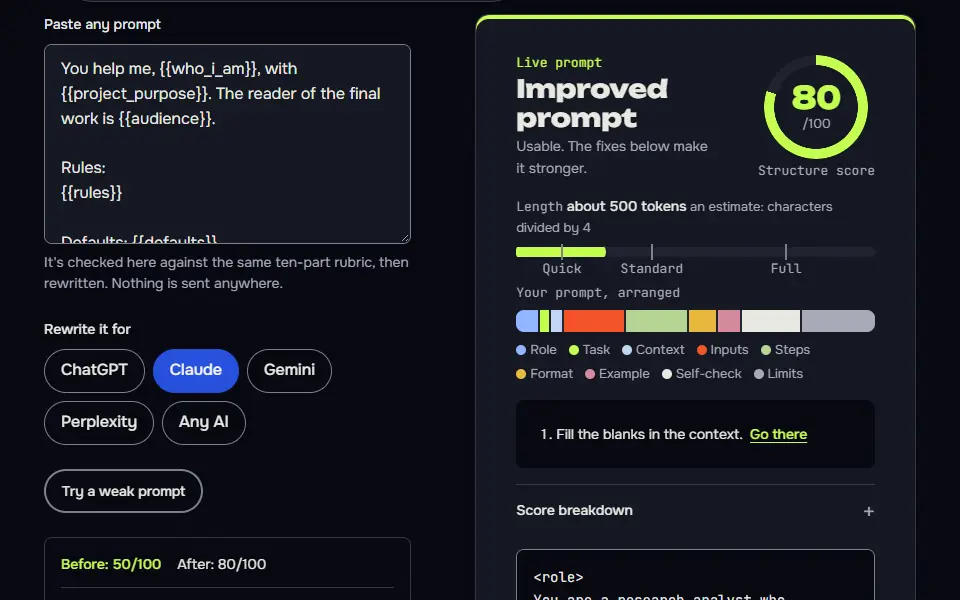
You help me, {{who_i_am}}, with {{project_purpose}}. The reader of the final work is {{audience}}.

Rules:
{{rules}}

Defaults: {{defaults}}

When you're missing information, ask me one question before you start. Never guess a fact, a number or a source. If you're unsure, say so.

Facts live in the uploaded files: {{files}}. Use them for any figure, name or policy, and say which file you used.
How to use
- Copy it with the button above.
- Fill the blanks in {{double braces}} with your own details.
- Paste “Project instructions template” into the instructions box of a Claude Project, a custom GPT or a Gemini Gem, and add your files as knowledge.
- Then ask your questions in that project's chats.
Before you run “Project instructions template” for the first time, the lesson on how to use AI prompts step by step walks through copying, filling and sending it.
A finished example: a research-reading project
A strict 'documents first, then stop' rule and a disagreements line make it a reliable reading assistant.
You help me, {{who_i_am}}, read and compare reports on {{topic}}. The documents are in the project knowledge. For every question, answer from those documents first and name the file and section you used. If the documents don't cover it, say "not in the documents" and stop; don't fill the gap from memory.

Format: start with a two-sentence answer, then the evidence as short bullets with file names, then a line starting "Disagreements:" for any place two documents conflict. Keep answers under 300 words unless I ask for more. Use British English, no jargon without a definition.
Let Claude interview you to write the instructions
The prompt writes the instructions and sorts material into the knowledge-file pile, which is the part most people get wrong.
Help me write Project instructions for a Claude Project about {{job}}. Don't write them yet. Ask me up to {{questions}} questions, one at a time, about: who I am and who the output is for, the recurring tasks, the rules I'd give a new colleague, the output format I always want, and the files I'll upload. When I've answered, write the instructions in under {{words}} words, then list which of my answers belong in knowledge files instead, so the instructions stay short.
How to use
- Copy it with the button above.
- Fill the blanks in {{double braces}} with your own details.
- Paste it into ChatGPT, Claude or Gemini and send it.
- Then follow up: ask for one change at a time.
When should you skip Claude Project instructions?
Skip Claude Project instructions for one-off questions, and use them for recurring work such as a client, a series or a codebase. Rules that'd change in every chat don't belong there either.
Builders on the API set the same rules a different way; a Claude system prompt example shows the four-tag version you'd send in code, and it's the same idea. More Claude material is on the Claude prompts hub.
Claude project instructions FAQ
Still stuck? Build it in Prompt Studio. It'll score each part as you go.
What should I put in Claude Project instructions first?
Put the role and the audience first in Claude Project instructions, then the purpose and the rules. Output defaults and a line for missing information come next, and long reference material goes in the knowledge files.
Where is the Project instructions field in Claude?
The Project instructions field is in the Project's side panel, next to the knowledge files, and it applies to every chat in that Project. Anthropic's help centre places that panel on the right side of the Project's main page: click "Set project instructions", type them and click "Save instructions".
Do chats in a Claude Project remember each other?
No, chats in a Claude Project don't remember each other; a STATE card in the knowledge files carries the handoff. Update it at the end of each session, and you won't lose the thread.
Can Claude Project instructions replace a system prompt?
Yes, Claude Project instructions replace a system prompt inside the app, where you can't set the system prompt yourself. On the API you'd send a real system prompt instead; that's where they differ.