
How to use AI prompts on this site
Free prompt courseLesson 2 of 225 minVideoGo to the lesson
Guide
3 min
- Plain English
The short answer
Every prompt here works the same way, in 4 steps: copy it, replace each blank in double braces such as {{audience}} with your own detail, paste it into ChatGPT, Claude, Gemini or your image, video or music AI, and send it. Then follow up with one change at a time instead of starting again from scratch.
How do you copy a prompt from a prompt card?
To copy a prompt from a prompt card, type into any fields at the top of the card, then press Copy prompt, so the copied text is the filled version. The prompt fills in as you type, and the Copy prompt button takes whatever's on the card at that moment. On a card with model tabs, the wording changes per model, so pick your AI first. Image cards add a style, light and ratio toolbar at the top of the page, and it's worth setting before you copy.
The Open in menu sends the prompt straight to ChatGPT or Claude with the text already in the chat box. Gemini doesn't accept a link like that, so for Gemini the menu copies the prompt and you paste it.
How do you fill the double-brace blanks in a prompt?
To fill the double-brace blanks in a prompt, replace each word in double braces, such as {{audience}}, and the braces themselves with your real detail. The word inside is a placeholder name, and it'll tell you what's wanted: {{product}} wants a product, {{word_count}} wants a number. The LinkedIn prompt in this lesson has 7 blanks, including post type, story, real fact, reader, goal, voice and length, and every filled value is a fact the AI will use.
Give real facts, and don't settle for adjectives. "Freelancers and small agency owners" beats "professionals". "The client renewed for a second year" beats "great results". The prompts tell the AI not to invent facts, so the facts you supply are the only ones it's got.
Don't leave a blank in. In our own tests, prompts sent with a blank still in got a polite request for the missing text instead of an answer, which costs you a round trip.
Which AI should each kind of prompt card go into?
Each kind of prompt card goes into its own AI: text prompts into ChatGPT, Claude or Gemini, image prompts into an image model, video prompts into Veo or Kling and music prompts into Suno or Udio. Pick the target AI by the card's kind, not by habit. For images, that's ChatGPT images, Gemini's Nano Banana or Midjourney. Music prompts carry tags that go in Suno's style box, not the lyrics box.
Paste the whole prompt in one message; don't split it. The rules at the bottom matter as much as the task at the top, and a half-pasted prompt loses them.
How to use AI prompts before and after
The same request, asked two ways. Read the second one slowly. Each line does a job.
Write a LinkedIn post about telling a client bad news early. Make it engaging.
You are a ghostwriter for a working professional, not an influencer. Write a LinkedIn post from the material below.

Post type: lesson from a mistake
What happened: I promised a client two weeks, it took five, and I told the client on day 8, as soon as I knew.
Real fact (don't add to it): the client renewed for a second year.
Who I want to read it: freelancers and small agency owners
What I want readers to do afterwards: tell clients bad news early, not late
My voice: direct and a little self-deprecating
Length: about 150 words, within 10 percent. Give the word count.

Rules: plain text with short lines, no markdown. The first two lines must work on their own. Use only the facts above: don't invent numbers, clients, quotes or motives. No stock phrases like "humbled" or "let that sink in". End with one specific question, then zero to three hashtags.
Why it works
The first version leaves the AI to invent the story, the reader and the proof, and "engaging" doesn't say what to do. The filled prompt hands over the real facts and a clear reader, and its built-in rules stop invented numbers and stock phrases.
How to use AI prompts examples
Ask the AI to interview you for the blanks
Handy on a phone, or when you're not sure what a blank wants.
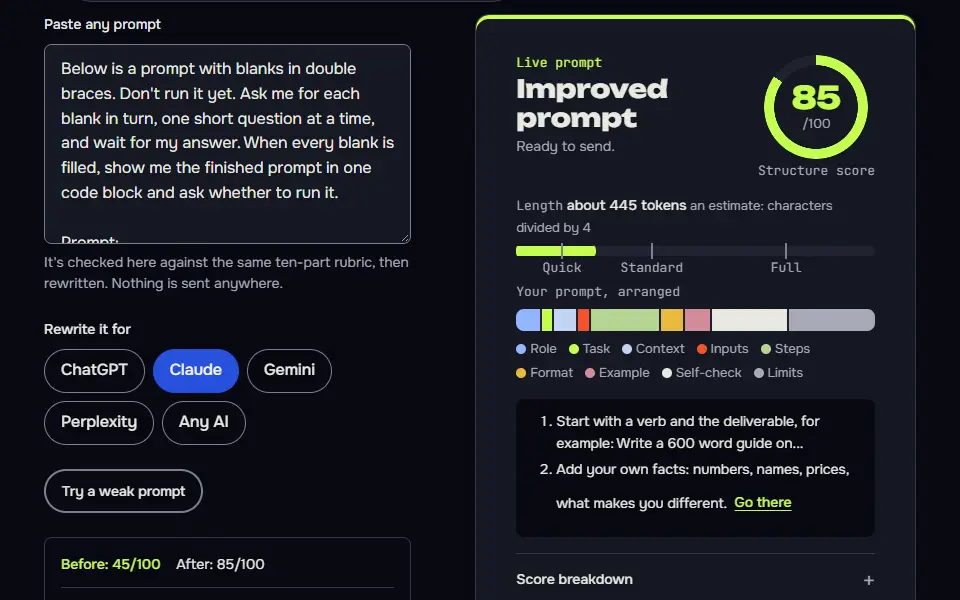
Below is a prompt with blanks in double braces. Don't run it yet. Ask me for each blank in turn, one short question at a time, and wait for my answer. When every blank is filled, show me the finished prompt in one code block and ask whether to run it.

Prompt:
"""
{{prompt_with_blanks}}
"""How to use
- Copy it with the button above.
- Fill the blanks in {{double braces}} with your own details.
- Paste it into ChatGPT, Claude or Gemini and send it.
- Then follow up: ask for one change at a time.
A follow-up that changes one thing
Stops the AI rewriting parts you were happy with.
Thanks. Change only this: {{the_one_change}}. Keep everything else exactly as it is, including the length and the format. Then tell me in one line what you changed.

If my draft isn't already in this chat, here it is:
{{draft}}
How to use
- Copy it with the button above.
- Fill the blanks in {{double braces}} with your own details.
- Send “A follow-up that changes one thing” in the same chat as your draft or earlier answer, not a new chat.
- Then check that only what you asked for changed.
Lesson 2 of 22Basics5 min
Lesson: How to use the prompts on this site
Every prompt here is a template: copy it, fill the blanks in double braces, paste it into your AI and follow up one change at a time. This page shows one of our own prompts, filled in and run, with the real answer it got.
Use it when
- You've found a prompt card and want a good answer on the first try.
- A card has blanks in {{double braces}} and you're not sure what goes in them.
- The first answer is close but not right.
Skip it when
- You need a prompt for a job no card covers: build one in Prompt Studio instead.
- You only want ideas, not a finished piece: a one-line question is fine.
You are a ghostwriter for a working professional, not an influencer. Write a LinkedIn post from the material below.

Post type: Lesson from a mistake (story)
What happened or what I want to say: I promised a client a two-week delivery and it took five. I told them on day 8 instead of day 13.
One real fact, number or detail that makes it believable (I supply it, you don't add to it): The client stayed and renewed for a second year
Who I want to read it: Freelancers and small agency owners
What I want readers to do or think afterwards: Make them tell clients bad news early
My voice: Direct, a little self-deprecating, no jargon
Length: about 150 words

Write three versions of the post. Give each a different opening line: one that starts in the middle of the moment, one that states the lesson, and one that asks a question I'd really ask.

Rules for every version
- Plain text only. LinkedIn doesn't render bold or markdown, so no asterisks, no headings and no bullet symbols. Use short lines instead.
- The first two lines have to work on their own, because most people see only those before "see more".
- One idea per post. Short paragraphs of one to three lines.
- Use only the real fact I gave you. Don't invent numbers, clients, quotes or results. If the post needs one I haven't supplied, write [add detail].
- No stock phrases: no "I'm thrilled to announce", "humbled", "next level", "let that sink in" and no "Agree?" at the end.
- End with one specific question or one clear next step, not both.
- Zero to three hashtags, all at the very end.
- Don't use em dashes or en dashes.

After the three versions, tell me which one you'd post and why in two lines, and flag any sentence that sounds like it was written by AI.
VERSION 1 (starts in the moment)

Day 8. I knew the two weeks I'd promised were gone.

I'd told the client two weeks. It took five.

The easy move was to wait. Day 13 would have been the day to say something, one day before the deadline, when the news is too late to help anyone.

I told them on day 8 instead. I did not enjoy it.

Early bad news gives a client time to adjust. Late bad news gives them a surprise and a reason to doubt you.

The client stayed. They renewed for a second year.
[...]
I'd post Version 1. The first two lines carry the whole story and the number, and the closing instruction is the exact behavior you want readers to copy.
What to notice: Our LinkedIn post prompt has 7 blanks, including post type, story, real fact, reader, goal, voice and length, and all 7 are filled here. The prompt said not to add facts, so the only fact in the answer is the one supplied (the client renewed). Our grader flagged one weakness: the opening lines both repeat the delivery promise, which wastes preview space before "see more". That's a follow-up for step 4.
Try it in Prompt StudioOpens the studio with the Fill-in-the-blanks template technique already selected.
Quick check: 3 questions
Practice: write your own
Here's one of our prompts with its blanks still in. Replace every blank with real details for a post of your own, then score it. A filled prompt should score far higher than the template.
Prompt Studio's rubric scores it right here. Nothing's sent anywhere.
Your progress is saved in this browser only. No sign-up.
How do you follow up after the first answer to a prompt card?
To follow up after the first answer, name the one thing that's wrong and ask for that change only, such as "Make version 1 shorter, keep everything else". One change per message tells you what each change did, and you won't lose track. A fix you keep making belongs in the prompt itself, and the prompt library handles prompt versioning: it keeps saved versions of each prompt with a before and after diff, a JavaScript Object Notation (JSON) backup and a share link.
The first answer is a draft, and that's fine. A weak reply usually means a blank wasn't filled or a detail wasn't given, so look there first. For a full routine of rounds, the follow-up loop lesson shows one, and the anatomy lesson explains what each part of a prompt is for.
Two lessons pick up where this one ends. A prompt that answers only from text you paste is how you prevent AI hallucinations, and a prompt that asks you questions before it writes is interview prompting. You can't break anything by trying: the cards don't save what you type, and the AI won't mind a second go.
How to use AI prompts FAQ
Still stuck? Build it in Prompt Studio. It'll score each part as you go.
Do the prompt cards on this site work in ChatGPT, Claude and Gemini?
Yes, the prompt cards on this site work in ChatGPT, Claude and Gemini, and cards where the wording differs have a tab per model. Pick the tab for your AI before you copy. Image, video and music cards have tabs for the models they're written for.
What happens if you leave a double-brace blank in a prompt?
The AI usually stops and asks you to fill the blank, or guesses something generic, if you leave a double-brace blank in a prompt. That's what our own tests showed: a prompt with a blank still in got a request for the missing text instead of an answer.
Can you save a filled-in prompt card on this page?
No, you can't save a filled-in prompt card on this page; copy it into a note, Prompt Studio or the prompt library. Prompt Studio keeps a draft in your browser and scores it as you edit, and the library's the better home for a prompt you'll reuse.