
YouTube channel ideas prompt and a 30 day plan
The YouTube channel ideas prompt that gives ideas with an audience asks for 6 ideas, each with a viewer, a promise, a repeatable video format and 3 example videos, then tests your top 3 in YouTube search.
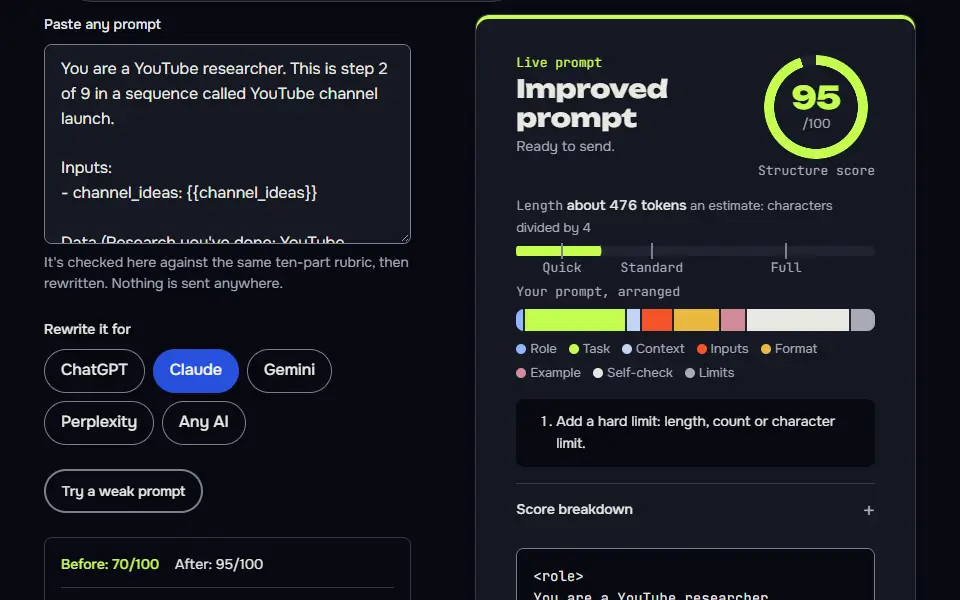
Live prompt
Step 1 of 9: Channel ideas
Fill in your details once. Step 1 of 9 builds here. Prompt Studio runs the rest.
0/100
The steps
- 1Channel ideas
- 2Demand check
- 3Positioning and channel name
- 4Channel branding
- 5First 10 video ideas
- 6Script for video 1
- 7Thumbnails and titles
- 8Upload SEO
- 930 day publish and review loop
Open the full Prompt Studio (Loop, Chain and Check).
Which YouTube channel ideas prompt gives ideas with an audience?
The YouTube channel ideas prompt that gives ideas with an audience asks for 6 ideas, each with a viewer, a promise, a repeatable video format and 3 example videos, then tests your top 3 in YouTube search. Step 2 turns that test into a worksheet you fill from YouTube itself.
How to use it
Enter your channel details
Enter the topics you could talk about for years, whether you'll be on camera or faceless, your weekly hours, the gear you have and what the channel is for in the tool. Not sure what to type? Fill a sample drops in a channel plan we've already run.
Pick how you'll run it
Build the plan Step by step, then run the weekly YouTube Studio review in Loop.
Paste each answer back
Place each reply beneath its step. The HANDOFF block carries the channel niche, viewer and promise into the name, the video list and the first script.
Export or automate
Download the plan as Markdown and keep the weekly review prompt from step 9 beside YouTube Studio. Uploads stay manual.
Three steps from the YouTube channel sequence
Step 2: Demand check
Part of the 9 step sequence: YouTube search, top channels and outlier videos to check demand, then one pick. Its HANDOFF feeds channel_niche, viewer into later steps.
You are a YouTube researcher. This is step 2 of 9 in a sequence called YouTube channel launch.

Inputs:
- channel_ideas: {{channel_ideas}}

Data (Research you've done: YouTube search suggestions, channels you found, their views and upload dates):
{{data}}

Task:
1. Spell out the method for my top 3 ideas: YouTube search autocomplete for each seed (type the seed plus a to z), the top channels for it, their videos that got far more views than the channel's subscriber count, and how recently those were posted.
2. If the Data block is empty, give only the worksheet and ask me to paste what I find; don't judge or pick yet. If research is pasted, use it to judge demand and competition per idea, quoting it.
3. Pick one idea and say why, only from pasted research.

Output: A worksheet table: Idea | Seed | What to check. A results table: Idea | Demand | Competition | Evidence. Then the pick.

Check before you reply: Every judgement quotes pasted data or says [needs data]. No view counts I didn't paste. Any statement about what ranks or shows on page 1 now is marked [needs data] unless I pasted the results. One pick. Don't invent search volumes, prices, reviews or client names; write [needs data] in tables and plans, and list gaps under To strengthen, never inside copy. No em dashes.

End with this block:
HANDOFF | youtube-channel | step 2
channel_niche: <one line>
viewer: <one line>
How to use
- Copy it with the button above.
- Fill the blanks in {{double braces}} with your own details.
- Paste it into ChatGPT, Claude or Gemini and send it.
- Then follow up: ask for one change at a time.
Before you run “Step 2: Demand check” for the first time, the lesson on how to run a prompt sequence walks through copying, filling and sending it.
Step 6: Script for video 1
Part of the 9 step sequence: a full script with hook, cues and an ending to the next video. Its HANDOFF feeds script_ready into later steps.
You are a YouTube scriptwriter who keeps people watching. This is step 6 of 9 in a sequence called YouTube channel launch.

Inputs:
- first_video: {{first_video}}
- viewer: {{viewer}}
- on_camera: {{on_camera}}

Data (Key numbers and facts you'll say on camera: measurements, prices, results, each change and what it saved):
{{data}}

Task:
1. Write the full script: a hook in the first 15 seconds that shows the result, a promise of what they'll get, the steps with on-screen notes, a mid point re-hook, and an ending that points to the next video.
2. Mark B-roll or screen recording cues in brackets.
3. Keep it to what I can film with my gear.
4. Use the numbers under Data in the voiceover. Mark [fill] only for a number that's missing there, and list each [fill] after the script.

Output: The script with timestamps and [cues].

Check before you reply: The hook shows the payoff within 15 seconds. Every step has a visual cue. No claims I can't back. Don't invent search volumes, prices, reviews or client names; write [needs data] in tables and plans, and list gaps under To strengthen, never inside copy. No em dashes.

End with this block:
HANDOFF | youtube-channel | step 6
script_ready: <one line>
Step 9: 30 day publish and review loop
Part of the 9 step sequence: 30 day plan with a weekly YouTube Studio review. Its HANDOFF feeds plan_30 into later steps.
You are a channel coach. This is step 9 of 9 in a sequence called YouTube channel launch.

Inputs:
- video_list: {{video_list}}
- time_budget: {{time_budget}}
- goal: {{goal}}

Task:
1. Plan 30 days: which videos, which days, and hours per week within my budget.
2. Each week, check YouTube Studio: impressions click-through rate, average view duration and the retention graph's biggest drop. Say what each number would make me change.
3. Write the weekly review prompt I'll paste back with my numbers.

Output: A 4 week table: Week | Videos | Hours | What to check. Then the weekly review prompt in a code block.

Check before you reply: Hours stay within my budget. No subscriber or view targets I don't control. The review prompt asks for real Studio numbers. Don't invent search volumes, prices, reviews or client names; write [needs data] in tables and plans, and list gaps under To strengthen, never inside copy. No em dashes.

End with this block:
HANDOFF | youtube-channel | step 9
plan_30: <one line>
YouTube channel step map: ideas to 30-day review
The YouTube channel step map runs 9 steps: ideas, demand check, name and handle, banner and icon, 10-video plan, first script, thumbnails, upload Search Engine Optimization (SEO) and a 30-day review.
Steps 3 and 4 settle the name, handle, banner and icon. Step 5 plans 10 videos before launch, step 6 writes the first script and step 7 gives thumbnail concepts and titles. In step 7 the AI writes 3 titles with character counts that you'll check against the limit: YouTube allows up to 100 characters in a video title. Step 8 sets the upload fields: title, description, tags and chapters, with the description inside the 5,000 character limit. In step 9 the AI plans 30 days inside your weekly hours, so you won't plan more than you'll film, and you aren't stuck with a plan that doesn't fit your week.
Channel ideas
6 channel ideas as viewer, promise and format. Passes on:
channel_ideas.Demand check
YouTube search, top channels and outlier videos to check demand, then one pick. Passes on:
channel_niche,viewer.Positioning and channel name
Channel promise and a name and handle shortlist. Passes on:
channel_name,promise.Channel branding
Description, banner and icon briefs with image prompts, colours and font. Passes on:
channel_look.First 10 video ideas
10 video ideas with hooks and thumbnail ideas. Passes on:
video_list,first_video.Script for video 1
A full script with hook, cues and an ending to the next video. Passes on:
script_ready.Thumbnails and titles
3 titles with counts and 3 thumbnail concepts with image prompts. Passes on:
title_pick.Upload SEO
Description, chapters, tags, end screen and pinned comment. Passes on:
upload_ready.30 day publish and review loop
30 day plan with a weekly YouTube Studio review. Passes on:
plan_30.
How do you check demand for a YouTube channel idea?
Check demand for a YouTube channel idea by typing its topic into YouTube search, noting the autocomplete phrases and the views on recent videos, then paste both into step 2.
Type each seed plus a to z and note the suggestions, look at the top channels, and find videos with far more views than the channel has subscribers, posted recently. Those outliers show demand a new channel can reach. The AI judges your pasted findings and writes [needs data] where you haven't looked yet, and it won't make up view counts, since it can't see them. That's the honest way to run a demand check. In my test run it had no research pasted, so it marked every result [needs data] and wrote a method to run in a private window, including videos with at least 5 times more views than the channel's subscribers (it labelled that as its own rule to adjust). It then settled on the promise "I tear down a slow WooCommerce store on screen, show what's slowing it, and fix it step by step", with Slow Store Teardown as a provisional name and its handle marked not yet checked.
Prompts for a YouTube channel launch: formula
The formula for YouTube channel launch prompts is role + channel HANDOFF (niche, viewer, format) + one output + its check, used from naming to upload SEO.
At the channel level, the formula reads viewer + promise + format, and those come from steps 1 to 3 and decide the name, so you won't rename the channel later. Each of the 10 planned videos then gets 4 terms in step 5: a working title, search or curiosity, a hook and a thumbnail idea, with the thumbnail text kept under 5 words. Of the 10 videos, 6 answer searches people already make and 4 suit browsing, so it's a mix of searched and suggested views.
Variables in the channel chain
1. reads interests, on_camera, goal, time_budget | prints channel_ideas
2. reads channel_ideas | prints channel_niche, viewer
3. reads channel_niche, viewer | prints channel_name, promise
4. reads channel_name, promise, viewer | prints channel_look
5. reads channel_niche, viewer, promise | prints video_list, first_video
6. reads first_video, viewer, on_camera | prints script_ready
7. reads first_video, channel_look | prints title_pick
8. reads title_pick, first_video, channel_name | prints upload_ready
9. reads video_list, time_budget, goal | prints plan_30
What happens after the first YouTube video goes up?
The 30 day loop starts after the first YouTube video goes up, then reads your own YouTube Studio numbers and changes the next titles, thumbnails and topics; nothing in it uses outside benchmarks, and it doesn't compare you with anyone else.
In step 9 the AI plans 30 days inside your weekly hours, then reviews each week in YouTube Studio: impressions click-through rate, average view duration and the biggest drop in the retention graph. You'll paste the numbers back and get one change for the next week. For writing more scripts, see video script prompts.
For a matching logo, colours and banner style, run the brand kit generator chain before step 4. Channels that sell a course or product can plan that release with the product launch prompt chain.
YouTube channel ideas prompt FAQ
Still stuck? Build it in Prompt Studio. It'll score each part as you go.
How many videos should I plan before I launch a channel?
Plan 10 videos before you launch a channel, which is what step 5 writes: 6 that answer existing searches and 4 that suit browsing. Step 6 writes the script for video 1 only, so you can start with one finished video and keep the rest as a plan you'll work through.
Can I start a faceless YouTube channel with this sequence?
Yes, you can start a faceless YouTube channel with this sequence if you pick a format with your own voice-over, screen recordings or original visuals. Tell step 1 you want to stay off camera and the ideas, scripts and cues will use screen recordings, voice over or B-roll.
Can I monetise a faceless channel that uses stock clips?
Yes, you can monetise a faceless channel that uses stock clips if the videos add your own commentary or editing; the YouTube Partner Program (YPP) follows YouTube's channel monetization policies, which can refuse monetisation for reused content with no added value. A faceless channel built on unedited stock clips doesn't add anything of its own, so pair the clips with your own script and voice-over.
How long should the 30-day review loop run?
Run the 30 day review loop once a month for as long as the channel posts, each time from that month's own YouTube Studio numbers. The first round is 4 weekly reviews: each week you'll paste impressions click-through rate, average view duration and the retention graph's biggest drop, and you'll get 1 change.
What are some good ideas for a YouTube channel?
Good ideas for a YouTube channel pair a specific viewer with a promise and a format you can keep up, such as small store owners, faster checkouts, 10 minute screen fixes. Step 1 writes 6 ideas in that shape from your interests, and step 2 checks which ones people already search for.