
Prompt engineering examples that work
Guide
4 min
- Plain English
The short answer
Prompt engineering is writing instructions so an AI model does what you meant on the first try. The skill is specificity: state the task, give the context, set limits and name the output shape. These before and after examples show each change on a chat prompt, an image prompt and a video prompt.
What does prompt engineering change in a prompt?
Prompt engineering changes four levers in a prompt: the task, the context, the constraints and the output shape, such as a table, bullets or JavaScript Object Notation (JSON). Almost every rewrite on this page moves one of these four, and what's left is refinement.
| Lever | What you add | What it fixes |
|---|---|---|
| Task | One clear verb and one deliverable | Vague, wandering answers |
| Context | Who it's for, what you already know, what failed before | Generic answers that fit anyone |
| Constraints | Length, tone, things to leave out, facts to use | Padding and invented details |
| Output shape | Table, bullets, JSON, word count, order | Answers you have to reformat |
OpenAI, Anthropic and Google say the same thing in their own docs: be direct, give the model what it needs, and show the format you want (OpenAI's prompt engineering guide, Anthropic's prompting best practices, Google's prompting strategies).
A working definition: prompt engineering is the practice of writing and testing the instructions a model gets until its answers are reliable. A prompt optimizer can do the first rewrite for you, but you still check the result.
What does a prompt engineering example look like for a chat prompt?
A prompt engineering example for a chat prompt turns a one-line request into a prompt with context, constraints, a fact guard and an output shape. To do the same to one of your own prompts, paste it into the one-step prompt improver and compare its version with yours lever by lever.
The before and after on this page rewrites a one-line request for a social post. Here's what each added piece does, and why it's there:
- "to freelance bookkeepers" is context. It decides vocabulary and which pain points count.
- "Under 120 words, plain tone, no hashtags" are constraints. They stop padding.
- "Use only these facts" is the fact guard against invented claims.
- "Give me two versions" is the output shape. You get a choice instead of a single guess.
What didn't change: the task is still "write a post". Prompt engineering rarely makes the request bigger. It makes it unambiguous, so the model doesn't have to guess.
How does prompt engineering change an image prompt?
Prompt engineering changes an image prompt by adding the light, the lens, the framing and the mood to the subject. Image models reward physical detail, and a weak prompt doesn't name anything but the subject.
Before
a mug on a table
After
A matte white ceramic mug of black coffee on a scarred oak table, steam rising, soft window light from the left, standard lens at f/2, shallow depth of field, warm morning mood, 4:5 portrait.
What changed
The after version settles 5 unknowns the model would've guessed: material, surface, light direction, lens look and aspect ratio. Tool-specific syntax is in the AI image prompt tips and the Nano Banana prompt guide.
How does prompt engineering change a video prompt?
Prompt engineering changes a video prompt by naming what moves, how the camera moves and how long the shot lasts. Video adds time, camera movement and sound to everything an image prompt needs, so there's more to pin down.
Before
a bakery at dawn
After
Slow dolly-in on a baker pulling a tray of loaves from a stone oven, flour dust drifting through window light, an 8-second shot, ambient oven crackle, no dialogue.
Each video model has its own quirks, so check that model's docs before you rely on a keyword or setting; a keyword one model obeys can be ignored by the next.
In what order should you learn prompt engineering techniques?
Learn prompt engineering techniques in 5 steps: a clear prompt, examples, reasoning, chaining and then context engineering. Each step builds on the one before, so don't skip ahead:
- A clear prompt: how to write a good AI prompt.
- Examples that show the pattern: few-shot prompting.
- Reasoning out loud: chain of thought prompting.
- Big jobs split into steps: prompt chaining.
- Control over what the model can see: context engineering, the last section's topic.
The full list lives in types of prompting, and developers writing prompts into software should read prompt engineering for developers next.
When is prompt engineering worth the effort?
Prompt engineering is worth the effort when you'll reuse the prompt, send the output to a client, or name exactly how the first answer missed. Volume counts too: a prompt that runs 500 times a day repays an hour of testing, and image and video prompts show small wording changes plainly.
It isn't worth it for a quick factual question, loose brainstorming or a back-and-forth chat, where a rough prompt plus two follow-ups is faster. Over-specifying can backfire: OpenAI notes that reasoning models respond well to brief, clear instructions, so long scaffolding can add nothing there, and it'll cost you time.
Prompt engineering before and after
The same request, asked two ways. Read the second one slowly. Each line does a job.
Write a LinkedIn post about our new feature.
Write a LinkedIn post announcing our invoice-reminder feature to freelance bookkeepers. Use only these facts: reminders send automatically 3 days before the due date; you can edit the wording; it's included in every plan. Under 120 words, plain tone, no hashtags, one question at the end. Give me two versions.
Why it works
The after version names the audience, limits the facts, caps the length and asks for two options, so there's nothing left to guess.
Prompt engineering examples
Rewrite a weak prompt with the four levers
It makes the model show its guesses first, which is where weak prompts usually fail.
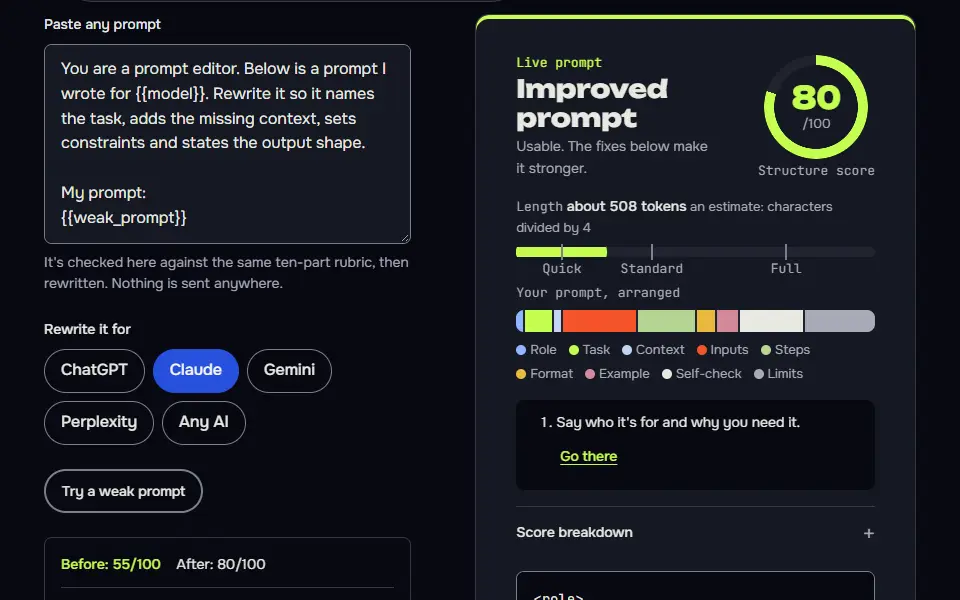
You are a prompt editor. Below is a prompt I wrote for {{model}}. Rewrite it so it names the task, adds the missing context, sets constraints and states the output shape.

My prompt:
{{weak_prompt}}

Before you rewrite, list up to 3 things you can't know from my prompt and would have to guess. Put them in a short list labelled "Assumptions" and ask me to confirm. Then give the rewritten prompt in a code block, followed by one line per change saying which lever it fixed (task, context, constraints or output shape). Do not add facts I haven't given you.
How to use
- Copy it with the button above.
- Fill the blanks in {{double braces}} with your own details.
- Paste it into ChatGPT, Claude or Gemini and send it.
- Then follow up: ask for one change at a time.
Before you run “Rewrite a weak prompt with the four levers” for the first time, the lesson on how to use AI prompts step by step walks through copying, filling and sending it.
Product-style photo with every unknown named
Material, surface, light direction, lens look and ratio are all stated, so the model has nothing to invent.
Attach your photo first. “Product-style photo with every unknown named” edits a photo you upload, so it won't work without one.
Any model
If no photo is attached or you can't edit images, say so in one sentence and stop. Use the attached photo of my mug as the product: keep its exact shape, glaze and any marks, and change only the scene and light. A {{material}} mug of black coffee on a scarred oak table, steam rising, soft window light from the left, standard lens, shallow depth of field, warm morning mood, {{ratio}} portrait framing, no text, no logos.
ChatGPT
If no photo is attached or you can't edit images, say so in one sentence and stop. Use the attached photo of my mug as the product: keep its exact shape, glaze and any marks, and change only the scene and light. Create a photorealistic image: a {{material}} mug of black coffee on a scarred oak table with steam rising. Soft window light from the left, standard lens, shallow depth of field, warm morning mood. Portrait framing at {{ratio}}. No text and no logos.
Gemini
If no photo is attached or you can't edit images, say so in one sentence and stop. Use the attached photo of my mug as the product: keep its exact shape, glaze and any marks, and change only the scene and light. A photorealistic close-up of a {{material}} mug of black coffee on a scarred oak table, steam rising. Soft window light from the left, shot with a standard lens, shallow depth of field, warm morning mood. {{ratio}} portrait. No text, no logos.
Nano Banana
If no photo is attached or you can't edit images, say so in one sentence and stop. Use the attached photo of my mug as the product: keep its exact shape, glaze and any marks, and change only the scene and light. Generate a photorealistic image of a {{material}} mug of black coffee on a scarred oak table, steam rising off the surface. Soft window light from the left, standard lens, shallow depth of field, warm morning mood, {{ratio}} portrait composition. Leave the frame free of text and logos.
Midjourney
{{material}} mug of black coffee on a scarred oak table, steam rising, soft window light from the left, standard lens, shallow depth of field, warm morning mood --ar 4:5 --no text, letters, watermarkHow to use
- Copy it with the button above.
- Fill the blanks in {{double braces}} with your own details.
- Paste it under your photo in your image AI and generate.
- Then ask for one change at a time, not a new prompt.
One video shot: movement, camera and sound
It states the movement, the camera path, the length and the audio in one pass.
Any model
Slow dolly-in on a baker pulling a tray of {{bread}} from a stone oven, flour dust drifting through window light, {{seconds}} seconds, ambient oven crackle, no dialogue.
Veo
Slow dolly-in on a baker pulling a tray of {{bread}} from a stone oven. Flour dust drifts through window light. {{seconds}} seconds. Audio: ambient oven crackle, no dialogue.
Kling
Slow dolly-in, baker pulls a tray of {{bread}} from a stone oven, flour dust in window light, warm tones, {{seconds}} seconds.
How to use
- Copy it with the button above.
- Fill the blanks in {{double braces}} with your own details.
- Paste it into your video AI, such as Veo or Kling.
- Then change one thing per try: camera, length or sound.
Is prompt engineering still worth learning?
Yes, prompt engineering is still worth learning, though the skill is now specificity and context, not secret phrases. The tricks that mattered in 2023, like magic phrases and elaborate role-play, don't count for much on current models. What's lasted is the habit: say exactly what you want, supply the right material and check the result against a standard.
Done for software and agents, that habit now goes by another name, and context engineering vs prompt engineering sets the two side by side. Newcomers who want the basics first should start with what a prompt is in AI. People who build with models should add evaluation: write down what a good answer looks like, then test every prompt change against it. You don't need a course to start, and it isn't as mysterious as it sounds; you'll get most of the value from writing down what you want.
Prompt engineering FAQ
Still stuck? Build it in Prompt Studio. It'll score each part as you go.
What does a prompt engineer do all day?
A prompt engineer writes, tests and versions the prompts a product or team runs, and fixes them when outputs drift. The day is drafting prompts, building small test sets, comparing versions and tracing failures. In many companies it's now part of a developer or product role, not a job title of its own.
Is writing ChatGPT prompts the same as prompt engineering?
Yes, writing ChatGPT prompts with a clear task, context, limits and format is prompt engineering at its everyday level. Typing a quick question isn't, though; the difference is that you state the task and check the answer against a standard.
What skills does prompt engineering need?
Prompt engineering needs 4 skills: clear writing, knowing the task's domain, testing outputs and spotting the exact miss. Domain knowledge is what lets you see a wrong answer, and testing is what tells you a change helped.
Do you need code to learn prompt engineering?
No, you don't need code to learn prompt engineering; code matters only when prompts run inside an app. Everything on this page works in a plain chat window, and you won't need to install anything.