
Few-shot prompting with an example builder
Free prompt courseLesson 6 of 228 minVideoGo to the lesson
Guide
3 min
- Plain English
The short answer
Few-shot prompting means putting a handful of input and output examples in your prompt so the model copies the pattern. Use 3 to 5 varied examples (Anthropic's range) in a consistent format, then add your real input last; 2 can work for a simple format. It's best for fixed formats, labels and tone, and less needed on reasoning models.
How does few-shot prompting work?
Few-shot prompting works by showing the model finished input and output examples instead of describing the format you want. You show, then you ask, and the model's job is to continue the pattern. The GPT-3 paper, Language Models are Few-Shot Learners (Brown et al., 2020), demonstrated the idea at scale.
Few-shot prompting sits between zero-shot prompting (no examples) and fine-tuning (retraining the model). OpenAI's docs describe it as including "a handful of input/output examples in the prompt, instead of fine-tuning the model". Nothing about the model changes; it's all in the text you send.
How many few-shot examples should you use, and in what order?
Use 3 to 5 few-shot examples (the range Anthropic suggests), in an order that doesn't favour one label, with your real input last. The number of examples matters less than how varied they are, and vendor guidance lines up closely:
- Anthropic suggests 3 to 5 examples, wrapped in
<example>tags so they aren't mistaken for instructions (multishot prompting docs). - Google recommends you always include few-shot examples for Gemini, and warns that an overloaded set can make the model overfit to them (prompting strategies).
- OpenAI says to show diverse inputs with the desired outputs.
In practice, you'll want to start with 3. Make them different from each other: a short input, a long one and an awkward edge case. Mix the labels so the order doesn't lean one way, and put your real input last, in the same slot the examples used. The model keeps copying the last example's wording? Reorder them or swap one out. That isn't a bug; it's what examples do.
How do you format few-shot examples with a template?
Format few-shot examples with a template by keeping every example in the same input and output layout, down to punctuation, and putting your real input in the same slot last. The first worked prompt on this page is that template as a fill-in builder: 3 examples plus your real input. For examples you want in every chat, save them as standing examples in a system prompt: the system prompt template builder is a free system prompt generator that holds them for you.
Format consistency is what you're really teaching. Identical labels such as Input and Output teach the shape, and an open final Output line tells the model where to continue. Reuse the skeleton for labelling, rewriting or extraction, such as pulling fields into JavaScript Object Notation (JSON). The result doesn't match? Tweak one example, not the whole prompt. More reusable skeletons are in prompt templates.
Where does few-shot prompting go wrong?
Few-shot prompting goes wrong in 4 ways: accidental patterns, copied wording, wasted tokens and reasoning models that don't need the examples.
- Accidental patterns. With three positive examples, you'll nudge the model toward positive. Balance your labels.
- Copied wording. The model may echo phrases from an example. Vary the wording so there's nothing to echo.
- Wasted tokens. Examples cost space, and a plain instruction that already works doesn't need them.
- Reasoning models. OpenAI's guide says reasoning models "often don't need few-shot examples to produce good results". A reasoning model needs fewer examples, so try it without them first and add them only if the format drifts.
Few-shot is easy to over-engineer. You'll usually get most of the benefit from the first 3 examples, and there's rarely a reason to go past 5, the top of Anthropic's range.
Few shot prompting before and after
The same request, asked two ways. Read the second one slowly. Each line does a job.
Sort these support emails by urgency.
Label each support email as urgent, normal or low. Examples:

Email: "Checkout is down and customers can't pay." -> urgent
Email: "Can you change the invoice address for next month?" -> normal
Email: "Love the new colours, thanks!" -> low

Email: "Our login stopped working an hour ago." ->
Why it works
The labels, the format and the line-ending cue all come from the examples, so the model doesn't have to guess what 'urgent' means to you.
Few shot prompting examples
Few-shot prompt builder
Identical Input and Output labels teach the format, and the open final Output line tells the model where to continue.
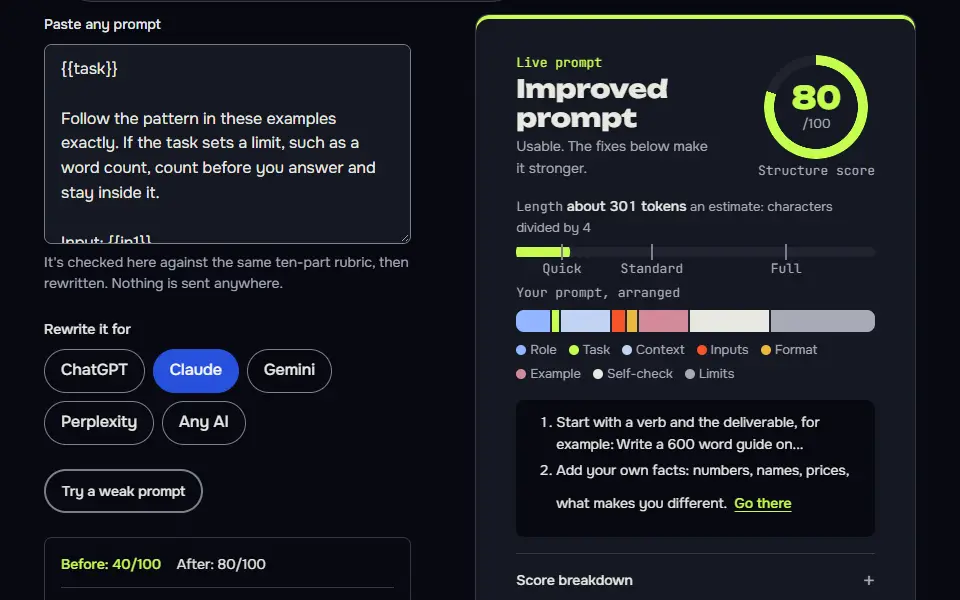
{{task}}

Follow the pattern in these examples exactly. If the task sets a limit, such as a word count, count before you answer and stay inside it.

Input: {{in1}}
Output: {{out1}}

Input: {{in2}}
Output: {{out2}}

Input: {{in3}}
Output: {{out3}}

Input: {{new_input}}
Output:
How to use
- Copy it with the button above.
- Fill the blanks in {{double braces}} with your own details.
- Paste it into ChatGPT, Claude or Gemini and send it.
- Then follow up: ask for one change at a time.
Before you run “Few-shot prompt builder” for the first time, the lesson on how to use AI prompts step by step walks through copying, filling and sending it.
Label support tickets with your own categories
Balanced examples across four labels stop the model defaulting to one, and the table keeps the answer easy to scan.
You label customer messages for a small online shop. Use only these labels: billing, shipping, product-question, complaint, other.

Message: "I was charged twice for order 4471."
Label: billing

Message: "Where is my parcel? It's been nine days."
Label: shipping

Message: "Does the large size fit a 15-inch laptop?"
Label: product-question

Message: "The zip broke after one week and nobody replied to my email."
Label: complaint

Now label every message in the list below. Return a table with two columns, Message number and Label. If a message fits two labels, use the first one that applies and add a short note under the table.

{{messages}}Ask the AI to draft examples for you
It bootstraps a full example set from one real one, then flags the weak link for you to fix.
I'm building a few-shot prompt for this task: {{task}}.

Here's one real example I already have:
Input: {{seed_input}}
Output: {{seed_output}}

Write {{count}} more input and output pairs in the same format. Make them differ from each other in length and difficulty, and include one awkward edge case. Don't repeat wording from my example. After the pairs, tell me which one is the weakest and why, so I can replace it with a real one.
Lesson 6 of 22Structure8 min
Lesson: Few-shot prompting
Few-shot prompting shows the AI 3 to 5 worked examples (Anthropic's range) before your real request, so it copies the pattern. It's the fix when a format or style is easier to show than to describe.
Use it when
- Labels, tone or format are easier to show than explain.
- Zero-shot answers keep coming back in the wrong shape.
- You need consistent output across a whole batch of items.
Skip it when
- The job is simple and common: examples just add length.
- You can't write examples that cover the tricky cases.
You label customer messages for a small online shop. Use only these labels: billing, shipping, product-question, complaint, other.

Message: "I was charged twice for order 4471."
Label: billing

Message: "Where is my parcel? It's been nine days."
Label: shipping

Message: "Does the large size fit a 15-inch laptop?"
Label: product-question

Message: "The zip broke after one week and nobody replied to my email."
Label: complaint

Now label every message in the list below. Return a table with two columns, Message number and Label. If a message fits two labels, use the first one that applies and add a short note under the table.

1. Can I change my delivery address?
2. Your packaging was damaged and I want a refund.
| Message number | Label |
|---|---|
| 1 | shipping |
| 2 | billing |
What to notice: The examples set the labels and the table perfectly. The miss came from the prompt, not the model: "use the first one that applies" was read as the order of the label list, so a damaged parcel with a refund demand became billing. The fix is a written priority order for ties.
Try it in Prompt StudioOpens the studio with the Few-shot technique already selected.
Quick check: 3 questions
Practice: write your own
Write one few-shot prompt for a labelling or rewriting job of your own. Give at least two worked examples in the same layout, then your real input.
Prompt Studio's rubric scores it right here. Nothing's sent anywhere.
Your progress is saved in this browser only. No sign-up.
When do few-shot examples help, and when do they hurt?
Few-shot examples help with fixed output formats, your own labels, a house style and extraction into a schema, and they hurt open reasoning on reasoning models. They help most where a sample explains more than a paragraph of rules could.
They'll hurt brainstorming, too, and any task where the examples would narrow the answers. For logic that has to be worked through step by step, a chain of thought prompt does the job, and it pairs well with one or two examples. Can't face writing the examples by hand? Have the model draft them with meta prompting, then keep the best 3. The wider map of techniques is on the types of prompting page.
Few shot prompting FAQ
Still stuck? Build it in Prompt Studio. It'll score each part as you go.
What is few-shot prompting in one line?
Few-shot prompting is putting a handful of input and output examples in a prompt so the model copies the pattern. There's no retraining, so it's the quickest way to pin down a format.
What does a few-shot prompt example look like?
A few-shot prompt example looks like three labelled review-and-sentiment pairs followed by one new review with the label left blank. For instance: 'Review: Great battery life. Sentiment: positive', 'Review: Stopped working in a week. Sentiment: negative', 'Review: Arrived late but works. Sentiment: mixed', then 'Review: Does what it says. Sentiment:'. The model fills in the last label in the same layout.
How is few-shot prompting different from zero-shot prompting?
Few-shot prompting is different from zero-shot prompting in that it includes worked examples, and zero-shot gives the instruction alone. Zero-shot is faster to write and often enough for simple jobs, while few-shot earns its tokens when the format is strict or the labels are yours.
Do reasoning models need few-shot examples?
No, reasoning models often don't need few-shot examples for reasoning tasks, though examples still help fix an output format. Test the prompt without them first, then add one or two only if the layout wanders.