
Types of prompting and when to use each
Prompt hub
14
The short answer
Types of prompting are the techniques for asking an AI: zero-shot (no examples), few-shot (with examples), role, step by step, chaining, iterating, self-critique and more. Start with the simplest one that works, then add structure only where answers go wrong. The table covers 20 types, from zero-shot to image prompts, and when to use each.
Types of prompting: every guide
14 pages in 4 groups: each one is a full pack you can copy from, not a teaser.
Starting techniques3 pages
Zero shot prompting asks for a result with no examples. See it next to one and few shot, tips…
Few shot prompting puts a few examples in a prompt first. See how many to use, in which order…
Role prompting gives an AI a persona that shifts its tone and point of view, yet a 2023 study…
Reasoning techniques5 pages
Chain of thought prompting asks an AI to think in steps first. Get copy-paste prompts, a step…
Least to most prompting splits a hard task into small sub-questions, then solves each in turn…
Tree of thought prompting lets an AI test a few ideas, rate each, cut the weak ones, then go…
Self consistency prompting runs a prompt a few times, then keeps the most frequent result. Get…
ReAct prompting has an AI think, act and read the result in a loop. Get a copy-paste template…
Workflow techniques3 pages
Prompt chaining splits a big job into small prompts that feed into each other. Copy 3 full…
Draft, critique, revise. Get a loop prompt with a state card, a resume line, and a point to…
Meta prompting is when an AI writes or fixes a prompt for you. Get a meta prompt to paste, a 3…
Setup and format guides3 pages
Prompt templates with blanks to fill in each time. Get ready ones for text, image and video, a…
Role, task, context, limits and format, in a block each. Fit it to each AI tool, and see if…
Where to set it in the API, a 4 tag skeleton, what to put in it or the user turn, and 5 habits…
The best types of prompting to start with
12 to try first. Switch the model once. Every card follows.
Draft, critique against criteria, then revise
Quote-as-evidence forces the critique to be about the text, since models inflate vague self-scores.
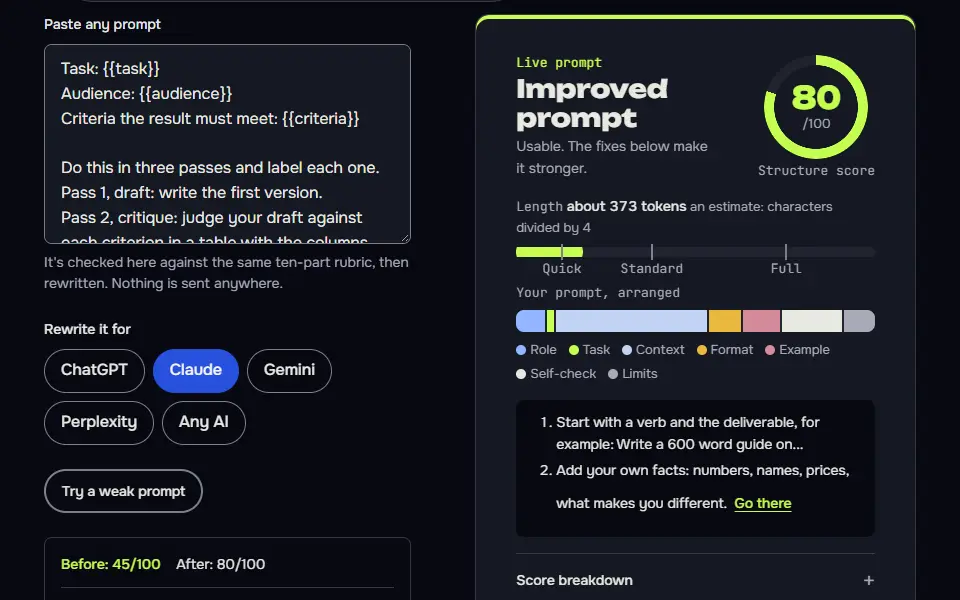
Task: {{task}}
Audience: {{audience}}
Criteria the result must meet: {{criteria}}

Do this in three passes and label each one.
Pass 1, draft: write the first version.
Pass 2, critique: judge your draft against each criterion in a table with the columns Criterion, Pass or fail, Evidence (quote the line) and Fix. Be strict. If you can't find evidence a criterion is met, mark it fail.
Pass 3, revise: rewrite the draft to fix every fail. Show the final version only, then list what you changed.

Don't give yourself credit for things the draft doesn't say. Don't invent facts. Don't use em dashes or en dashes.
How to use
- Copy it with the button above.
- Fill the blanks in {{double braces}} with your own details.
- Paste it into ChatGPT, Claude or Gemini and send it.
- Then follow up: ask for one change at a time.
Before you run “Draft, critique against criteria, then revise” for the first time, the lesson on how to use AI prompts walks through copying, filling and sending it.
Plan first, do the work, then verify against the plan
Writing what 'correct' looks like before the work gives the verification step something to check against.
Goal: {{goal}}
Inputs I'm giving you: {{inputs}}
Limits: {{limits}}

Work in three labelled stages.
1. Plan. List the steps you'll take and what a correct result looks like for each step. Don't start the work yet.
2. Execute. Do each step in order. Label each one with its step number.
3. Verify. Go back to the plan. For each step, say whether the result meets the "what correct looks like" line, quote the evidence, and fix anything that doesn't. If a step can't be verified from what I gave you, say so.

End with a status line: complete, complete with gaps (list them) or blocked (say what you need). Don't invent inputs. Don't use em dashes or en dashes.
Compare options with weighted criteria
The 'which score would flip the result' question shows you whether the winner holds up or only just wins.
Help me choose between these options: {{options}}

My criteria and how much each matters (out of 10): {{weights}}
Context you should know: {{context}}

Build a table with the options as rows and my criteria as columns. In each cell score the option from 1 to 5 and add a five-word reason. Then compute each option's weighted total and show the sum.
After the table:
- Say which option wins on the numbers.
- Tell me which single score, if it changed, would flip the result.
- Tell me what you'd want to know before trusting the winner.
If you lack information to score a cell, write "unknown", don't guess, and say what would settle it. Don't use em dashes or en dashes.
Process a list in one fixed row format
One row per item and a count check make long lists reliable, since the AI can't silently drop items.
Process every item in the list below. For each one, return exactly one row in this format and nothing else:
{{row_format}}

Rules for every row
{{rules}}

If an item can't be processed (missing information, unclear, a duplicate), still return its row and put "check" in the last column with a five-word reason. Don't skip items, merge items or change their order. After the rows, give a count: items in, rows out, and number marked check. If the counts differ, say why.

Items:
{{items}}

Don't use em dashes or en dashes.
Answer only from the source I paste, with quotes
The exact refusal sentence and the contradiction check make it easy to spot when the AI stepped outside the source.
Source:
{{source}}

Question: {{question}}

Answer using only the source above.
1. Give the answer in one to three sentences.
2. Support every claim with a short exact quote from the source in quotation marks.
3. If the source only partly answers the question, say which part it answers and which it doesn't.
4. If the source doesn't answer it, write exactly: "The source doesn't say." Don't fill the gap from memory.
5. Finally, list anything in the source that seems to contradict your answer.

Don't paraphrase a quote and present it as a quote. Don't use em dashes or en dashes.
Lock the output to a table with fixed columns
Naming the exact columns and the empty-cell rule keeps the output pasteable into a spreadsheet.
{{task}}

Return only a table in this exact format, with no text before or after it:
{{columns}}

Formatting rules
- One row per {{unit}}.
- Keep each cell under {{cell_limit}} words.
- Use "n/a" for a missing value. Never leave a cell empty and never invent one.
- Do not add extra columns, notes, headings or summaries.

Input:
{{input}}

Don't use em dashes or en dashes.
Break a big problem into ordered sub-problems
Solving the small pieces in order, with the dependencies visible, is the idea behind least-to-most prompting.
Big problem: {{problem}}
What I already know: {{known}}

Don't solve it yet. First break it into the smallest sub-problems that, solved in order, would answer it.
1. List the sub-problems in the order they must be solved. Show which ones depend on which.
2. For each, write the question it answers and what information you'd need.
3. Mark any sub-problem you can't solve from what I've given you.
Then stop and wait. When I type "go", solve sub-problem 1 only and show how its answer feeds sub-problem 2. Keep going one at a time as I say "next". At the end, combine them into a final answer and check it against the original problem.

Don't use em dashes or en dashes.
Classify new items from three labelled examples
Examples that each cover a different label teach the pattern better than any description of it.
You label customer comments. Here are labelled examples:

Comment: {{example_1}}
Label: {{label_1}}

Comment: {{example_2}}
Label: {{label_2}}

Comment: {{example_3}}
Label: {{label_3}}

Now label the comments below in the same way. Use only these labels: {{labels}}. Output one line per comment as: comment number, label, and a reason of five words or fewer. If a comment fits two labels, choose the closer one and add "(next best: other label)". If none fits, use "unclear".

Comments:
{{comments}}

Don't use em dashes or en dashes.
Review as a role with a clear point of view
Saying what the role cares about and ignores is what makes a role prompt useful. The label alone does very little.
Review the {{item}} below as {{role}}. This role cares about: {{cares_about}}. This role would ignore: {{ignores}}.

Stay in that viewpoint for the whole review.
1. Give your first reaction in two sentences.
2. List the three things this role would object to, each with a quote from the item and the reason.
3. List the one thing this role would like.
4. Say what would make this role say yes.

Don't review things the role wouldn't care about, don't soften the objections and don't invent facts about the item. If the item doesn't give enough information for this role to judge, say what's missing. Don't use em dashes or en dashes.

Item:
{{text}}
A reason, act, observe loop where you play the tools
Doing the 'tools' by hand shows how the ReAct loop works, and works in any chat without special features.
You're helping me answer a question that needs facts you don't have: {{question}}

Work in a loop that I operate by hand, since you can't browse or run anything.
Each turn, write exactly three labelled lines:
Thought: what you know, what you still need and why.
Action: one specific thing for me to look up or run, written so I can copy it into a search box, a spreadsheet or a terminal.
Stop there and wait.

I'll reply with "Observation:" and what I found. Then write your next Thought and Action. When you have enough, write "Final answer:" with the answer, the observations it rests on, and anything still uncertain.

Rules: one Action per turn. Don't make up observations. If I give you a result that doesn't match your Thought, say so and change course. Stop after {{max_turns}} turns and give the best answer you can, flagged as incomplete. Don't use em dashes or en dashes.

Begin with your first Thought and Action.
Ask the AI to write a better prompt than yours
Anchoring on the specific failure and asking for test inputs keeps the rewrite from becoming a vague 'improvement'.
Here's a prompt I use:
{{prompt}}

What it's meant to do: {{goal}}
Where it fails: {{failure}}

Don't run my prompt. Instead:
1. Ask me up to four questions if you need to know anything to improve it. Then wait.
2. Write an improved version. Keep my wording where it already works. Add only what fixes the failure I described, plus a line telling the AI what to do when it's unsure.
3. Explain each change in one line, referring to the failure it fixes.
4. Give me two test inputs: one typical, one that should be hard. For each, tell me what a good output must contain, so I can judge the new prompt myself.

Don't use em dashes or en dashes.
Turn an idea into a full image prompt in three formats
Making the seven decisions visible: 'make it look good' becomes choices you can change one by one.
My idea for an image: {{idea}}
What it's for: {{use}}
Style I like: {{style}}

Expand my idea into a complete image prompt by deciding these seven things, one line each: subject, setting, light, camera and lens, composition, mood and aspect ratio. Choose sensible values for any I haven't specified and mark those [chosen by you].

Then write the final prompt three ways:
1. Natural-language paragraph for ChatGPT or Gemini.
2. Midjourney: a comma-separated phrase list followed by --ar and --raw, with --no for anything to leave out.
3. A short negative list of things to avoid, such as text, watermark or extra fingers.

Don't include real people's names, trademarked characters or artists' names. Don't use em dashes or en dashes.
Before you start
Lists of prompting techniques often run to 50 names, and most are small variations. This page keeps the ones people really use, says what each is in a line and points to the guide where there's one. It's about prompting AI models only: the same phrase is used in applied behaviour analysis (ABA) and special education for cueing a learner, which isn't covered here.
What are the main types of prompting?
The main types of prompting are zero-shot, few-shot, role, step by step, chaining, iterating and self-critique, and the table lists about 20 types with a one-line definition and a use-when line for each. The number of examples is the first split: asking with none is zero-shot prompting; showing 3 to 5 worked pairs first (2 can work for a simple format) is few-shot prompting; and giving the model a job title is role prompting. Splitting a long job into linked steps, with a clean handoff between prompts, is prompt chaining, while refining one draft over several turns is iterative prompting. When you're stuck on the wording itself, a meta prompt asks the model to write the prompt for you.
| Type | What it is | Use it when | Learn more |
|---|---|---|---|
| Zero-shot | Ask directly, with no examples. | Simple, common tasks, or when you don't yet know what's going wrong. | Zero-shot guide |
| Few-shot | Show examples of the input and the output you want. Two to five is typical. | You need a specific format, tone or set of labels and a description isn't enough. | Few-shot guide |
| Role | Tell the AI who to act as. | You want a viewpoint or vocabulary. It won't add facts the model doesn't have. | Role guide |
| Step by step | Ask for the reasoning before the answer. | Maths, logic, decisions with more than one factor. Newer reasoning models often do this on their own. | Chain of thought guide |
| Chaining or sequencing | Split a job into prompts where each answer feeds the next. | Long or multi-stage work. | The chaining guide, with each answer fed into the next prompt |
| Looping or iterative | Refine over multiple turns: draft, feedback, revise, with a state card. | Quality comes from rounds, as in writing, audits and long edits. | Iterative guide |
| Self-critique | The AI judges its own answer against criteria, then fixes it. | Drafts that need polish. Use binary checks, since models overrate their own work. | See the self-critique prompt card |
| Plan, execute, verify | Plan first, do the work, then check each step against the plan. | Multi-step tasks where a skipped step is costly. | See the plan prompt card |
| ReAct or agent | Alternate reasoning with actions (search, run code) and observations. | Tasks that use tools or live data. | ReAct guide |
| Compare options | Generate multiple answers or branches, then compare or vote. | Decisions and hard problems where you're not sure the first answer is right. | Tree of thought guide and self-consistency guide |
| Interview first | The AI asks you questions before it answers or writes. | You don't know what it needs to know. | Examples: personal statement and questions to ask |
| Meta prompting | Ask the AI to write or improve the prompt. | You're stuck on wording. | Meta prompting guide |
| System prompt | Standing instructions for a whole conversation or app. | An assistant or bot used repeatedly. | Claude system prompts |
| Template | A reusable prompt with fill-in slots. | A task you repeat, so you don't retype it. | Template guide |
| Batch | Process long lists of items with one fixed row format and a count check. | Lists such as tags, titles or descriptions, where you can't afford a skipped item. | See the batch prompt card |
| Grounded | Answer only from material you provide, with quotes. | Accuracy matters more than fluency, and you've got the source. | Claude document Q&A |
| Format locked | Specify the exact output shape, such as a table, JavaScript Object Notation (JSON) or tags. | The output goes into a spreadsheet or tool. | Extensible Markup Language (XML) tags, JSON output and the format guide |
| Roleplay | The AI plays a character in a scene. | Practice conversations, fiction and games, where it's useful to stay in character. | Roleplay prompts |
| Decompose | Break a big problem into smaller ones and solve them in order. | Complex questions. | Least-to-most guide |
| Image prompts | Describe subject, setting, light, camera, mood and ratio. | Generating pictures when you're after a specific look. | Image prompt tips and AI image prompts |
One disambiguation: in therapy and special education, types of prompting means a hierarchy of cues for learners, which is a different subject from AI prompts.
Which types of prompting are reasoning techniques?
The types of prompting that are reasoning techniques are chain of thought, self-consistency, tree of thought, least-to-most and ReAct. They differ in how they reason, so each one suits a different kind of hard question:
- One path. Chain of thought prompting asks for the steps before the answer, in a single line of reasoning.
- Many paths. Self consistency prompting runs the same question several times and keeps the answer most runs agree on.
- Branches. Tree of thought prompting scores a few options, prunes the weak ones and expands the best.
- Sub-questions. Least-to-most prompting solves the easiest part first and feeds each answer into the next.
- Act and observe. React prompting alternates a thought with a tool call, such as a search, and reads the result before the next step.
Newer reasoning models already work step by step on their own, so on those models you'll often get the same quality from a shorter prompt that just asks for trade-offs.
How do you choose a prompting technique?
To choose a prompting technique, try zero-shot first, then add one technique at a time where the answer goes wrong. Adding one at a time tells you which change helped; adding four at once doesn't.
- Run the plain request and read the answer.
- Name what's wrong with it in one phrase.
- Add the single technique that fixes that failure.
- Run it again on the same input.
- Keep the change only if the answer improved.
- Save the prompt as a template once you're doing the task weekly.
Which prompting technique fixes which failure?
The prompting technique that fixes each failure is few-shot for a wrong format, grounding for wrong facts, step by step for weak reasoning and chaining for a job too big for one reply. A task you repeat is fixed by a template or a system prompt.
| Failure you see | Technique to add |
|---|---|
| Wrong format or tone | Few-shot examples, or a locked format for format control |
| Wrong or invented facts | Grounding in a source you paste, with quotes |
| Weak reasoning | Step by step, decomposing, or comparing options |
| Too big for one reply | Chaining, or rounds with a state card |
| Same task every week | A template or a system prompt |
Can you combine prompting techniques in one prompt?
Yes, you can combine prompting techniques in one prompt, and a common stack has 4 parts: a role, two examples, a locked format and a self-critique step. Most good prompts mix two or three techniques that fit the job.
A writing job might use interview first, then chaining across sections, then iterating with a state card, as in the book-writing prompt. Don't stack more than you need, though: every extra instruction is one more chance for two of them to conflict, and past four you'll usually see the model drop one.
How do you apply a type of prompting to your own task?
To apply a type of prompting to your own task, pick the row that matches your problem and build the first draft in the AI prompt generator. The free online AI prompt generator takes a one-line task and a target model, and you then add the technique from the row you picked.
Each technique guide shows the technique applied to a real task. For the wider discipline that ties them together, start with prompt engineering basics, and once a prompt has to carry documents, history and tool results, the worked cases in context engineering examples show what to feed the model and what to leave out.
Types of prompting FAQ
Still stuck? Build it in Prompt Studio. It'll score each part as you go.
What are three types of prompting?
Three types of prompting are zero-shot (no examples), few-shot (examples first) and chain of thought (step-by-step reasoning), the three most courses teach first. They map to three common problems: unclear task, unclear pattern and weak reasoning.
What are the five categories of prompts?
The five categories of prompts are direct, example-based, reasoning, workflow and structural prompts, a practical split, not an official list. Most real prompts mix two or three of them, so treat it as a menu.
What separates prompt chaining from chain of thought?
Prompt chaining splits a task across several prompts, while chain of thought asks for step-by-step reasoning inside one prompt. You can use both: chain the stages and ask for steps inside each one.
Do types of prompting change between ChatGPT, Claude and Gemini?
No, the types of prompting stay the same in ChatGPT, Claude and Gemini; only the layout differs, such as tags for Claude and headings for the others. Test a technique on your own task before you rely on it.