
What is a prompt in AI? A plain-English guide
Guide
3 min
- Plain English
The short answer
A prompt is the text, and sometimes the images or files, that you give an AI so it knows what to produce. A chatbot prompt is a question or instruction, an image prompt is a description of a picture, and a music prompt describes a song. Better prompts give clearer instructions and get better results.
What is an AI prompt in one sentence?
An AI prompt in one sentence is the text, and sometimes the images or files, that you give an AI so it knows what to produce. It's your side of the conversation: whatever you type, say or upload to get a response. The response is the model's output, and it's only as good as what you've asked for.
The word comes from "to prompt" someone, as in giving an actor a cue. The AI doesn't act until it gets your cue, and then it'll continue from there.
A prompt can be text, image or file input: a typed request, a photo to edit or a document to summarise all count.
What does an AI prompt look like in chat, image and music tools?
An AI prompt looks like a question in a chatbot, a picture description in an image tool and a song description in a music tool. To see one built for you, type a rough goal into the free prompt generator and compare its version with your own.
| Model | Example prompt | What you get |
|---|---|---|
| Chatbot prompt (ChatGPT, Claude, Gemini) | Explain how a mortgage works to a 16-year-old, in plain words. | A short explanation |
| Image prompt (Nano Banana, Midjourney) | A red bicycle leaning on a blue door, morning light, photo style. | An image |
| Music prompt (Suno) | Warm acoustic folk, female vocals, slow tempo, about leaving a town. | A song |
The idea is the same each time: describe what you want. What changes is the vocabulary each model reads, so what works in one won't always work in another. Image prompts want visual detail, and music prompts want genre and mood words; they're not interchangeable.
What are the parts of a good AI prompt?
The 4 parts of a good AI prompt are a task, some context, its limits and an output format. You don't need all of them every time, but they're what you'll reach for when an answer comes back wrong:
- The task: what you want done.
- The context: who it's for, what you already know.
- The limits: length, tone, things to leave out.
- The format: list, table, email, paragraph or JavaScript Object Notation (JSON).
A longer version with a copy-paste formula sits in the guide on writing prompts.
How is a user prompt different from a system prompt?
A user prompt is different from a system prompt in who writes it: you type the user prompt, and the app runs the system prompt before your message. The system prompt's the hidden set of app instructions, that set the assistant's role and rules before you say anything.
You'll write both when you're building with AI, and you can't skip the system one. See how Claude reads a system prompt for a worked case.
What is a prompt before and after
The same request, asked two ways. Read the second one slowly. Each line does a job.
Tell me about marketing.
Explain the difference between brand marketing and performance marketing to a small bakery owner. Use one example of each from a local business. Five sentences, no jargon.
Why it works
The first prompt could mean a thousand things. The second says who it's for, what to compare, how long to go and what tone to use.
What is a prompt examples
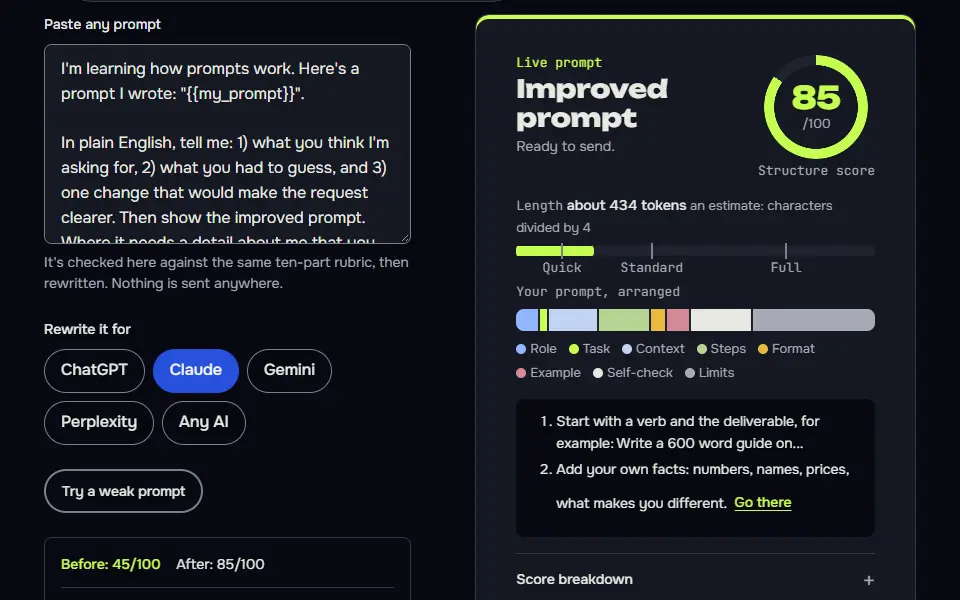
Learn what a prompt is by testing your own
Asking the model what it had to guess exposes the gaps in a beginner prompt.
I'm learning how prompts work. Here's a prompt I wrote: "{{my_prompt}}".

In plain English, tell me: 1) what you think I'm asking for, 2) what you had to guess, and 3) one change that would make the request clearer. Then show the improved prompt. Where it needs a detail about me that you don't know, put a short label in capitals, such as BUSINESS NAME, instead of making one up. Keep your whole reply under 150 words.How to use
- Copy it with the button above.
- Fill the blanks in {{double braces}} with your own details.
- Paste it into ChatGPT, Claude or Gemini and send it.
- Then follow up: ask for one change at a time.
Before you run “Learn what a prompt is by testing your own” for the first time, the lesson on how to use AI prompts step by step walks through copying, filling and sending it.
The same idea as an image prompt
The prompt shows how the same plain idea becomes a prompt: subject, setting, light, angle, mood, shape.
Any model
A red bicycle leaning against a blue wooden door on a cobbled street, early morning light, a few fallen leaves, photographed from a low angle, calm and quiet mood, {{ratio}}. No text, letters, numbers, logos or watermarks.ChatGPT
Make a photo-style image of a red bicycle leaning against a blue wooden door on a cobbled street. Early morning light, a few fallen leaves, shot from a low angle, calm and quiet mood. Aspect ratio {{ratio}}. No text, letters, numbers, logos or watermarks.Gemini
A photo of a red bicycle leaning against a blue wooden door on a cobbled street in early morning light. A few fallen leaves on the stones. Low camera angle. Calm, quiet mood. {{ratio}} format. No text, letters, numbers, logos or watermarks.Midjourney
red bicycle leaning against a blue wooden door, cobbled street, early morning light, fallen leaves, low angle, calm quiet mood --ar 3:2 --no text, letters, watermark
How to use
- Copy it with the button above.
- Fill the blanks in {{double braces}} with your own details.
- Paste it into your image AI and generate.
- Then ask for one change at a time, not a new prompt.
When does a careful AI prompt matter?
A careful AI prompt matters when you'll use, send or publish the result, repeat the prompt, or the first answer was off. For a quick question, type it plainly, read the answer and add a follow-up; it's easy to fix an answer in the next message, and you won't lose anything.
Prompts you'll reuse are worth saving, since you won't remember the wording, as fill-in-the-blank versions, and AI prompt templates shows how to build them. People who'll put prompts inside an app should go on to prompt engineering for developers. The technique pages on types of prompting cover the advanced options.
What is a prompt FAQ
Still stuck? Build it in Prompt Studio. It'll score each part as you go.
What is a simple example of an AI prompt?
A simple example of an AI prompt is 'Summarise this email in three bullet points for my manager', which names the task, the audience and the format. So is "a lighthouse at sunset, oil painting" typed into an image generator. A prompt doesn't have to be long or formal, and it isn't graded.
Is an AI prompt the same as a writing prompt?
No, an AI prompt isn't the same as a writing prompt; the term is a homonym, since a writing prompt is a topic for a person to write about, and an AI prompt instructs a model. "Describe a room from the point of view of a lost key" is a writing prompt in the human writing sense, though people sometimes ask AI to brainstorm them.
What does the word prompt mean outside AI?
Outside AI, the word prompt means a cue that tells someone what to say or do next, such as a line given to an actor. As a verb it means to cue someone, and as an adjective it means quick, as in a prompt reply.
Can a prompt include images or files?
Yes, a prompt can include images or files in models that accept them, along with the text instruction. An image editor takes your photo plus a line saying what to change, and a chatbot can read a report you attach.