
ChatGPT to PDF: turn a prompt's answer into a branded report
To turn a ChatGPT answer into a Portable Document Format (PDF) file, copy the answer, paste it into the Report maker and press Download PDF.
Make your report
Paste the answer, brand it, then save it as a PDF. The preview shows the real page breaks, so what you see is what you'll get.
- Free
- No sign-up
- Nothing uploaded
Paste or drop the answer
Copy the AI's answer and paste it, or drop a .md, .txt or .html file. It finds the title, any score line, tables and High, Medium or Low labels.
Add your brand
Type who it's for and who prepared it, add a logo, and pick two colours and a font pair. It warns you when a colour is too light to read.
Check the pages
The preview lays out every page the same way the PDF will, with the cover, contents, page numbers and tables kept whole where they fit.
Save it
Press Download PDF and choose Save as PDF in the print dialog. Or save a self-contained HyperText Markup Language (HTML) file, or copy it into Google Docs.
The short answer
To turn a ChatGPT answer into a Portable Document Format (PDF) file, copy the answer, paste it into the Report maker and press Download PDF. It reads the Markdown, adds a cover with your logo and colours, a contents page, page numbers and styled tables, then opens your browser's Save as PDF. It's free, and nothing is uploaded.
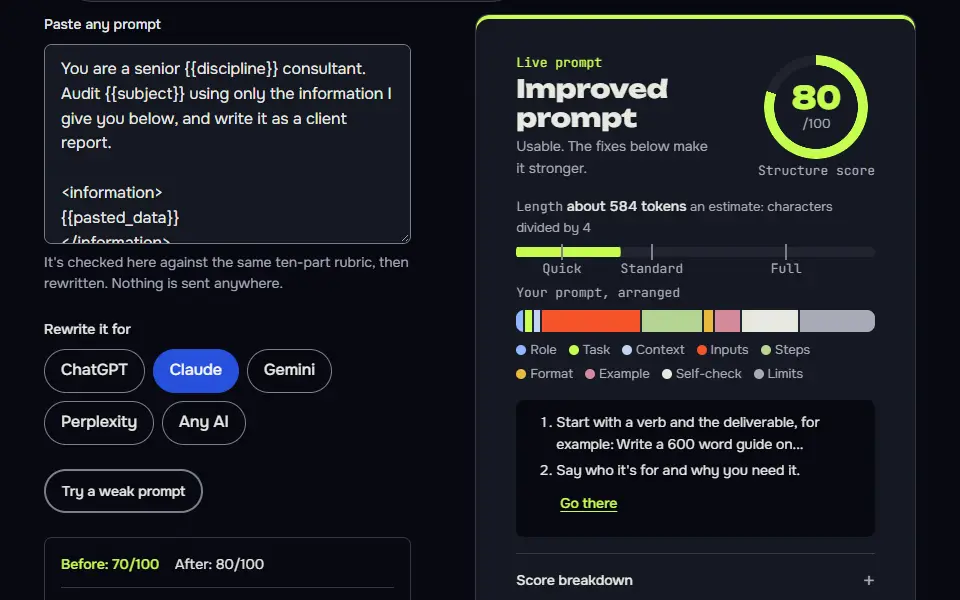
Three prompts that make the answer report-ready
Ask for an audit in Report maker Markdown
The fixed table columns and the exact severity words are what the Report maker turns into styled tables and coloured labels.
You are a senior {{discipline}} consultant. Audit {{subject}} using only the information I give you below, and write it as a client report.

<information>
{{pasted_data}}
</information>

Format the whole answer as clean Markdown for the aiprompts.si Report maker:
- One H1 that names the report and {{subject}}, then a 2 or 3 sentence summary.
- If you scored it against stated checks, a line "Score: N/100" and one sentence on what the score measures. If you can't score it honestly, write "Score: not scored".
- An H2 for each main area, with findings in a table: Issue | Severity | Fix | How to verify. Severity is exactly High, Medium or Low.
- Mark anything you couldn't check as "needs data". Don't invent numbers, tools or results.
- End with "## Next steps" as a numbered list, highest priority first.
No text before the H1 and no chat after the last step.
How to use
- Copy it with the button above.
- Fill the blanks in {{double braces}} with your own details.
- Paste it into ChatGPT, Claude or Gemini and send it.
- Then follow up: ask for one change at a time.
Before you run “Ask for an audit in Report maker Markdown” for the first time, the lesson on how to use the prompts this tool writes walks through copying, filling and sending it.
Ask for one self-contained HTML report in your brand
Asking for print styles and a contrast floor up front saves a round of fixing a layout that looks fine on screen and breaks on paper.
Turn the analysis below into a client report delivered as one self-contained HTML file in a single code block.

<analysis>
{{analysis}}
</analysis>

Design rules:
- All CSS inline in one <style> tag. No external scripts, fonts, images or stylesheets.
- Brand colours: main {{main_colour}}, second {{second_colour}}. Text must reach 4.5:1 contrast on its background.
- Page 1: a cover in the main colour with the title, "Prepared for {{client}}", "Prepared by {{author}}" and today's date.
- Page 2: a contents list of the sections.
- Print CSS: @page { size: A4; margin: 16mm }, a page number in @bottom-right with counter(page), and break-inside: avoid on table rows and cards.
- Findings in a table with Issue, Severity, Fix and How to verify, with High, Medium and Low as coloured labels.

Keep every fact from the analysis as it is. Don't add new findings, numbers or sources.
Reformat an answer you already have, without new facts
It separates layout from content: the model only regroups what's there, so a tidy report can't quietly gain new claims.
Below is an answer you gave me earlier. Reformat it as a report for {{audience}}. Don't add, drop or change any fact, number, URL or recommendation.

<answer>
{{previous_answer}}
</answer>

Structure:
1. One H1 title and a 2 sentence summary written for {{audience}}.
2. H2 sections in a logical order, with the original points grouped under them.
3. Any list of problems turned into a table: Issue | Severity | Fix. Use High, Medium or Low only where the original already says how serious it is. Otherwise write "not stated".
4. A final "## Next steps" numbered list built only from fixes already in the answer.

Return Markdown only. After it, list anything in the original you weren't sure where to put.
How the ChatGPT to PDF report maker works
The ChatGPT to PDF report maker works in 3 steps: paste the answer, add your logo and colours, then press Download PDF to save it through your browser's print dialog. Behind the button it reads the Markdown that ChatGPT, Claude or Gemini writes and lays it out as a report you'd hand to a client:
- PasteAn answer from ChatGPT, Claude or Gemini, or a .md, .txt or .html file.
- ReadHeadings, lists, tables, bold text, links and code blocks.
- Lay outCover, contents, labels, score card and page numbers.
- SaveYour browser's print dialog writes the PDF.
- A cover in your main colour, with your logo, the title, who it's for, who wrote it and the date.
- A contents page built from the H2 headings, with the page each section starts on.
- A score card when the answer has a line like "Score: 72/100" or "72 out of 100". It shows the number the AI wrote and doesn't make one up.
- Styled tables, with cells marked High, Medium or Low turned into coloured labels. Tables with seven or more columns can become one card per row, so they stay readable on a printed page.
- Issue and Fix cards when a list or paragraph uses "Issue:" and "Fix:".
- Running headers, footers and page numbers on every page after the cover.
The answer works best when you ask for the right shape. The three prompts on this page do that, and the Search Engine Optimization (SEO) prompt generator has a "Report for the Report maker" output option that does it for every audit workflow.
Yes, the report maker reads Markdown, plain text and HyperText Markup Language (HTML). Paste Markdown or plain text, or drop a .md, .txt or .html file. It handles headings, bulleted, numbered and task lists, tables, bold, italics, links, code blocks and quotes. HTML is cleaned first: scripts, styles, forms and anything that isn't text or a basic tag are dropped before it's laid out.
So it doubles as a Markdown to PDF converter for project documentation and notes, with a cover and page numbers on top. For prompt layouts that read well in any AI, including Markdown headings and, when code reads the answer, JavaScript Object Notation (JSON), see the prompt format guide.
PDF report formula
The PDF report formula is cover, summary, contents, sections, tables and appendix, and the maker builds the cover and contents for you. Ask your AI for the summary, sections, tables and appendix in Markdown, and the report maker puts each part in its place, adds page numbers and shows a score card when the answer holds a score.
- CoverThe H1 as the title, plus your logo, colour, name and date.
- ContentsEvery H2, with its page number.
- SectionsOne block of text per H2.
- Findings tableIssue, Severity, Fix and How to verify.
- Page numbersHeaders, footers and numbers after the cover.
- client-ready report
# [Report title]

## Summary
[three sentences]

## Findings
| Issue | Severity | Fix | How to verify |
| --- | --- | --- | --- |
| [issue] | High | [fix] | [check] |

Score: [0 to 100]/100

## Next steps
1. [step]Brackets mark what you or the AI fill in. The score line is optional, and the tool shows only a score the AI wrote.
The H1 becomes the cover title and each H2 becomes a section and a line in the contents. A table with Issue, Severity, Fix and How to verify columns becomes the findings table, with High, Medium and Low as coloured labels.
PDF report page size chart
The PDF report page size chart compares 2 sizes: A4 at 210 x 297 mm (8.27 x 11.69 in) and Letter at 8.5 x 11 in (215.9 x 279.4 mm). A4 is 5.9 mm narrower and 17.6 mm taller. The two sizes don't fit the same page exactly, which is why the report maker lets you pick one. A4 follows the International Organization for Standardization (ISO) 216 standard, and Letter follows the American National Standards Institute (ANSI) and American Society of Mechanical Engineers (ASME) standard Y14.1.
| Size | Millimetres | Inches | Standard and use |
|---|---|---|---|
| A4 | 210 x 297 mm | 8.27 x 11.69 in | ISO 216. Most countries outside North America. |
| Letter | 215.9 x 279.4 mm | 8.5 x 11 in | ANSI/ASME Y14.1. United States, Canada, Philippines. |
Sources: Wikipedia's International Organization for Standardization (ISO) 216 and Letter articles, which agree with the sizes quoted by paper and printing vendors. Sizes confirmed on 16 November 2026.
Choose the size your reader prints on. A4 is used in most countries, and Letter is used mainly in the United States, Canada and the Philippines. The report maker starts on A4 and keeps the paper size with your other brand settings, so you don't set it twice.
Is my ChatGPT answer uploaded by the report maker?
No, your ChatGPT answer isn't uploaded by the report maker; the PDF is built in your browser and saved on your device. The text you paste, the file you drop and your logo are read by your browser and never sent to our server. Only your brand settings (colours, font, paper size, your name and logo) are saved, and only in this browser's local storage, so they're there next time. Clearing your browser data removes them.
That matters for client work. An audit often has a client's name, rankings or revenue in it, and you shouldn't have to hand that to a converter site to get a tidy PDF.
How do you prompt ChatGPT for a report-ready answer?
Prompt ChatGPT for a report-ready answer by asking for Markdown with H2 headings, tables for figures and a 3-line summary at the top. The layout can only show what the answer holds, so 4 habits help:
- Ask for Markdown with one H1 and H2 sections. The H2s become the contents page.
- Ask for findings as a table with Issue, Severity, Fix and How to verify, and severity words limited to High, Medium and Low.
- Only ask for a score when there are stated checks behind it. A number with no method behind it looks precise and means little. The prompts here tell the AI to write "not scored" instead.
- Ask it to mark gaps as "needs data" instead of guessing. It reads as honest in a client report, and it's a to-do list.
For audits that start from real exports, the SEO audit sequence walks the AI from your Search Console and crawl files to ranked fixes. If your prompt still feels loose, run it through the prompt optimizer first, or build one from scratch in Prompt Studio.
Why use the print dialog to make the PDF?
The report maker uses the print dialog since your browser's own Save as PDF keeps text selectable and adds no watermark; pick Save as PDF, set margins to default and turn background graphics on. It's the same engine that Chrome, Edge, Safari and Firefox use to print. The Report maker lays out the pages first, then hands them to the print dialog with a print stylesheet for A4 or US Letter. That's why it can stay free with no account: there's no server making files.
Three settings give the cleanest file:
- Set the destination to Save as PDF, not a printer.
- Leave margins on Default. The report sets its own.
- Turn Background graphics on, or the cover colour and labels print white.
To edit the result instead, save it as one HyperText Markup Language (HTML) file: Download HTML writes one file with the fonts and your logo inside it, and Copy for Google Docs puts headings, tables and labels on your clipboard ready to paste.
Set ChatGPT to always answer in report-ready Markdown with ChatGPT custom instructions examples. Audit answers made with the free SEO prompt generator paste straight in here as a client report.
ChatGPT to PDF FAQ
Still stuck? Build it in Prompt Studio. It'll score each part as you go.
Why can't I download a PDF straight from ChatGPT?
You can't download a PDF straight from ChatGPT, since the chat is built for conversation, not as a one-click PDF export for a single answer, so you copy the answer and turn it into a PDF with a tool like this one or the print dialog. Printing the chat page prints the whole interface, and asking the AI to make a file gives you whatever layout it picks.
Can I turn a Claude or Gemini answer into a PDF the same way?
Yes, you can turn a Claude or Gemini answer into a PDF the same way: copy the answer with its formatting and paste it into the report maker. There's nothing to install and no account, since your browser makes the file.
How do I export all my ChatGPT conversations?
Export all your ChatGPT conversations from Settings, Data controls, Export data, and OpenAI emails you a download link; the report maker handles one answer at a time. OpenAI's help page says the link expires 24 hours after it arrives.
Is the report maker free with no watermark?
Yes, the report maker is free with no watermark, and it needs no account. The optional "Made with aiprompts.si" footer line is a switch you can turn off, and there's no daily limit.
Can I convert ChatGPT to PDF?
Yes, you can convert ChatGPT to PDF: copy the answer you want, paste it into the Report maker on this page and press Download PDF, then choose Save as PDF in the print dialog. You get a cover, contents, page numbers and styled tables. It works the same for Claude and Gemini answers, and it's free.
Why do tables break when I paste ChatGPT into a document?
Tables break when you paste ChatGPT into a document since chat answers are written in Markdown, where a table is rows of pipe characters and dashes. A word processor doesn't read Markdown, so the table arrives as raw characters or flattened cells, and you'll spend time rebuilding it. Paste the Markdown into the report maker instead, which reads the table syntax and draws a real table.