
AI website builder prompt: niche to live site in 17 steps
The best AI website builder prompt is a chain, not one prompt.
Live prompt
Step 1 of 17: Niche ideas from your skills and interests
Fill in your details once. Step 1 of 17 builds here. Prompt Studio runs the rest.
0/100
The steps
- 1Niche ideas from your skills and interests
- 2Demand and competition check
- 3Pick one niche with a scoring table
- 4Audience and search intent
- 5Offer
- 6Brand name and domain shortlist
- 7Brand strategy and voice
- 8Logo concepts and image prompts
- 9Colour palette with contrast checks
- 10Font pairing
- 11Sitemap and topical map
- 12Homepage and service page copy
- 13Design system tokens
- 14Build steps
- 15On-page SEO and schema
- 16Launch checklist
- 17First 90 days growth loop
Open the full Prompt Studio (Loop, Chain and Check).
What is the best AI website builder prompt?
The best AI website builder prompt is a chain, not one prompt: niche, demand, brand, build and launch steps that pass their decisions on; this one has 17 steps. Each step ends with a HANDOFF block, so a later step reads the niche, the offer and the palette by name.
How to use it
Enter your starting profile
Enter your skills, what you're into, where you are and who you'll sell to, the time and money you can put in and how you'd like to build in the tool. Press Fill a sample to start from a worked profile.
Pick how you'll run it
Go Step by step, or try 1 go with checkpoints at steps 3 and 6, and keep Loop for the 90 day phase.
Paste each answer back
Put each reply in its step's answer box. The HANDOFF block fills the next inputs, so the step 3 niche reaches the audience step, and you can return to any step later.
Export or automate
Download all 17 steps as Markdown or JavaScript Object Notation (JSON), and give the build checklist from step 14 to your developer or no-code builder.
Three steps from the niche to website sequence
Step 2: Demand and competition check
Part of the 17 step sequence: demand and competition check with the research method spelled out (autocomplete, Keywords Everywhere, Search Console, page 1). Its HANDOFF feeds demand_notes, seed_keywords into later steps.
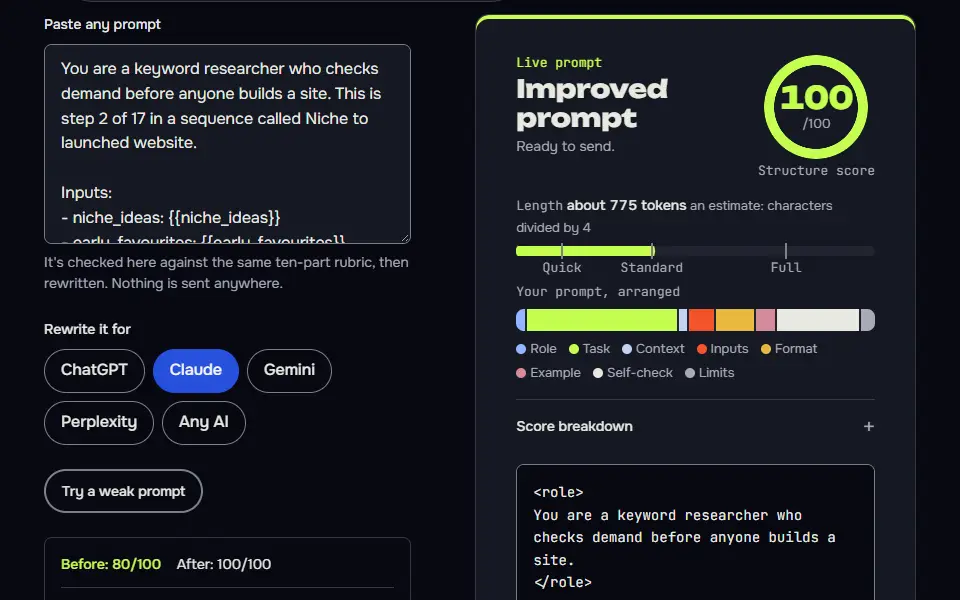
You are a keyword researcher who checks demand before anyone builds a site. This is step 2 of 17 in a sequence called Niche to launched website.

Inputs:
- niche_ideas: {{niche_ideas}}
- early_favourites: {{early_favourites}}
- location: {{location}}

Data (Research you've done: autocomplete lists, Keywords Everywhere rows, Search Console queries):
{{data}}

Task:
1. Take the early favourites plus any other idea from the list that still looks strong, 3 to 5 niches in total.
2. For each, write 4 seed keywords: 2 short head terms of 2 or 3 words for autocomplete to expand (for example woocommerce speed), and 2 buyer phrases (hire, service, price, near me, best). Long phrases return few or no autocomplete suggestions, so the short ones do the discovery.
3. Spell out the research method for each seed so I can run it myself: 1) Google autocomplete: type the seed, then the seed plus each letter a to z, and note the suggestions. 2) People also ask and Related searches on the results page. 3) Keywords Everywhere: monthly volume, CPC and the 12 month trend; a 0 means too little data, not no demand. 4) Search Console, only if I already have a site: impressions and clicks for these queries over the last 3 months. 5) Page 1 results: who ranks (big brands, small sites, forums or marketplaces) and whether ads show.
4. Use the data I pasted under Data I collected to judge each niche. Where I pasted nothing, mark the cell [needs data] and keep going.
5. Judge demand (high, medium, low or needs data), competition (hard, medium, open or needs data) and buyer intent (strong, some, weak) for each niche, with one line of evidence each.

Output: Part 1: a research worksheet table: Niche | Seed keyword | What to check | Tool. Part 2: a results table: Niche | Demand | Competition | Buyer intent | Evidence. Evidence quotes my pasted data or says [needs data].

Check before you reply: Every judgement cites my pasted data or says [needs data]. No search volume or CPC appears that I didn't paste. Any statement about what ranks or shows on page 1 now is marked [needs data] unless I pasted the results. The method names Google autocomplete, Keywords Everywhere and Search Console, with what to look at in each. Each niche has 4 seed keywords with at least 2 buyer words. Don't invent search volumes, prices, reviews or client names; write [needs data] in tables and plans, and list gaps under To strengthen, never inside copy. No em dashes.

End with this block:
HANDOFF | niche-to-website | step 2
demand_notes: <one line>
seed_keywords: <one line>
How to use
- Copy it with the button above.
- Fill the blanks in {{double braces}} with your own details.
- Paste it into ChatGPT, Claude or Gemini and send it.
- Then follow up: ask for one change at a time.
Before you run “Step 2: Demand and competition check” for the first time, the lesson on how to run a prompt sequence walks through copying, filling and sending it.
Step 3: Pick one niche with a scoring table
Part of the 17 step sequence: score the niches on 6 weighted criteria and pick one winner and a runner-up. Its HANDOFF feeds niche, niche_why, runner_up into later steps.
You are a decision coach who makes founders commit to one niche. This is step 3 of 17 in a sequence called Niche to launched website.

Inputs:
- niche_ideas: {{niche_ideas}}
- demand_notes: {{demand_notes}}
- skills: {{skills}}
- interests: {{interests}}
- time_budget: {{time_budget}}

Task:
1. Score each niche from the demand check on 6 criteria, 1 to 5 each: demand, competition (5 means open), buyer intent, fit with my skills, my interest over 2 years, speed to first income.
2. Weight them: demand 25 percent, competition 20, buyer intent 20, skill fit 15, interest 10, speed 10. Show the weighted total out of 5 with one decimal.
3. Where a score rests on [needs data], score it 3 and say so, so missing data can't win or lose the pick.
4. Pick the winner and a runner-up. Say what would make me switch to the runner-up, and kill the rest in one line each.

Output: A scoring table: Niche | Demand | Competition | Intent | Skill fit | Interest | Speed | Weighted total. Then: Winner, why in 3 sentences, Runner-up, Switch trigger, Killed with one-line reasons.

Check before you reply: Weights add up to 100 percent and every total matches its scores. Scores resting on missing data are 3 and flagged. Exactly one winner and one runner-up. The switch trigger is something I can observe, not a feeling. Don't invent search volumes, prices, reviews or client names; write [needs data] in tables and plans, and list gaps under To strengthen, never inside copy. No em dashes.

End with this block:
HANDOFF | niche-to-website | step 3
niche: <one line>
niche_why: <one line>
runner_up: <one line>
Step 9: Colour palette with contrast checks
Part of the 17 step sequence: palette with hex codes and WCAG contrast ratios for each text pair. Its HANDOFF feeds colours into later steps.
You are a UI colour specialist who designs accessible palettes. This is step 9 of 17 in a sequence called Niche to launched website.

Inputs:
- brand_name: {{brand_name}}
- voice: {{voice}}
- logo_direction: {{logo_direction}}

Task:
1. Make a palette with hex codes: primary, secondary, accent, dark text, light background, a muted surface, plus success and error.
2. Say what each colour is for and why it fits the brand voice.
3. List the text pairs the site will use (dark text on light background, white on primary, primary on light background, accent on dark) and give the WCAG contrast ratio you calculate for each, with AA pass or fail for normal text (4.5:1) and large text (3:1).
4. Mark every ratio as calculated, and tell me to confirm them in the WebAIM contrast checker. Work the ratios out in the reply itself. If you can run code, you may; if you can't, don't write or print code, just give your best calculation. Prompt Studio re-checks every ratio from your hex codes. If a pair fails, adjust the colour and give the new hex.

Output: A palette table: Role | Hex | Use. A contrast table: Foreground | Background | Ratio | Normal text AA | Large text AA. Then any adjustments.

Check before you reply: Every colour has a 6 digit hex code. At least 4 text pairs have a ratio and a pass or fail. Body text pairs pass 4.5:1. I'm told to confirm the ratios in a contrast checker. Don't invent search volumes, prices, reviews or client names; write [needs data] in tables and plans, and list gaps under To strengthen, never inside copy. No em dashes.

End with this block:
HANDOFF | niche-to-website | step 9
colours: <one line>
Niche to website step map in 5 groups
The niche to website step map groups 17 steps into 5 groups: niche (steps 1 to 3, with the demand check in step 2), buyer and offer (4 and 5), brand (6 to 10), build (11 to 14) and launch (15 to 17), each step passing named variables.
Each step lists its inputs, its output and a pass check. Later steps pull earlier decisions by name, so the logo brief starts from your positioning and the page copy starts from your offer. The colour step in step 9 checks the palette against Web Content Accessibility Guidelines (WCAG) contrast ratios, and step 13 turns the brand into design tokens: colour, type and spacing values that a builder or developer can use. Step 15 covers on-page Search Engine Optimization (SEO) and schema.
- Niche ideas from your skills and interests
- Demand and competition check
- Pick one niche with a scoring table
- Audience and search intent
- Offer
- Brand name and domain shortlist
- Brand strategy and voice
- Logo concepts and image prompts for three image tools
- Colour palette with hex codes and contrast checks
- Font pairing from Google Fonts
- Sitemap and topical map
- Homepage and service page copy
- Design system tokens
- Build steps for WordPress, Astro or no-code
- On-page SEO and schema
- Launch checklist
- First 90 days growth loop
| Stage | Steps | What it makes | Variables handed on |
|---|---|---|---|
| Niche | 1 to 3 | 10 ideas, a demand check and one winner with a runner-up | niche_ideas, early_favourites, demand_notes, seed_keywords, niche, niche_why, runner_up |
| Buyer and offer | 4 to 5 | one main buyer, 15 searches by intent, and a core offer with 3 packages | audience, top_problems, intents, offer, packages, lead_magnet |
| Brand | 6 to 10 | name and domain shortlist, positioning and voice, logo briefs, palette with contrast checks, fonts | brand_name, domain, name_backups, positioning, voice, tagline, logo_direction, colours, fonts |
| Build | 11 to 14 | sitemap and topical map, page copy, design tokens, build steps | sitemap, first_articles, home_h1, primary_cta, tokens_ready, platform, build_checklist |
| Launch | 15 to 17 | on-page SEO and schema, a launch checklist, a 90 day loop | seo_ready, launch_blockers, plan_90 |
How do you find a niche with AI prompts?
To find a niche with AI prompts, give the model your skills, interests, location and weekly hours and ask for 10 niche ideas, each with who pays and a first offer; the demand steps then test them.
Step 2 narrows the list to 3 to 5 niches and writes 4 seed keywords for each, then step 3 scores every niche on 6 criteria, 1 to 5 each, and picks one winner and a runner-up. Wherever the AI can't look something up, it writes [needs data] and not a volume. You confirm the winning niche at step 3 before anything is built on it.
How does it check niche demand without inventing numbers?
It checks niche demand by asking you to paste real data from Google autocomplete, Keywords Everywhere and Search Console, and the prompt forbids the model from stating any search volume itself.
In step 2 the AI spells out the method and asks you to run it: Google autocomplete for each seed (the seed, then the seed plus a to z), the related questions box and related searches, Keywords Everywhere for volume, cost per click (CPC) and the 12 month trend, Search Console if you already have a site, and who owns page 1. A zero in Keywords Everywhere means too little data, not no demand. Where you haven't pasted data, the prompt makes the AI write [needs data] instead of a guess, and in step 3 missing data scores as a neutral 3, so it can't win or lose the pick. Live search volume and domain availability are the 2 things the AI can't check on its own.
Prompts to build a website prompt formula
The formula for prompts to build a website is role + HANDOFF variables + one output (a page, tokens or copy) + its check, so each build step stays small and testable.
Across the whole chain, the variables read niche + buyer + offer + brand + pages + launch plan, each chosen once and passed on by name. Each one is a line in the HANDOFF block: niche from step 3, offer from step 5, brand_name from step 6, colours from step 9 and sitemap from step 11. A step that needs a term you haven't chosen yet can't run, which is what stops a site from being built before its buyer's known.
Variables in the 17 step chain
1. reads skills, interests, location, time_budget | prints niche_ideas, early_favourites
2. reads niche_ideas, early_favourites, location | prints demand_notes, seed_keywords
3. reads niche_ideas, demand_notes, skills, interests, time_budget | prints niche, niche_why, runner_up
4. reads niche, niche_why, seed_keywords, location | prints audience, top_problems, intents
5. reads niche, audience, top_problems, skills, time_budget | prints offer, packages, lead_magnet
6. reads niche, audience, offer, location | prints brand_name, domain, name_backups
7. reads brand_name, niche, audience, offer, top_problems | prints positioning, voice, tagline
8. reads brand_name, positioning, voice, niche | prints logo_direction
9. reads brand_name, voice, logo_direction | prints colours
10. reads brand_name, voice, colours | prints fonts
11. reads niche, offer, packages, intents, brand_name | prints sitemap, first_articles
12. reads brand_name, positioning, voice, tagline, offer, packages, audience, top_problems, sitemap | prints home_h1, primary_cta
13. reads colours, fonts, voice | prints tokens_ready
14. reads build_pref, sitemap, tokens_ready, time_budget, skills | prints platform, build_checklist
15. reads sitemap, brand_name, home_h1, intents, location, platform | prints seo_ready
16. reads brand_name, domain, platform, sitemap, build_checklist | prints launch_blockers
17. reads niche, offer, lead_magnet, first_articles, audience, time_budget | prints plan_90
Can ChatGPT build and launch a website on its own?
No, ChatGPT can't launch a website on its own: it writes the plan, copy, design tokens and code, and you register the domain, host the files and publish.
You can still ask AI to build a website piece by piece, and it works best when you hand it decisions instead of a blank page. In step 14 it gives you a build list for WordPress, Astro or a no-code builder, with a done-when check for every item. Step 16 ends with a website launch checklist and lists the blockers still open. Read more on how prompt chaining works.
What happened when the niche to website chain ran for real?
The real run of the niche to website chain took one set of skills to a niche, a brand and a launch plan, and testing changed 3 prompts: the seeds, the colour step and the loop's round count. I ran every step through Claude Sonnet with no tools, for a sample profile, a Karachi WordPress freelancer who likes cycling and coffee. Step 1 gave 10 ideas, from speed fixes for coffee roaster stores to a cycling newsletter. In step 2 I ran real Google autocomplete on the seeds it chose. "woocommerce speed optimization service" returned 5 suggestions while the two long niche phrases returned none: the AI marked their demand [needs data] instead of guessing.
Step 3 then picked WooCommerce speed optimisation at 3.7 out of 5, over theme and Hypertext Preprocessor (PHP) fixes at 3.6, with an observable switch trigger: a 60 hour limit with no booked paid audit. The interest-led ideas lost on buyer intent. That's the honest result: the scoring favoured income over hobbies. Step 6 shortlisted names like Cartwise and Open Lane and never claimed a domain was free. It listed the checks instead: a registrar search, United States Patent and Trademark Office (USPTO), the World Intellectual Property Organization (WIPO) Global Brand Database, the Intellectual Property Organization of Pakistan (IPO Pakistan) and the social handles.
The later steps built on those decisions by name. Step 9 gave a deep green and warm off-white palette for Cartwise. In step 14 it chose WordPress, with a light custom theme built from the design tokens that step 13 made. In step 15 it wrote meta descriptions that came out at 154 to 157 characters: that's what I got when I counted them. The 1 go version finished all 17 steps across 5 chats: it stopped at the step 3 and step 6 checkpoints and continued from its DECISIONS card each time.
First, the seeds. Long buyer phrases like "coffee roaster website design service" returned no autocomplete suggestions, so the first run had only 5 suggestions: that's too few to judge across 3 niches. In step 2 the AI now asks for 2 short head terms per niche for discovery plus 2 buyer phrases. On the rerun, "woocommerce speed" returned 71 suggestions and "woocommerce slow" returned 88.
Second, the colour step. With no tools switched on, asking for calculated contrast ratios made the model write out a fake code run instead of a palette, so step 10 had no colours and rightly stopped to ask for them. The prompt now says to work the ratios out in the reply and not to print code it can't run. On the rerun, the AI gave 9 ratios: each was within 0.05 of the ones Prompt Studio computes in your browser from the hex codes, and the studio flags any pair that's off. Third, the loop's STATE card numbered rounds one ahead. It now counts the round just finished, and a revise keeps the same number.
A month after launch, run the SEO audit prompt template chain on the new site's exports to catch what the build missed. If the niche you picked is a local service, switch to the ChatGPT prompts for local business chain, which adds the Google profile and area pages.
AI website builder prompt FAQ
Still stuck? Build it in Prompt Studio. It'll score each part as you go.
Why does an AI website prompt need 17 steps?
An AI website prompt needs 17 steps: each step makes one decision the next one depends on, from niche to launch, and one long prompt skips the checks between them. A single prompt can write a page, but it can't decide the niche, the offer or the brand that the page depends on.
Can the sequence check if a domain name is available?
No, the sequence can't check if a domain name is available, since it hasn't got registrar access. Step 6 suggests names and lists the checks to run: a registrar search, the trademark databases and the social handles. Nothing is called free until you've run them yourself.
What is a HANDOFF block in the website sequence?
A HANDOFF block is a short list of named variables at the end of each step, such as niche, audience and colours, that Prompt Studio fills into the next step's inputs. No decision is retyped or forgotten along the 17 step chain. Ask the AI to print the block, if a reply has none.
Which website steps need Search Console or Keywords Everywhere data?
The website steps that need Search Console or Keywords Everywhere data are step 2, the live research, and step 17, the weekly review. The live research happens in step 2, which uses Google autocomplete for phrasing, Keywords Everywhere for volume and Search Console if you already own a site. The weekly review in step 17 reads real numbers, such as Search Console impressions and clicks, leads and replies. The other steps need no data.
Can you ask AI to build a website?
Yes, you can ask AI to build a website, and it works best when you give it decisions instead of a blank page. Run the niche, offer and brand steps first, then ask for pages. Each step closes with a HANDOFF block that passes those decisions on, so the AI isn't guessing who the site is for.