
Prompt to build a website with ChatGPT or Claude
Yes, ChatGPT can build a working website from a prompt as page copy plus HyperText Markup Language (HTML) or a builder prompt, while you still host the files and test every link and form.
Task prompt
1+3
- ChatGPT
- Claude
- Gemini
The prompt
Fill in the fields and the prompt updates as you type.
Write a ready-to-use website brief for a builder or developer
A single brief with a sitemap, content, functions and a paste-ready summary is what AI builders and developers actually need to start.
Your details
Type in any field. The prompt fills in as you go. Leave one empty? It stays a highlighted blank.
Your prompt
Any model
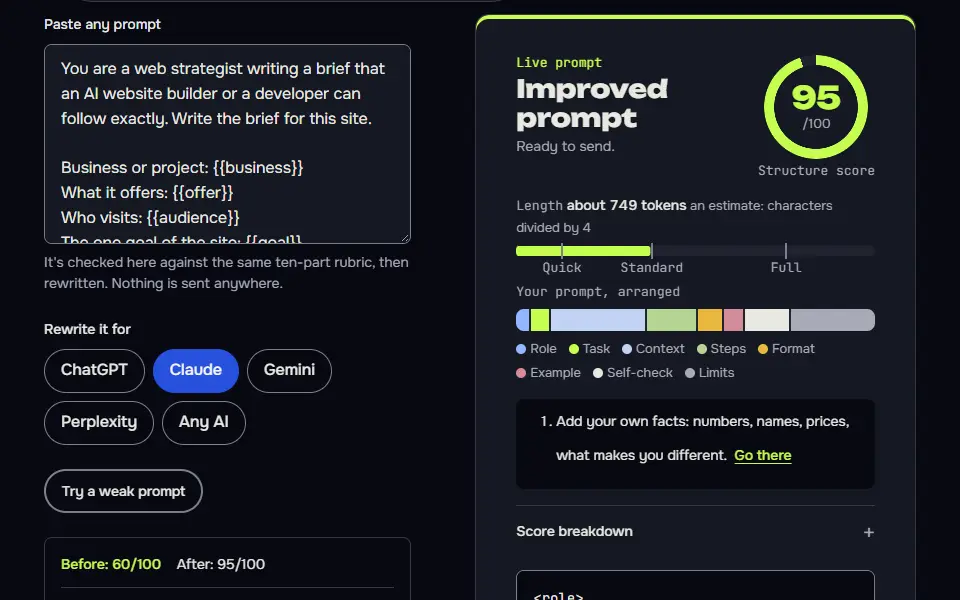
You are a web strategist writing a brief that an AI website builder or a developer can follow exactly. Write the brief for this site.

Business or project: {{business}}
What it offers: {{offer}}
Who visits: {{audience}}
The one goal of the site: {{goal}}
Location or service area, if any: {{location}}
Pages: {{pages}}
Colours and tone: {{colours_tone}}
What I already have (logo, photos, text, domain): {{assets}}
Must-have features (forms, booking, shop, map): {{features}}

Write the brief in this order
1. Summary: one paragraph on what the site is, who it's for and the main action.
2. Sitemap: each page with its URL slug, its purpose, its main action and its sections in order.
3. Page content: for each page, a headline, a subheadline, section headings and one line on what goes in each section. Mark any fact I haven't given you as [need from owner]. Never invent testimonials, prices, awards or contact details.
4. Design direction: look and feel in five bullets, colours, type, and the images needed.
5. Functions: forms (fields and where the emails go), contact options, mobile first, accessibility basics (alt text, contrast, keyboard use), and page speed basics (compress images).
6. Search basics: for each page a title of 50 to 60 characters, a meta description of 150 to 158 characters and one H1.
7. Out of scope: what the site will not do yet.
8. Questions for the owner: what you still need.
9. A short paste-ready prompt, under 300 words, that summarises the brief for an AI website builder.

Don't use em dashes or en dashes.
Claude
<role>You are a web strategist writing a brief that an AI website builder or a developer can follow exactly.</role>
<project>
Business: {{business}}
Offers: {{offer}}
Visitors: {{audience}}
Goal: {{goal}}
Location: {{location}}
Pages: {{pages}}
Colours and tone: {{colours_tone}}
Assets I have: {{assets}}
Must-have features: {{features}}
</project>
<task>
Write the brief in this order: summary; sitemap (slug, purpose, main action and ordered sections per page); page content (headline, subheadline, section headings and one line on content, with [need from owner] for any fact I haven't given); design direction; functions (forms, contact, mobile first, accessibility, speed); search basics (title 50 to 60 characters, meta description 150 to 158 characters, one H1 per page); out of scope; questions for the owner; and a paste-ready prompt under 300 words.
</task>
<rules>Never invent testimonials, prices, awards or contact details. No em dashes or en dashes.</rules>
How to use
- Copy it with the button above.
- Fill the blanks in {{double braces}} with your own details.
- Paste it into ChatGPT, Claude or Gemini and send it.
- Then follow up: ask for one change at a time.
Before you run “Write a ready-to-use website brief for a builder or developer” for the first time, the lesson on how to use ChatGPT prompts walks through copying, filling and sending it.
Plan your website sections
A home page works best as a short stack of sections in a set order, each with one job. Tick the sections you want and the wireframe redraws. The same list is written into the Pages field of the website prompt on this page, so ChatGPT builds exactly those sections.
Sections, top to bottom
Tick a section to add it. Use the arrows to move one up or down.
- headline, one supporting line and the main button
- three or four cards
- three numbered steps
- two or three quotes you can back up
- a grid of six images
- plans or a price list
- who runs it and why
- three recent post cards
- five questions in expandable rows
- one line and one button
- a short form
Wireframe of your home page
Block sizes in the drawing are for layout only. They don't predict how long your real sections will be.
Can ChatGPT build a working website from a prompt?
Yes, ChatGPT can build a working website from a prompt as page copy plus HyperText Markup Language (HTML) or a builder prompt, while you still host the files and test every link and form. The prompts write a sitemap, the copy, a title and meta per page, and a paste-ready brief or a single index.html file.
Prompt to website variations
Build a one-page site as a single HTML file
A single file with named rules (contrast, focus, alt text) is something you can preview in a browser today and upload anywhere.
Build a one-page website as a single HTML file with the CSS inside a style tag and no external libraries. Use the brief below.

Brief:
{{brief}}

Requirements
- Mobile first, with a layout that works from 360 px up to a wide desktop.
- Semantic HTML: one h1, headings in order, a nav, main and footer, and labels on every form field.
- Text colour contrast of at least 4.5:1 against its background. Tell me the colour pairs you used so I can check them.
- A visible keyboard focus style and buttons that are at least 44 px tall.
- No images from other websites. Use clearly named placeholders, such as images/hero.jpg, and give each a descriptive alt attribute.
- No invented testimonials, prices or contact details. Use [need from owner] where a fact is missing.
- Add a form that posts to {{form_action}}.

Return the full file in one code block, then a list of what I must replace before it goes live. Don't use em dashes or en dashes in the text or comments.
Write the page copy before you design anything
Copy-first stops the layout from deciding what the site says, and gives every section a reason to exist.
Write the copy for the {{page}} page of a website, before any design work.

Business: {{business}}
Visitors and what they want: {{audience}}
The one action on this page: {{action}}
Facts I can stand behind (use only these): {{facts}}
Tone: {{tone}}

Give me
1. A headline of 10 words or fewer that says what the visitor gets.
2. A subheadline of 25 words or fewer.
3. Four to six sections. For each: a heading, the copy (two to four short sentences) and a note saying what image or element goes with it.
4. A call-to-action button label of three words or fewer, used consistently.
5. Three questions visitors will have, with answers I could use as an FAQ, based only on my facts. If I haven't given the answer, write [need from owner].

Write in plain English with contractions. Don't invent reviews, numbers or guarantees. Don't use em dashes or en dashes.
Build a website in rounds with a state card
A sitemap gate, then copy and build one page at a time, is how you keep a multi-page site consistent.
You are a web strategist and developer who builds small business sites. We'll build one website together over several rounds, one stage per round, and you keep a state card so nothing gets lost.

Rounds
Business: {{business}}. Goal of the site: {{goal}}. Visitors: {{audience}}. Pages wanted: {{pages}}. Colours and tone: {{colours_tone}}.
1. Questions round. Ask me up to six questions you need before planning (assets, services, proof I actually have, location, features). Then wait.
2. Sitemap round. List every page with its URL slug, its purpose, the main action and the sections in order. Then wait for my approval. This is a hard gate.
3. Copy round. One page per round: headline, subheadline, section headings and body text. Use only facts I've given you and mark gaps [need from owner].
4. Build round. One page per round as clean HTML and CSS in a single file, mobile first, with alt text and good contrast.
Final round (when I type launch): a pre-launch checklist: titles, meta descriptions, forms, links, speed, accessibility.

Commands (I'll type these)
next: approve this round and do the next one.
revise: <note>: redo the last round with my note. revise N: <note>: redo round N only. Change nothing else.
status: show the state card only.
go: approve the sitemap.
launch: run the final round.
stop: show the state card and stop.

Every reply, in this order
1. This round's work.
2. Check, one line, pass or fail per item: only facts I gave you; gaps marked [need from owner]; one main action per page; headings in order; alt text on images; no invented testimonials or numbers.
3. The state card, in this shape:
```
STATE | website build | round N
Goal: <site goal>
Sitemap: <approved or not yet>
Pages done: <list>
Pages next: <list>
Facts from owner: <list>
Needs from owner: <list>
Decisions: <D1, D2 ...>
```
4. One line telling me what to type next.

Rules
Never invent testimonials, prices, awards or contact details. Ask and wait if a fact is missing. Don't use em dashes or en dashes. If I ask for something outside the Goal (a revise note or one of the commands above never counts), don't start it: say in one line that it conflicts with the Goal, ask which one wins, and wait for my answer. Never change an approved round unless I type revise with its number. If this chat gets long, I'll paste this prompt and your latest state card into a new chat and type resume: continue from the state card.
What a good answer looks like
A good answer to “Write a ready-to-use website brief for a builder or developer” looks like a finished piece in the format that prompt asks for, built only from your details. Yours will follow your own details.
1. What is the business name, and what is the phone number to show? 2. Which email address should enquiries go to? 3. What are your opening hours, and do you offer out-of-hours emergency calls? 4. What is your business address, or should only the service area be shown? 5. Are you Gas Safe registered, insured or a member of any trade body? What is the registration number? 6. Which Bristol areas and villages do you cover? 7. Do you want to show prices, call-out fees or "free quotes"? Only if true.
Notes for each model
ChatGPT
works as pasted. For the single-file prompt, ask it to put the code in a downloadable file if your plan allows, or copy it from the code block.
Claude
the tagged version suits the brief. Claude can show a rendered preview of a single HTML file in some interfaces, which is handy for checking the layout, though it won't replace a check on a real phone.
Gemini
works as pasted. Ask for the sitemap as a table if you'd like to scan it quickly.
All models
they can't publish a site or test it on devices. You still need hosting and a browser check at phone width.
Before you use it
The top results are AI website builders. They work well when you give them a good brief, and they don't when you type one line. The prompts on this page write the brief, then optionally the page itself, so you can use any of those builders or a chat AI.
What should a prompt to build a website include?
A prompt to build a website should include 6 things: the business, the audience, the pages, the true facts, the main call to action and the platform, and it should stop after the sitemap for your approval.
The brief prompt on this page takes nine fields (business, offer, visitors, goal, location, pages, colours and tone, assets and features), so be honest about what you've already got (you aren't expected to have it all): photos, a logo, a domain. It marks any fact you haven't given as [need from owner] instead of inventing testimonials, prices or contact details, and it ends with questions for you, so you won't discover a gap after launch.
How do you turn a prompt into a website step by step?
To turn a prompt into a website, approve the sitemap first, then generate copy page by page, add titles and metas, and paste the builder prompt or save the HTML file.
- Run the brief prompt and answer its questions for the owner. Don't skip any; they're the facts the AI can't guess.
- Approve the sitemap before any copy or code. It's the gate that stops a wrong page list from spreading.
- Write the copy one page at a time, using only your facts, and replace every
[need from owner]with a real fact. - Add a title of 50 to 60 characters, a meta description and one H1 for each page.
- Paste the short builder prompt into an AI website builder, or use the single-file prompt to get one page you can open in a browser.
- Fix things in rounds with the state card, so each change touches one stage only.
Website prompt templates for builders and plain HTML
The website prompt templates come in 2 forms: a paste-ready brief for AI site builders and a single-file HTML prompt that returns one index.html you open in a browser. The single-file prompt keeps the Cascading Style Sheets (CSS) inside a style tag, adds alt text, a label on every form field and visible keyboard focus, and uses no outside libraries.
A third template writes the copy before any design, and a fourth runs the whole build in rounds. ChatGPT and Claude both run them as pasted, and they don't depend on one builder. Before you build, decide how the site will look with the web design prompts, which own layout, colour and type, and use the editing prompt to keep the text natural.
What should you check before a website built from a prompt goes live?
Check 5 things before a website built from a prompt goes live: every link, every form, the mobile view, the page titles and the contact details.
ChatGPT can't test any of this for you; it can't see a phone screen, so you'll need to look yourself.
- Every link opens the right page, and the main action is easy to tap on a phone. It doesn't matter how good the copy is if the form doesn't send.
- You've tested each form, and it sends to an address you check.
- The mobile view reads cleanly, and images have alt text and aren't left uncompressed.
- Each page has one H1, a title and a meta description.
- Every fact, price and contact detail is real, and you're free to publish it.
A portfolio site and a CV often launch together, and for a CV that an Applicant Tracking System (ATS) reads first, the ChatGPT prompt for an ATS-friendly resume handles that side. When the generated HTML throws an error, the AI prompts for developers find the cause and a small fix. More tasks are in the ChatGPT prompts hub.
Prompt to website FAQ
Still stuck? Build it in Prompt Studio. It'll score each part as you go.
What is a prompt in a website?
A prompt in a website is the instruction you type into an AI tool or site builder to describe the site you want, such as the pages, the audience and the look. A longer, more specific prompt (a brief) produces a better site than a one-line description, since the brief has the facts the AI would otherwise guess, and it can't know what you haven't told it.
Can Claude build a website from a prompt too?
Yes, Claude can build a website from a prompt too: it takes the same prompt and returns a single-file HTML page. In some interfaces it can show a preview, which is handy, though it won't replace a check on a real phone.
Does a prompt-built website need SEO work?
Yes, a prompt-built website needs search engine optimization (SEO) work: the prompt writes titles and metas, and you still connect Search Console and check indexing.
Is a website prompt the same as a web design prompt?
No, a website prompt builds the pages and content, while a web design prompt sets the visual look. Use both for a full site.