
ChatGPT prompts by task, ready to copy
Prompt hub
15
Which ChatGPT prompt should you start with?
Start with the ChatGPT prompt that matches your job: the 12 best general prompts on this hub cover writing, summarizing, planning, learning and deciding, each with fields you fill in before you paste. Pick the card closest to today's job and copy it into ChatGPT, the chat AI made by OpenAI.
ChatGPT prompts by topic
15 pages: each one is a full pack you can copy from, not a teaser.
It edits a draft to fit a sample of your voice, flags stiff lines first, adds no facts, and it…
It asks, it finds your best stories, it quotes lines for feedback, and it will not write it all.
First an outline gate, a story bible on a state card, then chapters built from beats, and a…
It puts a real fact in each post, bans stock lines, gives 3 hooks in plain text, fit for a…
A real detail from the photo, 3 hooks to pick, alt text and its tags, plus Story and carousel…
It fits your history to the post, lists gaps as questions, and flags your weakest bullets first.
For ChatGPT that ask for the fault, a little diff and a test, plus Copilot, review and…
A sitemap gate, copy that fits your facts, a title list, a builder prompt or a single file…
A brief that sets layout, type and tints, cuts the stock look, lists contrast pairs to test…
To learn, to decide, to plan or to test your thinking, plus a coach to fix it if it is too…
Fields to set it up, a line to fix drift, a state card for a long story, and a practice partner.
Tag each line as fact, inferred or guess, with a list of what it still holds in memory, fun…
It tells you what it can't calculate, reads pasted chart data, will not predict, and fits a…
It drafts your own replies from true facts, adds a little hook, checks your full profile, and…
29 fill-in prompts to plan a session, list words, set home practice, file notes, and it still…
The best ChatGPT prompts to start with
12 to try first. Switch the model once. Every card follows.
Explain a topic to a newcomer, then check I got it
The 'where the analogy breaks' line and the hidden-answer quiz turn a one-way explanation into a check that you actually got it.
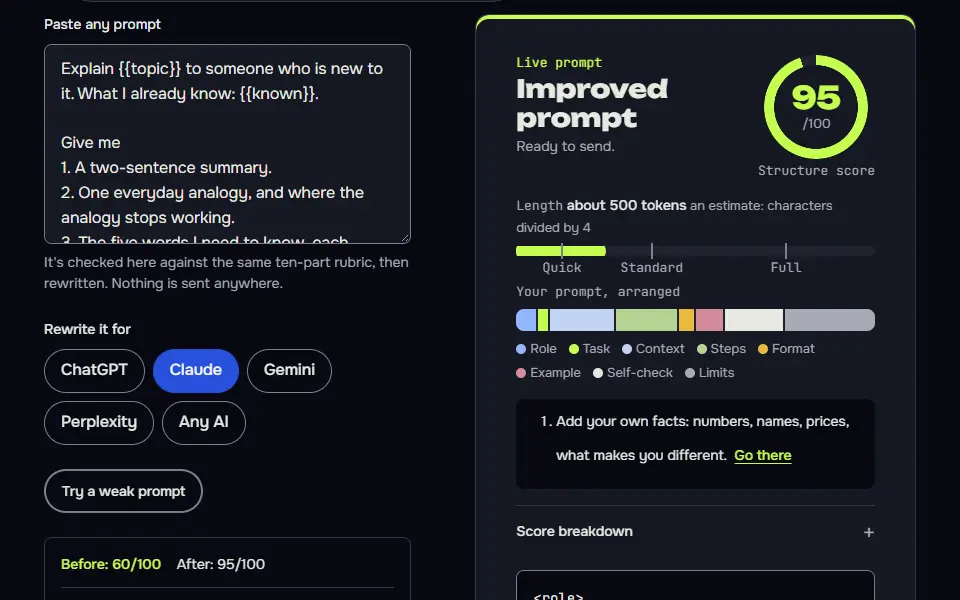
Explain {{topic}} to someone who is new to it. What I already know: {{known}}.

Give me
1. A two-sentence summary.
2. One everyday analogy, and where the analogy stops working.
3. The five words I need to know, each defined in one line.
4. The most common misunderstanding, and what's true instead.
5. Three questions to check I've understood. Don't show the answers until I ask.

Keep it under 300 words. If you're not sure about a fact, say so instead of guessing. Don't use em dashes or en dashes.
How to use
- Copy it with the button above.
- Fill the blanks in {{double braces}} with your own details.
- Paste it into ChatGPT, Claude or Gemini and send it.
- Then follow up: ask for one change at a time.
Before you run “Explain a topic to a newcomer, then check I got it” for the first time, the lesson on how to use ChatGPT prompts walks through copying, filling and sending it.
Three reply drafts to an email, from your intent
Three tones with a 'when to use it' line help you choose instead of rewriting a single draft again and again.
Here is an email I received:
{{email}}

What I want to happen: {{intent}}
Things I must not say or promise: {{limits}}

Write three replies, each under {{max_words}} words: one short and friendly, one warm with a little more detail, and one firm and polite. Under each, add one line saying when I'd choose it. Don't invent facts, dates or commitments that aren't in my intent. If you need a fact to reply properly, put it in [brackets] for me to fill in. Write in plain English with contractions. Don't use em dashes or en dashes.
Summarise a long text into decisions, actions and open questions
'Not stated' beats a guess. The summary stays honest, and the gaps become the questions you ask next.
Summarise the text below for a busy reader who has two minutes. Use only the text.

{{text}}

Format
- Five lines at most: what this is and what matters.
- Decisions made, each in one line.
- Actions, as a table with Owner, Task and Due date. If the text doesn't say who or when, write "not stated". Don't guess.
- Open questions the text raises but doesn't answer.
- Anything that looks contradictory or unclear, quoted.

Keep the summary under {{max_words}} words. Don't add outside facts or opinions. Don't use em dashes or en dashes.
Turn a messy brain dump into a realistic week
Saying what doesn't fit is the useful part. Most planners squeeze everything in and fail by Wednesday.
Here is everything on my mind, in no order:
{{dump}}

My fixed commitments this week: {{fixed}}
Hours I can realistically work on these tasks each day: {{hours}}
My energy pattern: {{energy}}

Please
1. Sort the list into: must happen this week, should happen, could wait, and drop. Give one line of reasoning for each "drop".
2. Build a day-by-day plan that fits the hours. Put demanding tasks in my high-energy time and leave a buffer of about 20 percent.
3. List the three things most likely to slip and what to do if they do.
4. Name the one task that, if done first, makes the others easier.

If the hours don't fit the list, tell me what doesn't fit instead of squeezing it in. Don't use em dashes or en dashes.
A 30-day plan to learn a skill in 20 minutes a day
Every day ends with a checkable output, and the 'too big' rule keeps the plan honest.
Build me a 30-day plan to learn {{skill}}. I'm at this level: {{level}}. I can give it {{minutes}} minutes a day, and my goal by day 30 is: {{goal}}.

Give me
1. The goal broken into four weekly milestones I can test myself against.
2. A day-by-day table: day, a 20-minute task, and the output I should have at the end of it (something I can check).
3. One rest or review day each week.
4. The three free or cheap resources type I'd need (for example a book, a course or a tool), without naming specific products or prices you can't be sure of.
5. How to tell on day 10 whether the plan is working, and how to adjust it if not.

Be realistic. If the goal is too big for 30 days at this pace, say so and propose the closest achievable goal. Don't use em dashes or en dashes.
Rewrite for clarity at a chosen reading level
Listing what changed and what couldn't be simplified lets you keep control of the meaning.
Rewrite the text below so a reader at a {{level}} reading level can understand it on the first read. Keep the meaning and every fact.

Text:
{{text}}

Rules
- Shorter sentences, plain words, active voice. Keep necessary technical terms and explain them once.
- Don't add facts or opinions, and don't remove any.
- Keep the order of ideas unless something is clearly out of place.

Then list the five biggest changes you made and why, and flag any sentence you couldn't simplify without changing the meaning. Don't use em dashes or en dashes.
Brainstorm 15 ideas, then rank them on your criteria
Diverge first, then rank in a table. Scoring against your criteria stops you picking the idea you thought of first.
I need ideas for {{need}}.

My constraints: {{constraints}}
What good looks like: {{criteria}}

1. Give me 15 ideas that are genuinely different from each other. No near-duplicates, and no ideas that break my constraints.
2. Score each idea from 1 to 5 against each of my criteria in a table, and show the total.
3. Pick the top three. For each, give the first small step I could take this week and the main risk.
4. Tell me which idea is the most unusual one and why it might still be worth a test.

Score honestly. If an idea can't be scored because you lack information, write "unknown" and say what you'd need. Don't use em dashes or en dashes.
Run a pre-mortem on a plan
Picturing failure first surfaces risks that people tend not to mention when they are describing a plan they like.
Here is my plan: {{plan}}
Timeline: {{timeline}}
What success looks like: {{success}}

Imagine it's the end of the timeline and the plan has failed. Tell me why.
1. List the seven most likely reasons, ranked by likelihood times damage. Make them specific to my plan.
2. For each, give an early warning sign I could spot in the first two weeks and one thing I can do now to prevent it.
3. Identify the assumption in my plan I'm least likely to have checked.
4. Tell me what I'd have to believe for the plan to be a good idea, as three short statements.

Be direct and don't soften the risks. Don't invent facts about my situation, and ask me if you need one. Don't use em dashes or en dashes.
A tutor that teaches by asking questions
Hints before answers keeps the work on your side, and the 'say it back' step is a proven way to check comprehension.
Be my tutor for {{topic}}. I'm at this level: {{level}}.

Method
- Ask me one question at a time. Start easy and adjust to how I answer.
- If I'm right, say why in one line and go a step deeper. If I'm wrong, don't give the answer. Give a hint, then ask a simpler question.
- After five questions, tell me what I understand well, what I'm shaky on, and what to study next.
- If I type "explain", give a short direct explanation and then ask me to say it back in my own words.

Don't lecture. Keep every message under 80 words. Don't use em dashes or en dashes. Start with your first question.
Proofread and explain every change
A change log teaches you the rule behind each fix and proves the AI didn't quietly rewrite your style.
Proofread the text below. Fix spelling, grammar, punctuation and obvious word errors only. Don't change the meaning, tone or style, and don't rewrite sentences that are correct.

Text:
{{text}}

Variety of English to use: {{english}}

Give me
1. The corrected text.
2. A table of every change: original, corrected, and the rule in a few words (for example "comma splice").
3. Up to three places where the writing is correct but unclear, quoted, with a question I could answer to improve them. Don't change those.

If there are no errors, say so. Don't use em dashes or en dashes.
Find what changed between two versions
A table with exact quotes catches the quiet changes, such as a number or a deadline, that a skim would miss.
Compare Version A and Version B of the same document and tell me what changed.

Version A:
{{version_a}}

Version B:
{{version_b}}

What matters most to me when comparing: {{focus}}

Give me
1. A table of changes: location, Version A wording, Version B wording, and the type of change (added, removed, reworded, moved).
2. The three changes that matter most for {{focus}}, with a sentence each on the effect.
3. Anything that looks accidental, such as a dropped sentence or a changed number.
4. Anything that's the same but that I might expect to have changed.

Quote exactly. Don't guess at intent. If the texts are too long to compare carefully in one go, tell me which part you compared. Don't use em dashes or en dashes.
Turn a frustrated draft into a calm, clear message
Anchoring on the outcome you want, not the feeling you have, is what turns venting into a message that works.
Here is the message I wrote while I was annoyed. Don't send it as it is.
{{draft}}

Who it's for and our relationship: {{recipient}}
What I actually want to happen next: {{outcome}}

Write two versions of a message that gets me that outcome:
1. Calm and direct: states the facts, the impact on me and the specific request.
2. Warm and firm: the same content with more care for the relationship.

Rules: Keep every factual point that's in my draft, drop the sarcasm and blame, and make exactly one clear request. Don't add facts. Under 120 words each. After the two versions, tell me in two lines what I'd probably regret about the original. Don't use em dashes or en dashes.
Best ChatGPT prompts by task
The best ChatGPT prompts by task sit in 15 full packs on this hub, sorted by job across career, coding, social posts, websites, writing, better questions and fun. Each pack is a working page you copy from, not a teaser.
Honest bullets that clear an Applicant Tracking System (ATS) and never invent a number come from the ChatGPT resume prompt. Applicants get an interview-first workflow in prompts for personal statements, which never writes the essay for you. For posts built on one real fact from your week, open the LinkedIn post generator pack. Captions with a real detail, alt text and three hook styles come from the Instagram post prompt.
Debugging, review and test-first loops for developers are in the coding prompts pack. To get a working site out of a chat, from sitemap to launch checks, start with the website-building prompts. Layout, colour and type briefs that steer clear of template looks are collected as web design prompts.
Long fiction and nonfiction projects run chapter by chapter with the prompt for writing a book chain. When the draft reads stiff, the prompt to make ChatGPT write like a human edits it toward your own voice. Grouped by goal, the prompt question examples show how a vague question becomes a sharp one. Characters that hold across turns, plus a practice-conversation partner, live on the roleplay prompt page.
Curious what the model has picked up from your chats? Try the ChatGPT prompts about yourself. For fun readings that say what they can and can't calculate, use the astrology prompt for ChatGPT by date of birth. Dating profile answers written from true facts are on the best prompts for Hinge page. Session plans, word lists and home sheets for clinicians are in ChatGPT prompts for speech therapists.
ChatGPT prompts for work
ChatGPT prompts for work give the AI your role, the document and the reader, then ask for one output in a fixed format, such as a 5-line meeting summary or a 150-word reply email. Four of the 12 best cards are built for the office: the three-way email reply, the summary that splits a long text into decisions, actions and open questions, the week planner that turns a brain dump into a calendar you can keep, and the pre-mortem that tests a plan before you commit.
Each one carries the say-needs-data rule. Where the report you paste doesn't hold a date, an owner or a figure, ChatGPT writes "needs data" in that spot instead of making one up, so you're never forwarding a number you didn't supply. Email, reports, meetings and planning are the uses people bring most, and they're the ones these cards cover first.
What makes a ChatGPT prompt work?
A ChatGPT prompt works when it states 4 things: the task, the context, the limits and the output format, and tells ChatGPT to ask for missing facts instead of guessing them. The task is one clear job. The context is what the AI can't know on its own, like your audience or your draft. Limits set length, tone and what's off the table. The format says what you'll get back: a table, 5 bullets or a ready-to-send draft.
The needs-data line is the one most lists leave out, and it's what removes most invented facts. It's a short line, but it's the one that'll save you from checking every figure twice. For a longer walk-through with worked examples, read how to write a good AI prompt.
Do ChatGPT prompts work in Claude, Gemini and Perplexity?
Yes, ChatGPT prompts work in Claude, Gemini and Perplexity with small layout changes: Claude follows tagged sections well, Gemini prefers plain paragraphs and Perplexity needs a search-style question first. The task doesn't change; only the wrapping does, and you won't need to touch the fields you've filled.
That's what the model tabs on each card are for. They hold the same prompt in ChatGPT, Claude and Gemini layouts, so you don't have to rewrite anything by hand. Claude's version wraps each part in tags written in Extensible Markup Language (XML) style. Most of your work happens in Claude? The Claude prompts hub keeps prompts written for it from the start.
Image prompts and photo editing beyond ChatGPT text
For pictures, the image prompts hub and the Nano Banana hub hold the photo prompts; this hub keeps to text tasks you run in a ChatGPT chat. Pictures instead of text? The AI image prompts hub has the photo and art prompts. Editing a photo you already have works best with Nano Banana photo editing prompts in Gemini.
ChatGPT prompts FAQ
Still stuck? Build it in Prompt Studio. It'll score each part as you go.
What is the trending ChatGPT prompt right now?
The trending ChatGPT prompts change week to week and are mostly image trends, such as caricature and action-figure photos. The image prompts hub tracks those, while this hub keeps prompts that stay useful after the trend has moved on.
What prompts make ChatGPT go crazy?
Prompts that make ChatGPT go crazy are usually contradictions, loops or jailbreak attempts, and they waste a chat. This hub doesn't list them; it lists prompts that produce a finished, usable answer. Trying to get around the rules can get an account blocked, so it isn't worth it.
Are the ChatGPT prompts on this hub free?
Yes, every ChatGPT prompt on this hub is free to copy, and you won't need to sign up to use one; each runs in the free or paid ChatGPT plan. They run in other chat AIs too, and nothing you type into a card leaves your browser.
How many tasks should one ChatGPT chat hold?
One ChatGPT chat should hold one task only, so earlier instructions don't leak into the next answer; start a new chat when the job changes. Long jobs that won't fit in one chat are what the rounds versions with a state card are for.