
Prompt optimizer: improve a prompt, then run the next pass
A prompt optimizer rewrites a rough prompt so the AI gets what it needs: a clear task, context, limits and an output format.
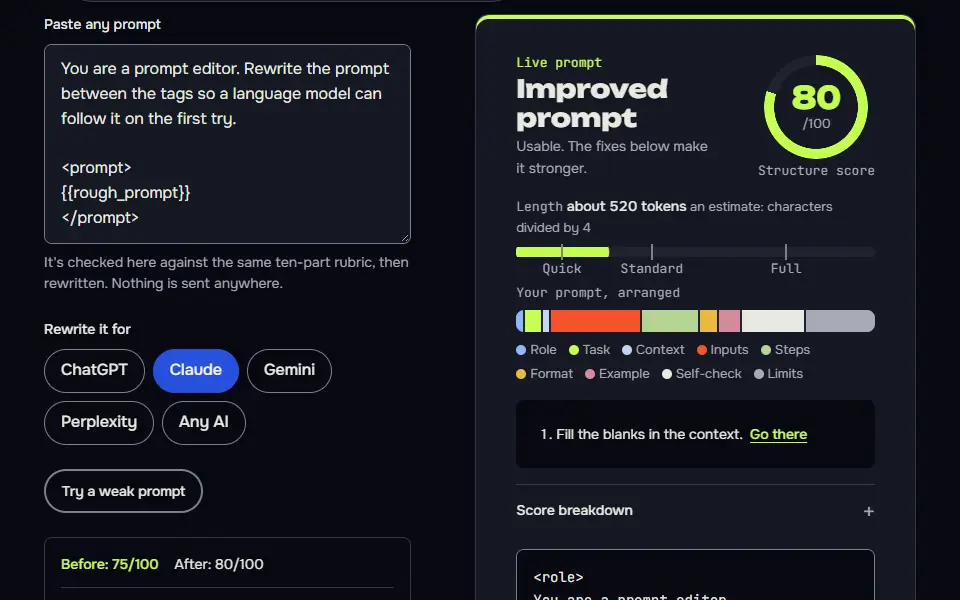
Live prompt
Improved prompt
Paste a prompt. It's scored, then rewritten with the missing parts.
0/100
Open the full Prompt Studio (Loop, Chain and Check).
Before and after, scored by this page's own checker
Yours
25of 100
Write a short but detailed and engaging blog post about coffee. Make it good. Use only the data provided and search the web for latest news.
Optimized
55of 100
You are a senior writer and editor who writes blog posts that people read to the end, in plain, specific language. Write a short blog post about coffee. 1. Open with the point or the...
The ten checks, before and after
- Role0 to 2
- Context0 to 0
- Task1 to 2
- Inputs0 to 1
- Limits1 to 2
- Format0 to 2
- Example0 to 2
- Self-check0 to 2
- Model fit1 to 2
- Length2 to 2
Each check scores 0, 1 or 2. The score measures structure, not answer quality.
Vague words found
Clashing instructions
What changed
- Turned "Make it good." into concrete targets in the steps and the checklist.
- "Detailed" clashed with "short": it's now a target, short but specific, with a word count.
- Dropped the web search line: it clashed with "use only the data".
Sample prompt. Paste your own into the tool and this view switches to it.
The short answer
A prompt optimizer rewrites a rough prompt so the AI gets what it needs: a clear task, context, limits and an output format. Paste yours into the tool on this page, choose ChatGPT, Claude, Gemini or Perplexity, and it scores the prompt on a ten-part rubric, rewrites it and shows a line-by-line diff. It runs in your browser.
How to use it
Paste your prompt
Open the optimizer and paste the prompt as you wrote it, even if it's one rough line. Or load the weak sample to see how it works.
Choose the AI that will run it
Pick ChatGPT, Claude, Gemini or Perplexity so the rewrite uses the layout that model reads best.
Fill the gaps, then check the diff
Answer the boxes it lists, then switch to the line diff to see what changed and why. Keep the edits you agree with.
Run it and check the answer
Copy the result into your AI. Paste the reply into Check mode to get the next message, and save a version if you'll reuse the prompt.
Prompt optimizer examples
Ask an AI to rewrite a prompt without changing its meaning
The bracket marks make every addition visible, and the closing questions replace guessing with your input.
You are a prompt editor. Rewrite the prompt between the tags so a language model can follow it on the first try.

<prompt>
{{rough_prompt}}
</prompt>

Rules:
- Keep my meaning. Don't add facts, names, numbers or claims that aren't in the prompt.
- Add what is missing and mark each addition in [square brackets]: audience, output format, length, and what to do if something is unclear.
- Replace vague words such as "good" or "engaging" with something I can check.
- Write it for {{model}}.

Return three things: the rewritten prompt in a code block, a list of the changes you made, and up to 3 questions only I can answer.
How to use
- Copy it with the button above.
- Fill the blanks in {{double braces}} with your own details.
- Paste it into ChatGPT, Claude or Gemini and send it.
- Then follow up: ask for one change at a time.
Before you run “Ask an AI to rewrite a prompt without changing its meaning” for the first time, the lesson on how to use the prompts this tool writes walks through copying, filling and sending it.
Pressure-test a prompt before you rely on it
Asking for failures first catches problems that a polite rewrite smooths over.
Here is a prompt I plan to reuse:

<prompt>
{{prompt}}
</prompt>

Before I run it, find where it could go wrong. List the 5 most likely failures, such as a missing detail, two instructions that clash, a format the AI could misread, or a place where it would be tempted to make something up. For each one, give the exact line to change and the replacement wording. Then write 3 test inputs I can use to check the fixed prompt: a normal one, an awkward one and one that tries to break the rules.Cut a long prompt down without losing the rules
Listing doubtful cuts keeps you in control, and fixing the step order means the logic survives.
Shorten the prompt below by about {{percent}} percent of its length, compressing the wording inside each rule and step as well as removing repeats. Count the characters before and after and report both with the percentage cut. If you can't reach the target without dropping a rule, say so. Keep every rule, number, name and constraint. Remove repeated ideas, filler openers and anything that only restates another line.

<prompt>
{{long_prompt}}
</prompt>

Show the shorter version first. Then list anything you removed that you weren't sure about, so I can put it back. Don't change the order of the steps.
How the prompt optimizer works
The prompt optimizer works in 4 steps: it scores your pasted prompt, rewrites it for the model you pick, shows a line-by-line diff and lists any facts it needs from you. It's rule-based and private: the rewrite happens in your browser with no AI call, so you get the same result every time. Each check is worth 10 points (a tenth of the score). Image prompts get their own ten checks: subject, setting, style, light, leave out, shape, framing, camera, model syntax and length.
- PasteYour prompt, and the AI that will run it.
- ScoreTen checks add up to a score out of 100.
- Fill gapsBoxes for the missing facts, so the rewrite uses yours.
- RewriteRule-based, with a line diff against your original.
- Next passCheck the reply, then run the loop again.
Most weak prompts fail in the same five places, and the rewrite fixes those:
- Vague words. "Good", "engaging" and "professional" become something checkable, such as a length, a reader reaction or a tone.
- No audience. The AI can't guess who it's writing for.
- No output shape. The rewrite adds a format, such as a bulleted list, a table or a 120-word paragraph.
- No limits. It adds a do-not list and a fallback for when the AI isn't sure.
- Wrong syntax for the model. Claude likes Extensible Markup Language (XML) tags, Gemini likes plain headed sections, and ChatGPT is happy with either.
The tool can't add facts you haven't given it, and it won't pretend it can. It flags the gap for you to fill in, when your prompt needs a price, a date or a quote.
Improve mode scores the prompt you paste on the ten-part rubric, then rewrites it, and it never calls an AI. You paste a prompt, typed or copied from a document or a Portable Document Format (PDF) file, and choose the AI that will run it, so nothing leaves your browser and the tool doesn't invent details. Three parts are worth knowing:
- Fill the gaps. It lists what's missing and gives you boxes to answer, so the rewrite uses your real details.
- Before and after. You can switch to a line diff to see exactly what changed, line by line.
- Try a weak prompt. Load a sample and watch the score move, if you only want to see how it works.
Your prompts can be saved as versions in this browser, and the "Compare with newest" link shows how v2 differs from v1.
Prompt optimizer formula
The prompt optimizer formula is role, context, task, inputs, limits and format, followed by an example and a self-check line, in that order. Add model fit and length and you have the ten parts the tool scores. A part earns 0, 1 or 2 points, so it's missing, thin or complete, and the total is multiplied by 5.
- RoleA named expert for the job.
- ContextThe audience and the goal.
- TaskOne clear job that starts with a verb.
- InputsYour facts, set apart, and a rule for missing ones.
- LimitsA length or count, and what to leave out.
- FormatThe shape of the answer.
- ExampleOne sample of good.
- Self-checkThree or more checks to run before replying.
- Model fitTags for Claude, headings for ChatGPT, plain sections for Gemini.
- LengthNo repeated lines and no filler.
- score out of 100
Every rewrite aims at the lowest part first, and it doesn't touch a part that's already complete. A prompt with a role and a task but no context and no limits shows exactly which parts to add: the tool lists context and limits, in that order.
Prompt optimizer score weights chart
The prompt optimizer score weights chart gives each of 10 checks the same 10 points, so a prompt reaches 100 only when every part is present. Four caps, including no context, thin context, no inputs and garbled text, stop a weak prompt from scoring high. A check scores 0, 5 or 10 points, and the caps apply after the points are added up.
| Cap | What triggers it | Highest score |
|---|---|---|
| No context | No audience and no goal | 55 |
| Thin context | Some context, but incomplete | 80 |
| No inputs | No facts and no rule for missing ones | 70 |
| Garbled text | A sentence that reads broken | 70 |
A score of 85 or more counts as ready to send, and a lower one doesn't mean the prompt won't work. The caps explain why a long, neat prompt can still stall at 55: with no context, the AI has to guess who the answer is for, and the score won't pretend it doesn't.
How do you optimize a ChatGPT prompt by hand?
To optimize a ChatGPT prompt by hand, make 5 edits: name a role, add the context, split the task into steps, set the output format and add a line that tells ChatGPT to ask for missing facts. Do them in that order, since each edit leans on the one before it. It's a manual method, so it works for readers who don't use the tool.
- Name a role. "You're a B2B copy editor" gives ChatGPT a point of view that "help me" doesn't.
- Add the context. Say who'll read the answer and what it's for.
- Split the task into steps. Number them, so no step gets skipped.
- Set the output format. Ask for a table, a list or a 150-word paragraph.
- Ask for missing facts. End with "If a fact is missing, ask me before you write."
That's the order the optimizer checks too, so a hand-edited prompt usually scores well once you paste it in for a second opinion.
How do you run the next optimizer pass?
Run the next optimizer pass by sending the improved prompt through Check mode, fixing what it flags, then using Loop mode once; stop when the score stops rising. That's the whole next-pass routine, and it has one stop rule: stop at 85, the score the studio treats as ready, or when a pass stops raising the score. One rewrite is a draft, and the better habit is a short loop. Check mode looks for missing parts you listed, dashes, stock phrases, unsourced numbers and length, and it writes the next message for you. Send that, and repeat once or twice. For jobs with many rounds, Loop mode adds commands and a state card that keeps the session on track.
Move the prompt into a saved assistant with the system prompt generator, if the same prompt will run in many chats. The Claude prompt generator builds the XML-tag layout from scratch, if you use Claude.
Rule-based prompt optimizer or AI rewrite: which should you use?
Use a rule-based prompt optimizer for private, repeatable structure and an AI rewrite for smoother wording, and many people run the rule-based pass first and an AI polish second. A rubric-based tool like this one is predictable and private, and it tells you why it changed each line. An AI rewrite is more fluent and can restructure your idea, but it may add claims you didn't make. Paste the result into an AI with the "Pressure-test a prompt before you rely on it" example prompt to test it. The meta prompting guide covers asking an AI to write prompts for you.
If your starting point is a picture instead of text, the AI image prompt extractor builds the first draft for you to optimize. Standing instructions behave differently from one-off prompts, so compare yours with what the free system prompt generator builds.
Prompt optimizer FAQ
Still stuck? Build it in Prompt Studio. It'll score each part as you go.
Is this prompt optimizer free?
Yes, this prompt optimizer is free, with no account and no limit on passes. It runs in your browser, your text isn't sent anywhere, and you can save versions locally to compare them later.
Is a prompt enhancer different from a prompt optimizer?
No, a prompt enhancer does the same job as a prompt optimizer: both rewrite a prompt to be clearer, and "enhancer" tools usually call an AI to do it. Optimizer, enhancer, improver and refiner all name the same kind of tool. This one scores ten checks and shows a diff, while an AI rewriter may add claims you didn't make.
What does the prompt optimizer never change?
The prompt optimizer never changes your facts, numbers or names; it marks a missing fact as a question for you instead. You get a box to fill instead of an invented price, date or quote, and the line diff shows each swap so you can undo any you don't want.
How many prompt optimizer passes are enough?
Two prompt optimizer passes are enough for most prompts: a third rarely raises the score, and real answers from the model tell you more. The first pass fixes structure, the second fills what Check mode flags, and 85 is the score the studio treats as ready to send.
Why doesn't a longer prompt always score higher?
A longer prompt doesn't always score higher since length is only 1 of the 10 checks, and padding without inputs or a format loses points elsewhere. The length check takes points off for text over 9,000 characters, for repeated lines and for filler such as "please" and "just". In a test on this site's engine, a 34-character prompt scored 25 and a 2,195-character studio prompt scored 80.
Does OpenAI have a prompt optimizer?
Yes, OpenAI has a prompt optimizer, in part: its developer dashboard has a chat-based tool that rewrites a prompt using current best practices. The dataset-backed version is being deprecated with the Evals platform, which turns read-only on 31 October 2026 and is scheduled to shut down on 30 November 2026. OpenAI's guide warns that an optimized prompt can do worse than the original on specific inputs, so review it. This page works for any chat AI and needs no account or Application Programming Interface (API) key.