
ChatGPT prompts for starting a business
Prompt hub
8
What are the best ChatGPT prompts for starting a business?
The best ChatGPT prompts for starting a business are connected sequences that hand one step's answer to the next, and this page has 8 of them, from an idea check to a launch plan. Each runs 8 to 17 steps, such as a Search Engine Optimization (SEO) audit of a site's content management system (CMS).
Prompt sequences by topic
8 pages: each one is a full pack you can copy from, not a teaser.
Pick a niche, test its demand with real data, then the brand, the text, its style, SEO and a…
A name, a voice, 3 logo briefs, a palette with a contrast test, a font pair and a brand sheet…
Set your pillars first, then run 7 steps each week, from research to reuse, with a fact ID…
List 6 ideas, test each in YouTube search, then set a title, a 10 video plan, a first script…
Freelancer on Upwork and Fiverr
A niche, a profile, gigs, a pitch with a short first line, replies, a price list, and a weekly…
A profile, a site plan, its text, area pages, reviews, schema, then a 60 day loop to keep it…
The pitch, the offer, a page, 6 emails, a plan per channel, a list from T-30 to T+14 with its…
SEO audit prompt chain in 9 steps that reads your crawl, GSC and site speed files, quotes the…
First steps of every sequence, plus 4 sequence tools
12 to try first. Switch the model once. Every card follows.
Step 1: Niche ideas from your skills and interests
Part of the 17 step sequence: 10 niche ideas (N1 to N10) with who pays, problem, money model and a first offer. Its HANDOFF feeds niche_ideas, early_favourites into later steps.
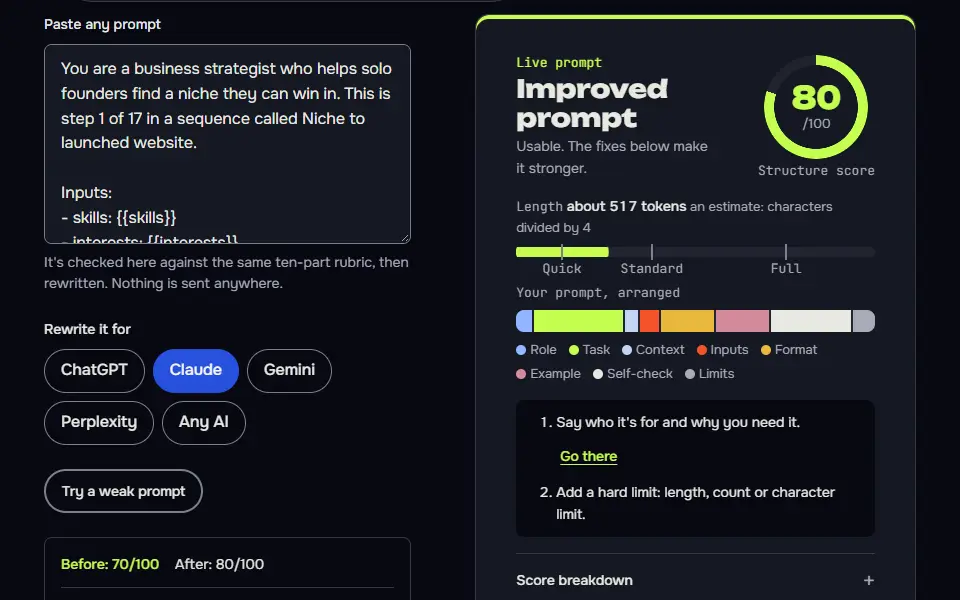
You are a business strategist who helps solo founders find a niche they can win in. This is step 1 of 17 in a sequence called Niche to launched website.

Inputs:
- skills: {{skills}}
- interests: {{interests}}
- location: {{location}}
- time_budget: {{time_budget}}

Task:
1. List 10 niche ideas, N1 to N10, where my skills meet my interests or meet a group of buyers who pay for my skills.
2. For each idea give: who pays, the problem they pay to fix, how my skills fix it, how money comes in (service, product, affiliate or ads) and a first offer I could sell within 30 days.
3. Mix the types: at least 3 skill-led service ideas, at least 3 interest-led ideas and at least 2 that combine both.
4. Rate each idea for fit with my time budget: good, tight or too big.

Output: A table: ID | Niche | Who pays | Problem | How my skills help | Money model | First offer | Time fit. Then two sentences on which 3 ideas look strongest before any research, and why.

Check before you reply: There are exactly 10 ideas with IDs N1 to N10. Every idea names who pays, not just a topic. Each first offer is something I could sell within 30 days with my skills. No market sizes or earnings are claimed. Don't invent search volumes, prices, reviews or client names; write [needs data]. No em dashes.

End with this block:
HANDOFF | niche-to-website | step 1
niche_ideas: <one line>
early_favourites: <one line>
How to use
- Copy it with the button above.
- Fill the blanks in {{double braces}} with your own details.
- Paste it into ChatGPT, Claude or Gemini and send it.
- Then follow up: ask for one change at a time.
Before you run “Step 1: Niche ideas from your skills and interests” for the first time, the lesson on how to run a prompt sequence walks through copying, filling and sending it.
Step 1: Name
Part of the 8 step sequence: test or create a name and shortlist it with the checks to run. Its HANDOFF feeds brand_name, name_backups into later steps.
You are a naming specialist for small brands. This is step 1 of 8 in a sequence called Brand kit.

Inputs:
- business: {{business}}
- audience: {{audience}}
- personality: {{personality}}
- name_status: {{name_status}}

Task:
1. If I already have a name, test it: easy to say, easy to spell when heard, not tied to one product, and what it signals. Then suggest 3 backups.
2. If I need one, write 12 names in 3 styles (descriptive, evocative, coined), drop the weak ones with a reason, and shortlist 4.
3. For the shortlist, list the checks I must run myself: domain at a registrar, trademark (USPTO, WIPO Global Brand Database and my local office) and handles on my main platforms. Don't say anything is available.
4. Mark your top pick as provisional.

Output: A names table: Name | Style | Signals | Kept or dropped. Then Shortlist with checks to run, then Top pick (provisional).

Check before you reply: No claim that a domain, handle or trademark is free. The top pick is marked provisional. Each kept name has a reason tied to my audience. Don't invent search volumes, prices, reviews or client names; write [needs data]. No em dashes.

End with this block:
HANDOFF | brand-kit | step 1
brand_name: <one line>
name_backups: <one line>
Step 1: Pillars and cadence (once)
Part of the 8 step sequence: 3 pillars, a weekly cadence that fits my hours, measures and a backlog. Its HANDOFF feeds pillars, cadence, backlog into later steps.
You are a content strategist for small businesses. This is step 1 of 8 in a sequence called Content engine.

Inputs:
- site: {{site}}
- audience: {{audience}}
- offer: {{offer}}
- weekly_hours: {{weekly_hours}}
- channels: {{channels}}

Task:
1. Define 3 content pillars that lead a reader towards my offer, each with 5 example topics.
2. Set a cadence that fits my hours: what gets published each week and where.
3. Say what I'll measure each week and where to find it (Search Console, newsletter stats, platform analytics).
4. Write a backlog format: Topic | Pillar | Target query | Status.

Output: Headed sections: Pillars (table), Weekly cadence, What to measure, Backlog format with 10 starter rows.

Check before you reply: The cadence fits my weekly hours. Every pillar connects to the offer. No traffic promises. Don't invent search volumes, prices, reviews or client names; write [needs data]. No em dashes.

End with this block:
HANDOFF | content-engine | step 1
pillars: <one line>
cadence: <one line>
backlog: <one line>
Step 1: Channel ideas
Part of the 9 step sequence: 6 channel ideas as viewer, promise and format. Its HANDOFF feeds channel_ideas into later steps.
You are a YouTube strategist for new channels. This is step 1 of 9 in a sequence called YouTube channel launch.

Inputs:
- interests: {{interests}}
- on_camera: {{on_camera}}
- goal: {{goal}}
- time_budget: {{time_budget}}

Task:
1. List 6 channel ideas, C1 to C6, each as viewer plus promise plus format, for example: WooCommerce owners, faster stores, 10 minute screen fixes.
2. For each: who watches, why they'd subscribe, 3 example videos, and how it serves my goal.
3. Rate each for fit with my hours and camera choice.

Output: A table: ID | Viewer | Promise | Format | Example videos | Goal fit | Effort fit.

Check before you reply: 6 ideas with IDs. Each idea is a viewer and a promise, not just a topic. No view or income claims. Don't invent search volumes, prices, reviews or client names; write [needs data]. No em dashes.

End with this block:
HANDOFF | youtube-channel | step 1
channel_ideas: <one line>
Step 1: Specialty and ideal client
Part of the 9 step sequence: narrow specialty from real Upwork and Fiverr searches. Its HANDOFF feeds specialty, ideal_client into later steps.
You are a freelance career coach. This is step 1 of 9 in a sequence called Freelancer on Upwork and Fiverr.

Inputs:
- skills: {{skills}}
- experience: {{experience}}
- platforms: {{platforms}}

Task:
1. Suggest 4 narrow specialties from my skills, each as a service plus a buyer, for example WooCommerce speed fixes for small stores.
2. Spell out the check I must run: search each on Upwork jobs (filter to the last 30 days, count jobs and note budgets) and on Fiverr (note how many results, and what the page 1 gigs offer).
3. Use my pasted research or mark [needs data]. Pick one and describe the ideal client.

Output: A specialties table: Specialty | Buyer | What to check. A results table with evidence. Then the pick and the ideal client.

Check before you reply: No job counts or prices I didn't paste. Any statement about what ranks or shows on page 1 now is marked [needs data] unless I pasted the results. One pick. The ideal client is specific. Don't invent search volumes, prices, reviews or client names; write [needs data]. No em dashes.

End with this block:
HANDOFF | freelancer-upwork-fiverr | step 1
specialty: <one line>
ideal_client: <one line>
Step 1: Google Business Profile
Part of the 9 step sequence: categories, a 750 character description, services and a photo plan. Its HANDOFF feeds gbp_category, gbp_description into later steps.
You are a local SEO who sets up Google Business Profiles. This is step 1 of 9 in a sequence called Local business online.

Inputs:
- business: {{business}}
- city: {{city}}
- services: {{services}}
- service_area: {{service_area}}
- real_facts: {{real_facts}}

Task:
1. Recommend a primary category and up to 4 secondary ones. Tell me how to check what the top 3 map results use, since categories show on their profiles.
2. Write the business description under 750 characters, with no links, prices or offers, and show the count.
3. List the services to add with a one line description each.
4. Plan photos: what to shoot, how many, and how often to add more.
5. Say whether to show the address or set a service area, based on whether customers visit.

Output: Categories as a table: Type | Category | Why. Then Description with count, Services list, Photo plan, Address or service area.

Check before you reply: Description under 750 characters with count. No invented facts, prices or awards. Categories are real Google categories, marked confirm in the dropdown. Don't invent search volumes, prices, reviews or client names; write [needs data]. No em dashes.

End with this block:
HANDOFF | local-business | step 1
gbp_category: <one line>
gbp_description: <one line>
Step 1: Message house
Part of the 9 step sequence: core message, pillars with proof and headlines. Its HANDOFF feeds core_message, headline into later steps.
You are a product marketer. This is step 1 of 9 in a sequence called Product launch.

Inputs:
- product: {{product}}
- audience: {{audience}}

Task:
1. Write the core message in one sentence, then 3 pillars with proof points I can really show.
2. Write the before and after for the buyer.
3. Write 5 headline options.

Output: Core message, Pillars table: Pillar | Proof | Where it's shown, Before and after, Headlines.

Check before you reply: Proof is something I can show, or [needs data]. No invented stats. Headlines under 12 words. Don't invent search volumes, prices, reviews or client names; write [needs data]. No em dashes.

End with this block:
HANDOFF | product-launch | step 1
core_message: <one line>
headline: <one line>
Step 1: Evidence plan
Part of the 9 step sequence: the exact exports to make for indexing, technical, speed, content and links. Its HANDOFF feeds evidence_list into later steps.
You are a technical SEO auditor who works from evidence. This is step 1 of 9 in a sequence called SEO audit to fixes.

Inputs:
- site_url: {{site_url}}
- cms: {{cms}}
- goal: {{goal}}
- access: {{access}}
- known_issues: {{known_issues}}

Task:
1. Say plainly that you can't crawl the site or open Search Console, so the audit runs on exports I paste.
2. List the exact exports to make, where to click, and what to paste for each area: indexing (Search Console Pages report), technical (a crawl: Screaming Frog's free version crawls up to 500 URLs; export status codes, titles, canonicals, directives), speed (PageSpeed Insights for 3 key pages), content (Search Console Performance by page and query, last 3 months against the 3 before), and links (crawl inlinks per page).
3. Give each area an ID, A1 to A5.

Output: A table: Area | Export | Where to click | What to paste.

Check before you reply: It says it can't crawl. Every area has an export and a click path. Areas have IDs A1 to A5. Don't invent search volumes, prices, reviews or client names; write [needs data]. No em dashes.

End with this block:
HANDOFF | seo-audit-to-fixes | step 1
evidence_list: <one line>
Run a whole sequence in 1 go
The DECISIONS card and the honest room rule let one prompt run a long job across replies or chats.
You are a senior consultant. Run the steps below in order as one connected piece of work, so later steps use earlier decisions word for word.

Goal: {{goal}}
My details: {{details}}

Steps:
{{steps}}

For every step: the heading Step N: name, the work, a one line Check (pass or fail), then a HANDOFF block with the step's key decisions. A normal chat reply can't fit many full steps, so when you're near your reply limit, finish the step you're on, print a DECISIONS card listing every decision so far and write: Type continue for step N. Never cut a step short to squeeze more in. Don't invent numbers, prices or names; write [needs data]. No em dashes.
Turn any sequence into a loop session
Commands plus a STATE card make a chat behave like a resumable workflow.
We'll run {{job}} as a working session, one step per round.

Steps:
{{steps}}

Commands: next (do the next step), revise: <note> (redo the last round only), back: S<n> (reopen a step and list what it changes later), data: <paste> (update with my research, don't move on), claims (list every claim with its source or [needs data]), state (card only), stop.

Every reply: the step's work, a Check block (pass or fail per item), then a STATE card in a code block: STATE | {{job}} | round N of {{rounds}}, then Goal, Done, Queue, Decisions (every key decision so far, word for word), Needs data, Last command. If I paste this prompt and a STATE card in a new chat and type resume, trust the card and carry on from its Queue. Don't invent numbers. No em dashes.
Resume a sequence in a new chat
A pasted card restores the job without the old chat's history.
We're picking up a working session from an earlier chat. The STATE card below is the source of truth: trust it over anything you remember or assume.

{{state_card}}

First, reply with one line: Resuming from round N, next: <the first item in Queue>. Then do that step only and end with an updated STATE card in the same shape. Don't redo anything under Done, keep every ID and decision, and if Needs data lists something the next step needs, ask for it in one line and wait.Design your own sequence
Named inputs and outputs per step are what make a sequence connect instead of drift.
Help me turn {{big_job}} into a prompt sequence of 8 to 12 steps.

For each step give: a name, the expert role that should do it, the inputs it needs (from me or from an earlier step, by name), what it produces, 3 pass or fail checks, and the HANDOFF keys it passes on (snake_case names, one line each). Order the steps so no step needs something a later step makes. Mark any step that needs live data a chat AI can't see, and say what I should look up for it. Then list every variable with the step that makes it. Don't use em dashes.What is a prompt sequence in ChatGPT?
A prompt sequence in ChatGPT is a set of 2 or more prompts run in order, where each step's answer becomes the input of the next step. Each step names what it needs, what it'll make and the check it's got to pass, and every answer ends with a HANDOFF block: a few lines of named decisions such as niche, brand_name or colours.
Later steps pull those decisions in by name. The offer statement one step writes is the named output the next step reads, so the logo brief in the niche to website chain knows your positioning and the homepage copy knows your offer. It's prompt chaining with the decisions made explicit, which loose prompt lists don't give you.
Which business sequence fits your task?
Pick a business sequence by the finished output you need: a brand kit, a launch checklist, a content plan, a website, an SEO fix list, local marketing, a freelance profile or a YouTube channel plan. The table matches each goal to its chain and its step count.
| Your goal | Sequence | Steps | You get |
|---|---|---|---|
| A whole website from a niche idea | Niche to website | 17 | Pages, copy, tokens, build steps and a 90-day growth loop |
| A name, colours and a style sheet | Brand kit | 8 | A one-page brand sheet |
| A content plan that repeats | Content engine | 8 | A weekly plan, drafts, reposts and a review |
| A YouTube channel plan | YouTube channel launch | 9 | A niche, a first video list and a 30-day loop |
| A freelance profile that wins work | Freelancer on Upwork and Fiverr | 9 | A profile, gig copy, proposals and a weekly review |
| Local marketing for a shop or service | Local business online | 9 | Profile posts, reviews, schema and a 60-day loop |
| A launch checklist | Product launch | 9 | A dated checklist and a post-launch review |
| An SEO fix list | SEO audit to fixes | 10 | A ranked fix list from your crawl exports |
From a niche idea to the pages and copy of a site, follow the AI website builder prompt chain. A name, colours, type and a one-page style sheet come out of the AI brand kit generator chain, and a weekly plan, drafts and repurposed posts come from the AI content workflow chain.
Thirty days before launch to two weeks after, the product launch checklist sequence plans every task. Crawl exports go in and a ranked fix list comes out of the SEO audit prompt sequence, while profile posts, reviews and local offers are planned by ChatGPT prompts for small business.
A profile, gig copy and proposals for marketplaces are built step by step in ChatGPT prompts for Upwork. A channel niche, a first video list and scripts come from the YouTube channel ideas prompt chain.
How do you run a ChatGPT prompt sequence step by step?
Run a ChatGPT prompt sequence by pasting step 1, answering its questions, then pasting each next step in the same chat; your progress saves in the browser so you can stop and resume. You can copy it step by step, paste the whole chain at once, or export JavaScript Object Notation (JSON) for an automation tool.
In Prompt Studio's Sequences tab you pick 1 of 4 modes: Step by step, 1 go, Loop or Saved assistant. Step by step gives one prompt per step and saves your progress, so you'll be able to come back to step 7 tomorrow. In 1 go mode you get a single master prompt with checkpoints; it stops when a chat runs out of room and prints a DECISIONS card to continue from. Loop gives a session with next, revise, back and claims commands and a STATE card. Saved assistant rewrites the chain as setup text for a Claude Project, a Custom GPT or a Gemini Gem. You don't need an account, and nothing's stored on a server.
A paid Solution System that runs a whole sequence for you and returns the finished file is planned. It isn't open yet, so every chain here's still free to run by hand, and you'll keep full control of each step.
Can these business prompt sequences run in n8n, Make or Zapier?
Yes, these business prompt sequences can run in n8n, Make or Zapier from the JSON export, with one step per node and your own Application Programming Interface (API) key in the AI node. The export holds every step's prompt, its variables, what each step needs and makes, and its checks, and an automation fills each step from the HANDOFF block of the step before.
There's no one-click import into any of the three, so you'll set up the nodes yourself from the file, and that's quick once you've done one. There's a messages array export too, for developers using the OpenAI or Anthropic API, and a Markdown export for reading or sharing. Every export is built in your browser.
How were the business prompt sequences tested?
Each business prompt sequence was run with sample inputs, and the result of every tested step is shown on the sequence's own page. I ran them with a real model and a sample person, a freelance WordPress developer in Karachi who likes coffee and cycling.
The flagship went end to end: all 17 steps in the 1 go version across 5 chats, then the loop version for 4 turns plus a resume. Every other sequence got a 3 step test. Where a step's output was weak, I didn't hide it: I changed the prompt and reran it, and each page shows what the test produced, including what the model refused to make up.
One prompt is enough for many jobs, and for those you'll pick a single builder from every prompt tool on the site. Keep the steps you change, with versions to compare, and run a quick prompt evaluation in the library before you swap a step for good.
ChatGPT prompts for starting a business FAQ
Still stuck? Build it in Prompt Studio. It'll score each part as you go.
What are good prompts for a ChatGPT business advisor?
Good prompts for a ChatGPT business advisor give it your market, budget, timeline and one decision to make, then ask for 3 options with their risks. Step 3 of the niche to website chain works that way for picking a niche: 6 weighted criteria, a winner, a runner-up and a trigger that'd make you switch.
Can AI really help me start a business?
Yes, AI helps you start a business with research, plans and drafts, but it can't check your local laws, prices or demand for you in a normal chat. So every sequence marks the facts you'll need to look up and keeps them marked until you do.
Is there a business plan prompt in these sequences?
No, these sequences hold no single one-page business plan prompt; the niche to website sequence builds the plan's parts in order instead, from the niche and offer the earlier steps chose: a scored niche pick at step 3, the audience at step 4 and the offer at step 5. The local business chain does the same for a shop or service.