
ChatGPT prompts for coding, debugging and tests
A good coding prompt gives ChatGPT the language and version, the error or goal, the smallest code that shows it and the expected behaviour, then asks for the root cause, a minimal diff and one test.
Task prompt
1+3
- ChatGPT
- Claude
- Gemini
The prompt
Fill in the fields and the prompt updates as you type.
Debug or write code with a minimal, checkable fix
Asking for the cause, a minimal change and a test stops the usual failure: a confident rewrite of code that wasn't broken.
Your details
Type in any field. The prompt fills in as you go. Leave one empty? It stays a highlighted blank.
Your prompt
Any model
You are a senior {{language}} engineer helping on an existing project. Help me with the task below.

Environment
- Language and version: {{language}}
- Framework and libraries (versions if I know them): {{stack}}
- What I'm trying to do: {{goal}}

The relevant code only:
{{code}}

What happens now, copied exactly (error message, output or behaviour):
{{problem}}

What I expected instead: {{expected}}

Constraints: {{constraints}}

How to answer
1. Restate the problem in one sentence so I can confirm you understood it.
2. If you need more information to be sure, ask up to three specific questions and stop there. If not, carry on.
3. Give the most likely cause first and one alternative. Tell me how I can tell which one it is.
4. Give the fix as the smallest change that works. Show only the lines that change, with enough code around them to place them. Don't rewrite things I didn't ask about.
5. Give one test or one command I can run to prove the fix works.
6. Mention any side effect, edge case or security risk the change creates.

Rules
- Don't invent functions, flags or library methods. If you aren't sure something exists in my version, say so.
- Keep my naming and style.
- Don't use em dashes or en dashes.
Claude
<role>You are a senior {{language}} engineer helping on an existing project.</role>
<environment>
Language and version: {{language}}
Framework and libraries: {{stack}}
Goal: {{goal}}
Constraints: {{constraints}}
</environment>
<code>
{{code}}
</code>
<problem>
{{problem}}
</problem>
<expected>
{{expected}}
</expected>
<task>
Restate the problem in one sentence. If you need more information, ask up to three specific questions and stop. Otherwise give the most likely cause and one alternative, with a way to tell them apart. Then give the smallest change that fixes it, showing only the changed lines with a little context. Add one test or command to prove it works and mention any side effect or security risk. Don't invent functions or flags, and say so if you aren't sure an API exists in my version. Keep my naming and style. Don't use em dashes or en dashes.
</task>
Copilot
/fix {{problem}}

Context: {{language}}, {{stack}}. Goal: {{goal}}. Expected: {{expected}}. Constraints: {{constraints}}.
Explain the likely cause in two sentences, then show only the lines that change. Don't add new dependencies or rename anything. Add one test I can run to confirm the fix, and say if you aren't sure an API exists in my version.
How to use
- Copy it with the button above.
- Fill the blanks in {{double braces}} with your own details.
- Paste it into ChatGPT, Claude or Gemini and send it.
- Then follow up: ask for one change at a time.
Before you run “Debug or write code with a minimal, checkable fix” for the first time, the lesson on how to use ChatGPT prompts walks through copying, filling and sending it.
What makes a good coding prompt for ChatGPT?
A good coding prompt gives ChatGPT the language and version, the error or goal, the smallest code that shows it and the expected behaviour, then asks for the root cause, a minimal diff and one test. That's 4 inputs and 3 outputs. Paste 20 to 40 lines and the full traceback, and you'll get a fix you can check.
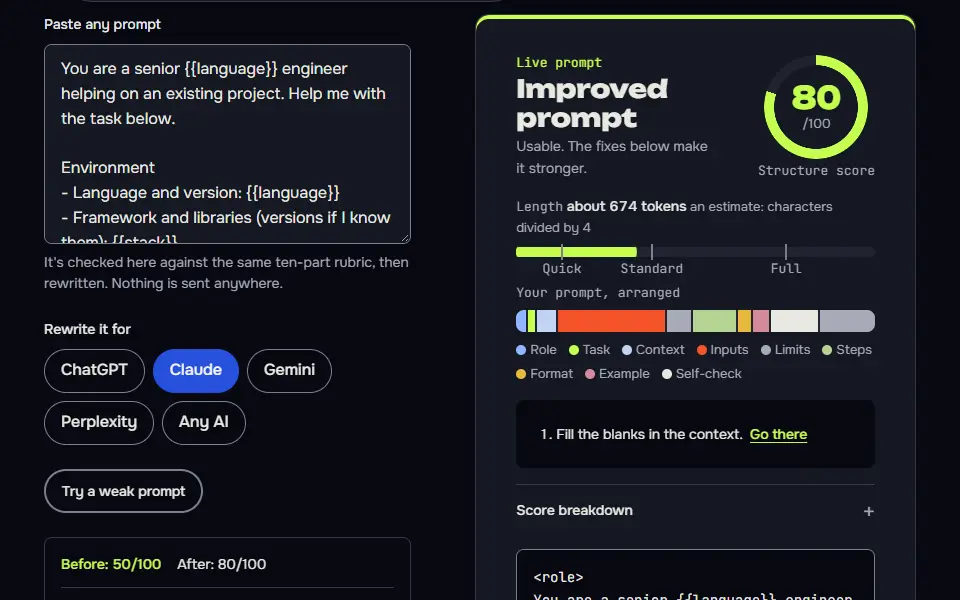
Coding prompts variations
Explain unfamiliar code before you touch it
A guided read before an edit is the cheapest way to keep from breaking code you don't understand yet.
I inherited this {{language}} code and need to understand it before I change anything. Explain it to me as a colleague who has a few minutes.

Code:
{{code}}

What I need to do with it afterwards: {{next_step}}
My level: {{level}}

Answer in this order
1. What it does, in two sentences.
2. A walk-through in the order the code runs, one short line per step. Quote the line you mean.
3. Inputs, outputs and any side effects such as files, network calls, global state or database writes.
4. Anything fragile or surprising, with the line number or quote. Don't guess at problems that aren't visible in the code.
5. Three questions I should ask the previous author, or check in the repo, before changing it.

Don't suggest rewrites yet. If a name or function is defined elsewhere and I haven't pasted it, say what you'd need to see instead of guessing. Don't use em dashes or en dashes.
Refactor without changing behaviour
Listing the behaviour first and flagging every risky line turns a refactor into something you can actually review.
Refactor the {{language}} code below to {{refactor_goal}}, without changing what it does.

Code:
{{code}}

Tests or examples that must keep passing (paste them, or describe the behaviour):
{{tests}}

Process
1. List the behaviours you must preserve, including error handling and edge cases you can see in the code.
2. Propose the refactor as a numbered list of small steps. Each step must leave the code working.
3. Show the final code. Mark every place where behaviour could differ, even slightly, with a comment starting REVIEW.
4. Say which of my tests would catch a mistake in your refactor, and which behaviours have no test.

Don't add features, rename public functions or change dependencies. Don't use em dashes or en dashes.
Build a feature in rounds with tests first
Planning, tests, then one small step at a time is how experienced developers use AI without losing control of the code.
You are a senior {{language}} engineer pair-programming with me. We'll build one feature over several rounds, one step per round, and you keep a state card so nothing gets lost.

Rounds
Feature: {{feature}}. Stack: {{stack}}. Constraints: {{constraints}}.
1. Restate the feature, list the open questions you need answered, and propose a plan of 4 to 6 steps. Then wait for my go.
2. Write the tests or acceptance checks first, as code I can run.
3 and later. Implement one step per round. Show only the changed code and the command to run.
Final round (when I type review): list risks, missing tests, and anything I should read twice. No new code unless I ask.

Commands (I'll type these)
next: approve this round and do the next one.
revise: <note>: redo the last round with my note. revise N: <note>: redo round N only. Change nothing else.
status: show the state card only.
review: run the final round.
ran: <paste output>: read my test or error output and decide what to change.
stop: show the state card and stop.

Every reply, in this order
1. This round's work.
2. Check, one line, pass or fail per item: only code for this step; no invented APIs; matches my constraints; a command or test to verify; nothing outside the plan changed.
3. The state card, in this shape:
```
STATE | feature build | step N of M
Goal: <feature>
Done: <steps finished>
Next: <next step>
Files touched: <list>
Open questions: <list>
Decisions: <D1, D2 ...>
```
4. One line telling me what to type next.

Rules
If you're unsure an API exists in my version, say so and wait. Keep each round small enough to run and check. Don't use em dashes or en dashes. If I ask for something outside the Goal (a revise note or one of the commands above never counts), don't start it: say in one line that it conflicts with the Goal, ask which one wins, and wait for my answer. Never change an approved round unless I type revise with its number. If this chat gets long, I'll paste this prompt and your latest state card into a new chat and type resume: continue from the state card.
What a good answer looks like
A good answer to “Debug or write code with a minimal, checkable fix” looks like a finished piece in the format that prompt asks for, built only from your details. Yours will follow your own details.
Most likely cause: order_by(Order.created_at) sorts ascending by default, so the oldest order comes first. This matches your symptom exactly (got id 7, the oldest, instead of 42). Alternative: created_at is not actually reliable as a "newest" marker, for example if it is null, or if the test creates orders with identical or out-of-order timestamps. In that case descending order would still fail or be unstable. Only the order_by line really changes: Order.created_at becomes Order.created_at.desc(). .desc() is a standard SQLAlchemy column method and is available in 2.0.
Notes for each model
ChatGPT
use the main prompt as it is. For long code, paste it in one message so the question isn't split from the code.
Claude
the tagged version keeps code, error and instructions apart, which helps with big pastes.
GitHub Copilot Chat
it can see your open files, so the short version with a slash command such as
/fixis enough. Add your constraints in the same message.All models
they can't run your code. The test or command in the answer is for you to run, so don't assume it passes.
Which coding prompt version fits your task?
The coding prompt version that fits your task is the debug prompt for an error, the safe refactor prompt for finished code, the Copilot version inside your editor and the test-first loop for a new feature. The pack holds 4 prompts: the main prompt plus 3 variations.
- Error or a new function: the main prompt, which asks for the cause, the smallest change and a test.
- Code you didn't write: the explain-first version.
- Working code you want to tidy: the safe refactor version, which keeps behaviour the same.
- A whole feature: the loop version. It plans, then you write the test, run it and watch it fail, write the code and rerun, one small step at a time.
For the thinking behind these prompts, read prompt engineering for developers. The website prompt writes the brief first, so it suits a site you're building from scratch. More task prompts live in the ChatGPT prompts hub. Don't mix versions in one chat, since it'll blur the instructions.
How do you stop ChatGPT inventing functions in code?
To stop ChatGPT inventing functions, name the library version, paste the relevant docs lines and tell it to say when it isn't sure a function exists. An invented function or library call is the most common way an AI coding answer fails, and it reads as confident as a real one.
- Name the version. Write
SQLAlchemy 2.0, not just the library, since methods change between releases. - Paste the docs. Add the few lines of official documentation for the call you're unsure about.
- Ask for honesty. End with a rule such as: if you aren't sure a method exists in my version, say so.
Then run the code. A method name you don't recognise belongs in the official docs, where the real signature lives, before you rely on it.
What code shouldn't go into a ChatGPT coding prompt?
Application Programming Interface (API) keys, passwords, tokens, customer data and code your employer forbids sharing shouldn't go into a ChatGPT coding prompt; replace them with placeholders such as YOUR_KEY.
- Connection strings and private links with credentials in them.
- Real names, emails or order data from a live database.
- Licensed or client code you haven't got permission to share.
Check your employer's rules on AI tools and use the one your company approves. Don't paste first and ask later. That's the safest habit, and it isn't hard.
Coding prompts in Claude and GitHub Copilot
Coding prompts run in Claude with the code inside tags and in GitHub Copilot as a slash command in the editor chat; the inputs and the cause, diff and test outputs stay the same.
Claude keeps the code, the error and the instructions apart when they sit in their own tags, which helps with a big paste. Copilot Chat sees your open files, so the short version with a slash command such as /fix is enough, with your constraints in the same message. None of them can run your code, so the test in the answer is yours to run.
Shipped the feature and want to tell people? The ChatGPT prompt for a LinkedIn post turns a release note into a post. Docs and READMEs read better after one pass with the ChatGPT prompt for human writing.
Coding prompts FAQ
Still stuck? Build it in Prompt Studio. It'll score each part as you go.
Is there a coding prompt generator on this site?
Yes, there is a coding prompt generator on this site: paste a rough request into the prompt optimizer and it rewrites it with context, limits and an output format, then lists the facts it still needs from you, such as the language and version.
Which runs coding prompts better, ChatGPT or Claude?
Both ChatGPT and Claude run these coding prompts; the better one is the model that gives the smaller, correct diff on your own bug. Run the same prompt in each once and keep the one whose fix passes your test.
Do these coding prompts work for Python?
Yes, these coding prompts work for Python and any other language. Fill in the language and version field, for example Python 3.12, and add the framework versions you use.
Is it safe to paste my code into an AI chat?
No, it isn't safe to paste your code into an AI chat if it holds secrets or private customer data. Strip keys and personal details first, cut the code down to a small example that shows the bug, and check your employer's AI policy before you paste company code.