
Batch prompting: one prompt, many items, same format
Free prompt courseLesson 21 of 226 minVideoGo to the lesson
Guide
3 min
- Plain English
The short answer
Batch prompting means giving the AI one set of instructions and a numbered list of items, then having it process every item the same way, in order, in one reply. It saves time on repetitive jobs like product descriptions or meta descriptions. Keep batches small enough to check, and ask for a per-item check.
What is batch prompting in a chat?
Batch prompting in a chat is one prompt with a numbered list of items, processed one at a time with the same steps and format, in one reply. It's the step after a template. A prompt templates guide shows one prompt with blanks for one item; a batch fills those blanks for every item on a list at once, and that's the whole difference.
The term has a second, research and Application Programming Interface (API) sense. There, batch prompting means many questions per model call to cut cost; Cheng and colleagues tested it in 2023 and found accuracy held up for small batches. This lesson is about the chat sense, the one you can use today without writing code.
How do you write a batch prompt?
To write a batch prompt, number the items, add "one at a time, in order, don't skip or merge", give the per-item steps once, fix the format and add a check column. A batch repeats one step over many items; a job whose steps build on each other is a different shape, and our multi-step prompt sequences run those in 8 to 17 steps, each ending with a HANDOFF block the next step reads.
- Numbered items. Put them in their own section, one per line, so the AI can't merge any.
- One-at-a-time rule. "One at a time, in order, don't skip or merge." It's the line that stops the most common batch failure, a skipped or merged item.
- Per-item steps. Say once what each output must contain, so you don't repeat it per item.
- Fixed format. A table with one row per item is easy to check and paste into a spreadsheet; JavaScript Object Notation (JSON) suits code.
- Check column. Ask for a count or a pass mark when there's a limit, such as characters, so you can see each result against it.
Don't worry if your first batch isn't perfect. You'll usually spot the problem in row one, and it's quicker to fix the prompt and rerun than to patch the output by hand.
Batch prompting before and after
The same request, asked two ways. Read the second one slowly. Each line does a job.
Write meta descriptions for my dog lead, toothbrushes and tea towel.
Batch prompting: the rewrite, ready to fill in
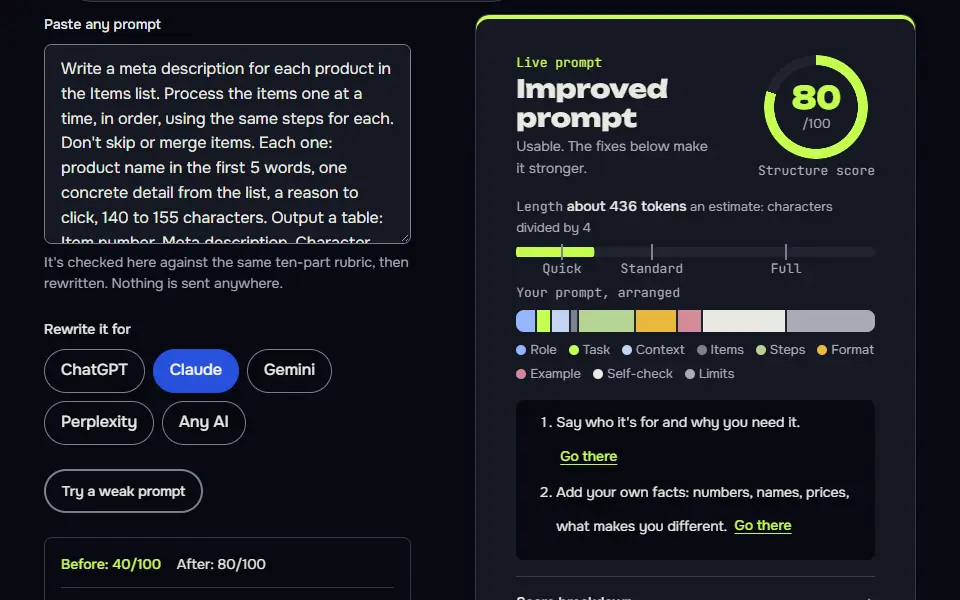
Write a meta description for each product in the Items list. Process the items one at a time, in order, using the same steps for each. Don't skip or merge items. Each one: product name in the first 5 words, one concrete detail from the list, a reason to click, 140 to 155 characters. Output a table: Item number, Meta description, Character count.

Items:
{{items}}How to use
- Copy it with the button above.
- Fill the blanks in {{double braces}} with your own details.
- Paste it into ChatGPT, Claude or Gemini and send it.
- Then follow up: ask for one change at a time.
Before you run “Batch prompting: the rewrite, ready to fill in” for the first time, the lesson on how to use AI prompts step by step walks through copying, filling and sending it.
Why it works
The first version invites different lengths and styles, and maybe one merged answer. The second fixes the order, the steps and the limit for every item, and the count column lets you check each row in a glance.
Batch prompting examples
Batch template for any list
The Check column makes the AI test every row, and makes it easy for you to scan.
Task: {{task}} for each item in the Items list.

Items:
{{items}}

Process the items one at a time, in order, using the same steps for each. Don't skip or merge items.
For each item: {{steps}}
Limits: {{limits}}. Don't invent details that aren't in the list.

Output a table with one row per item: Item number, Result, Check (does it meet the limits? yes or no).
Batch rows pasted from a spreadsheet
Copying the first column back lets you paste the results straight into the right rows.
Below are rows copied from a spreadsheet, one per line, with columns separated by tabs: {{columns}}.

"""
{{rows}}
"""

For every row, in order, write {{output}} using only that row's data. Return a table with the first column copied exactly from the input so I can match rows, then your result. If a row is missing data you need, write needs data in the result for that row instead of guessing.
Lesson 21 of 22Loops and agents6 min
Lesson: Batch prompting
Give one set of instructions and a numbered list, and ask the AI to process every item the same way, in order, with a check column. It turns repetitive jobs into one prompt you can reuse.
Use it when
- You need the same kind of output for every item: products, pages, emails, rows.
- Every item follows the same rules and limits.
- You want results in a table you can paste into a spreadsheet.
Skip it when
- Each item needs a different approach.
- A step depends on the result of the last one: chain the prompts instead.
- You have hundreds of items: use an Application Programming Interface (API) batch job or a spreadsheet formula.
## Role
You are an e-commerce copywriter who writes short, honest meta descriptions.

## Task
Write a meta description for each product in the Items list.

## Items
1. Waxed cotton dog lead, 1.5 metres, brass clip, olive green
2. Bamboo toothbrush, pack of 4, soft bristles, compostable handle
3. Linen tea towel, 50 by 70 cm, pre-washed, natural colour

## How to work
Process the items one at a time, in order, using the same steps for each. Don't skip or merge items.
For each item: name the product in the first 5 words, include one concrete detail from the list, and end with a reason to click.

## Limits
Each description is 140 to 155 characters, counted with spaces. Don't invent materials, prices or claims that aren't in the list.

## Output format
A table with three columns: Item number, Meta description, Character count.

## Checklist
- All 3 items are done, in order.
- Every description is 140 to 155 characters.
- No detail appears that isn't in the Items list.
| Item number | Meta description | Character count |
|---|---|---|
| 1 | Waxed cotton dog lead in olive green, 1.5 metres long with a brass clip. Check the full details and see if it suits your dog's everyday walks. | 142 |
| 2 | Bamboo toothbrush pack of 4 with soft bristles and a compostable handle. Take a look and see how easy it is to swap your old brush for this pack. | 145 |
| 3 | Linen tea towel, 50 by 70 cm and pre-washed, in a natural colour. See the full details, check the size and find out if it suits your kitchen. | 141 |

All three are in order, each is within 140 to 155 characters (counted by hand, spaces included), and each uses only details from your list.
What to notice: We counted every description ourselves: 142, 145 and 141 characters, which is exactly what the model reported, and all 3 are inside 140 to 155. Every detail comes from the list. The weak spot is sameness: all three close with a similar "see the full details" line.
Try it in Prompt StudioOpens the studio with the Batch technique already selected.
Quick check: 3 questions
Practice: write your own
Write a batch prompt for three to five items of your own: products, pages, emails or rows. Number the items, give the per-item steps once and set a limit you can check.
Prompt Studio's rubric scores it right here. Nothing's sent anywhere.
Your progress is saved in this browser only. No sign-up.
Where do batch prompts go wrong?
Batch prompts go wrong when a long list drifts: the last items get shorter or vaguer, or start repeating each other's phrasing. Batch drift doesn't hit every row equally; it shows up in later items first. Our test shows the milder kind. All 3 meta descriptions met the 140 to 155 character limit, and the counts the model reported (142, 145 and 141) matched our own recount exactly. Each one kept its measurements in both units, such as the tea towel's 50 by 70 cm (about 20 by 28 in). The weak spot was repeated phrasing: every description closed with a similar "see the full details" line. A rule such as "vary the closing line" fixes that, and you'll see the change in one rerun.
The clear point to leave chat is hundreds of items, since a chat window isn't the right tool for them. Move to a spreadsheet formula or an API batch job with the same prompt, and keep the item numbers so no result loses its row.
How many items should go in one batch prompt?
One batch prompt should hold 3 to 5 items at first, then grow in steps while you read the last items closely. Quality tends to slip at the end of a long list, so that's where you'll look first. Split the list as soon as the later rows get vaguer than the early ones.
Once a batch works, a second pass can grade it for you: a self-critique prompt has the model score each row against your checklist and rewrite the rows that fail. It's the next lesson in the free prompt course.
If a card's blanks confuse you, how to use these prompts covers them before you scale up.
Batch prompting FAQ
Still stuck? Build it in Prompt Studio. It'll score each part as you go.
Is chat batch prompting the same as API batching?
No, chat batch prompting isn't the same as API batching: one runs a list in a single reply, the other sends many questions in one model call to save cost. The chat kind doesn't need code. The API kind's a developer tool, and a 2023 study found it holds up for small batches.
How do I stop batch prompt outputs sounding the same?
Stop batch prompt outputs sounding the same by adding a rule to vary opening and closing lines and giving each item one detail that must appear, such as a size like 50 by 70 cm. In our test every description met its limit but ended with a similar line, which is the usual batch habit.
When is a chat window the wrong tool for batch prompting?
A chat window is the wrong tool for batch prompting when the list runs to hundreds of items; use a spreadsheet formula or an API batch job with the same prompt. A chat reply can't hold that many rows, and you won't read them all closely anyway.