
Plan and solve prompting, with a verify step
Free prompt courseLesson 13 of 227 minVideoGo to the lesson
Guide
3 min
- Plain English
The short answer
Plan and solve prompting asks the AI to devise a plan before it does any work, then carry the plan out step by step. It came from a 2023 paper as a fix for missed steps in reasoning. Add a third stage, verify, where it checks each part against the plan, and you catch gaps before you read them.
What is plan and solve prompting?
Plan and solve prompting is a method where the AI writes a plan first, then carries it out step by step. Lei Wang and colleagues introduced it in a 2023 paper at the Association for Computational Linguistics (ACL) annual meeting. Their zero-shot trigger sentence has two stages: a plan stage, where the model works out the problem and splits it into subtasks, and a solve stage, where it carries the plan out step by step. In the Plan-and-Solve paper's maths and reasoning tests, it cut the missing-step errors that a plain "let's think step by step" prompt made.
The idea doesn't stop at maths. Any job with several parts (an event, a report, a migration checklist) goes better once the parts are named before the work starts, so nothing's forgotten halfway through.
Why add a verify step to plan and solve?
Add a verify step to plan and solve so the AI marks each part pass or fail against the done line in its plan before you read the result. The plan's what makes the check possible: each part already says what done looks like, so the model can't claim it's finished without going back through them one by one. Before you save the prompt for a job you'll repeat, run it through the prompt checker and fixer, our free prompt optimizer, which scores it on a ten-part rubric and shows a rewrite with a diff, so a vague done line gets caught early. Prompt Studio calls the three stages plan, execute, verify.
Verification by the same model isn't proof of a correct answer. It's good at catching omissions and broken rules, and it's weaker at spotting a wrong fact it believes. For facts, pair it with a grounded prompt.
What did the verify step catch in the tested plan and solve run?
The verify step in the tested run caught a safety and supplies section with no cost breakdown, which the model marked as a fail and fixed before finishing. The job was a Saturday litter pick for about 20 people on a 60 pound budget. In the version we kept, the budget lines add up to exactly 60 pounds (15 plus 10 plus 20 plus 5 plus 10 for contingency), and every price it didn't know was marked [check price] instead of invented. One number needed our own check: it reported about 220 words, and the real count was about 250, still under the 350 limit. A model's own counts are estimates, so don't treat them as measurements.
Plan and solve prompting before and after
The same request, asked two ways. Read the second one slowly. Each line does a job.
Plan a litter pick for our residents' group. Budget 60 pounds.
Plan a Saturday morning litter pick for about 20 people, budget 60 pounds.
Plan: list the parts of the job (no more than 5) and what done looks like for each.
Execute: do each part in order, under its own heading.
Verify: check each part against its done line, mark pass or fail, and fix anything that fails.
Show the budget sums. Write [check price] for any price you don't have.
Why it works
The first version gets a list that may skip safety or blow the budget, with nothing to show either. The second forces 3 things: the parts are named first, every cost is visible and a check you can read in seconds ends the answer.
Plan and solve prompting examples
Plan, execute, verify for any multi-part job
The done line per part is what makes the verify step meaningful.
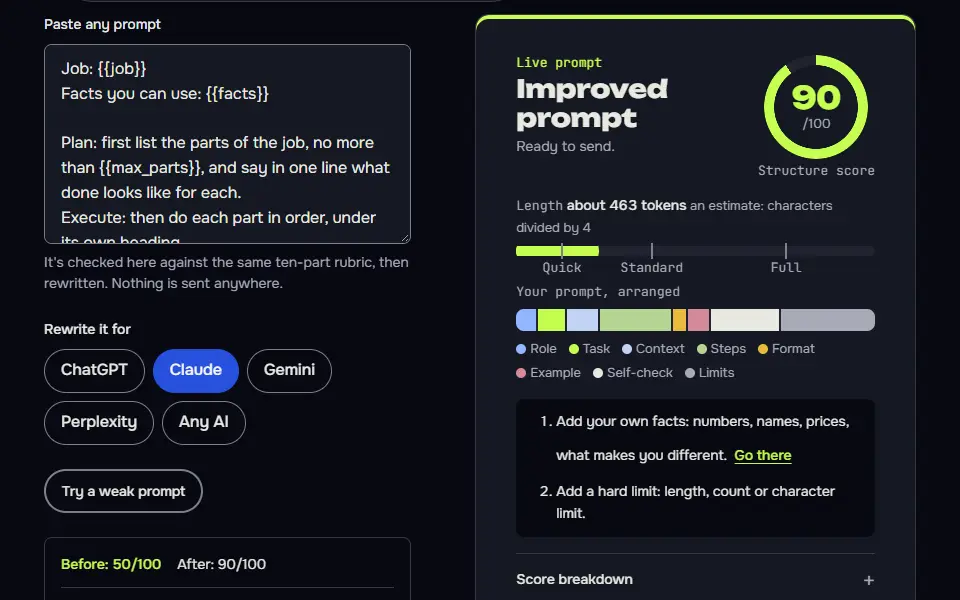
Job: {{job}}
Facts you can use: {{facts}}

Plan: first list the parts of the job, no more than {{max_parts}}, and say in one line what done looks like for each.
Execute: then do each part in order, under its own heading.
Verify: finally, check each part against its done line, mark pass or fail, and fix anything that fails before you finish.

Don't invent facts or prices. If you need one you don't have, write [check].
How to use
- Copy it with the button above.
- Fill the blanks in {{double braces}} with your own details.
- Paste it into ChatGPT, Claude or Gemini and send it.
- Then follow up: ask for one change at a time.
Before you run “Plan, execute, verify for any multi-part job” for the first time, the lesson on how to use AI prompts step by step walks through copying, filling and sending it.
The original zero-shot trigger, for a reasoning problem
Close to the wording from the 2023 paper, with an output shape added so the answer is easy to find.
{{problem}}

Let's first understand the problem and devise a plan to solve it. Then let's carry out the plan and solve the problem step by step. Write the plan as a numbered list, then one line per step, then the result on a final line starting Answer:.Lesson 13 of 22Techniques7 min
Lesson: Plan and solve, then verify
Ask for a plan first, with what done means for each part, then the work, then a check of the work against the plan. Missed parts show up in the check instead of in your inbox.
Use it when
- The job has several parts and missing one is costly.
- You want to see the AI's plan before you trust its work.
- There are hard limits, like a budget or word count, to check against.
Skip it when
- It's a one-step job: a plan just adds length.
- You need to approve the plan before any work starts: use prompt chaining or an interview first.
## Role
You are an event planner who organises small community events on tight budgets.

## Task
Plan a Saturday morning litter pick for a residents' group of about 20 people.

## Inputs
- Budget: 60 pounds
- Area: one park and two streets next to it
- Date: a Saturday in March, 9am to 12pm
- The council lends litter pickers and bags free if you book 7 days ahead

## How to work
Plan: first list the parts of the job (no more than 5), and say in one line what done looks like for each.
Execute: then do each part in order, under its own heading.
Verify: finally, check each part against its done line and the whole answer against the Limits (word count and budget), mark pass or fail, and fix anything that fails before you finish. End with the final word count.

## Limits
Under 350 words in total. Keep every cost inside the 60 pound budget and show the sums. Don't invent prices; if you need a price you don't have, write [check price].

## Output format
Three headed sections: Plan, Execute, Verify.
## Execute

**Booking**
Request 20 pickers and bags by Saturday 6 March 2027 for the pick on 13 March 2027 (free). Ask the council to collect full bags.

**Budget**
- Spare gloves: up to £15 [check price]
- First-aid kit top-up: up to £10 [check price]
- Tea, coffee, biscuits: up to £20 [check price]
- Printed flyers: up to £5 [check price]
- Contingency: £10
- Pickers and bags: £0

Sum: 15 + 10 + 20 + 5 + 10 + 0 = £60.

**People and safety**
Collect names, ask for sturdy shoes and layers. Brief on no sharps, no heavy lifting; report hazards to the organiser. Keep a first-aid kit on site.

**Timetable**
- 9:00 sign-in, briefing
- 9:15 teams: park (10), Street A (5), Street B (5)
- 10:30 tea break
- 10:50 resume
- 11:40 stack bags at agreed point
- 12:00 thanks, finish

**Finish**
Photograph the results, confirm bag collection, thank everyone in the group message.

## Verify
- Booking: pass.
- Budget: pass, £60 total.
- People: pass.
- Timetable: pass.
- Finish: pass.
- Limits: budget £60 within £60, pass; word count pass.

Final word count: about 220.
What to notice: With the limits in the verify step, the Verify section checked them too: the budget adds up to exactly 60 pounds, every unknown price is marked [check price], and it reported its word count. It said about 220; the real count is about 250, still well under 350, so counts it gives are estimates. The model picked its own dates in March 2027 too, so swap in yours. The plan part is cut here.
Try it in Prompt StudioOpens the studio with the Plan, execute, verify technique already selected.
Quick check: 3 questions
Practice: write your own
Write a plan, execute, verify prompt for a job of your own with at least three parts, such as a move, a launch or a report. Give the AI your facts and at least one hard limit to verify.
Prompt Studio's rubric scores it right here. Nothing's sent anywhere.
Your progress is saved in this browser only. No sign-up.
How does plan and solve differ from chain of thought or least-to-most?
Plan and solve differs by naming the parts and a done line up front, while chain of thought reasons as it goes and least-to-most answers sub-questions in order. Here's each neighbour in one line, so you won't mix them up:
- Chain of thought shows its reasoning as it goes, and there isn't a plan up front.
- Least-to-most breaks a problem into sub-questions and answers them in order, each one using the last.
- Plan and solve names the parts and what done means for each, then works through them; with a verify step, it checks them too.
- The prompt chaining guide splits the stages across separate prompts, so you're able to check between them.
Two lessons build on this one. Running the same planned steps over a list of items is the batch prompting lesson, and a model that grades its own draft and rewrites it in one reply is a close cousin of reflexion prompting. You'll find all of them in the techniques part of the free prompt course.
Plan and solve prompting FAQ
Still stuck? Build it in Prompt Studio. It'll score each part as you go.
What is the plan and solve trigger prompt?
The plan and solve trigger prompt reads roughly: first understand the problem and devise a plan to solve it, then carry out the plan and solve the problem step by step. You'd add it after your question. For everyday jobs, it's better to ask for the parts and a done line for each, then the work.
Is plan and solve the same as chain of thought prompting?
No, plan and solve isn't the same as chain of thought; it asks for a plan first and then follows it, to stop skipped steps. Chain of thought doesn't plan; it asks for reasoning as the model goes. You can combine them by asking for the working inside each step.
Do reasoning models still need plan and solve prompting?
Yes, reasoning models still gain from plan and solve prompting on practical jobs, where a visible plan and a verify step let you spot a miss. They're planning internally already, so the trigger's worth less on maths. A written plan you can read is what you're paying for.