
ChatGPT, Grok and Copilot prompt guide
Guide
4 min
- Plain English
The short answer
A good ChatGPT prompt follows the same basics as any chatbot prompt: a clear goal, the context that matters, limits and a stated format. The differences aren't big. ChatGPT likes outcome-first prompts, Copilot works from goal, context, expectations and source, Perplexity searches the web from your wording, and reasoning models like Grok and DeepSeek need little step-by-step coaching.
What works in every ChatGPT, Copilot and Grok prompt?
Every ChatGPT, Copilot and Grok prompt works better with a clear goal, the context that changes the result, limits and a stated format. Every vendor's docs repeat that core in some form: say what you want, share the facts that change the answer, set the two limits that matter (such as length and audience) and name the output.
That's why prompts travel well between tools, and you'll rarely need a full rewrite. A ChatGPT prompt that leads with the outcome and names a format is already most of the way to working in Copilot or Grok.
How does each chatbot read a prompt differently?
Each chatbot reads a prompt differently in what it rewards: ChatGPT outcome-first requests, Copilot goal and source, Perplexity search-ready wording, Grok and DeepSeek short reasoning tasks. The table compares 5 chatbots from each vendor's own docs. It isn't a ranking, and it doesn't say one tool's better.
Comparison table
| Chatbot | What it rewards | Where it breaks |
|---|---|---|
| ChatGPT | Start with the result you want, then add only the detail that changes the answer. OpenAI's prompting page says a short prompt is often enough and your first prompt doesn't need to be perfect. | Over-long scaffolding. Ask for citations when currency matters. |
| Microsoft Copilot | Microsoft's four-part model: goal, context, expectations, source. The goal is the core part; the rest sharpen it. | Vague sources. Say which file or material to use. |
| Perplexity | Specific wording, since your text drives the first web search. | Pasting full example answers, which can pull the search toward the example's topic. |
| Grok | For reasoning models, state the task, constraints and output format directly, per xAI's best-practices page. | Editing earlier turns in an Application Programming Interface (API) conversation, which xAI says breaks the prompt cache. |
| DeepSeek | Direct problem statements with a stated output format. | Few-shot examples on its reasoning models. Third-party integration guides, such as the R1 guide in Vercel's AI Software Development Kit (SDK), say they can hurt quality. |
Gemini sits close to ChatGPT: Google's prompting strategies page asks for clear instructions, context and a named format, so Gemini prompt tips mostly repeat the shared core. Sources: ChatGPT prompting, Microsoft Copilot, Perplexity, xAI, Vercel AI SDK on R1, Google.
How do you prompt Perplexity and other web-search chatbots?
You prompt Perplexity and other web-search chatbots by writing the request as a precise search query with names, dates and the source type you trust. Perplexity and the web modes of ChatGPT and Copilot run a web search from your wording, so the words pick the pages. A loose question gets loose sources, and you won't always notice. Three habits help:
- Name the topic, region and time frame, such as "UK, 2026, official statistics".
- Ask for a set number of results and their citations.
- Tell it what to do when nothing matches. Search returns near-misses, such as a different year or company, and you'd prefer to be told than handed one as an answer.
How do you prompt Grok, DeepSeek and other reasoning models?
You prompt Grok, DeepSeek and other reasoning models with a short goal and success criteria, without step-by-step coaching. A reasoning model thinks before answering, so short prompts work: OpenAI says asking its reasoning models to "think step by step" isn't necessary and that they often don't need few-shot examples.
Put your effort into the task, the limits and the output shape (bullets, a table or JavaScript Object Notation (JSON)), and skip the coaching; it's already doing that part, and extra steps don't make it smarter. The second worked prompt shows the same task trimmed for a reasoning model, and the third rewrites it for a search-based one.
How do you save chatbot prompt rules so every chat follows them?
To save chatbot prompt rules for every chat, put your standing preferences into the assistant's custom instructions instead of each prompt. In ChatGPT that's the custom instructions field; once your tone, audience and format rules live there, each prompt only has to carry the task. The custom instructions generator turns a rule list into text you can paste straight in.
You'll only want rules that hold for every chat, such as "British spelling" or "tables over long paragraphs". A rule that's only true for one project belongs in that prompt, or it'll leak into chats where it doesn't fit.
ChatGPT prompts guide before and after
The same request, asked two ways. Read the second one slowly. Each line does a job.
Tell me about electric cars.
Goal: help me decide whether to switch from a petrol car to an electric one in the next year. Context: I drive about 8,000 miles a year, mostly short trips, and I park on the street. Expectations: a short pros and cons table, then three questions I should answer before buying. Source: use only well-known, widely reported facts and say when you're unsure.
Why it works
The after version is the same request in Microsoft's goal, context, expectations, source form, and it works as well in any chatbot.
ChatGPT prompts guide examples
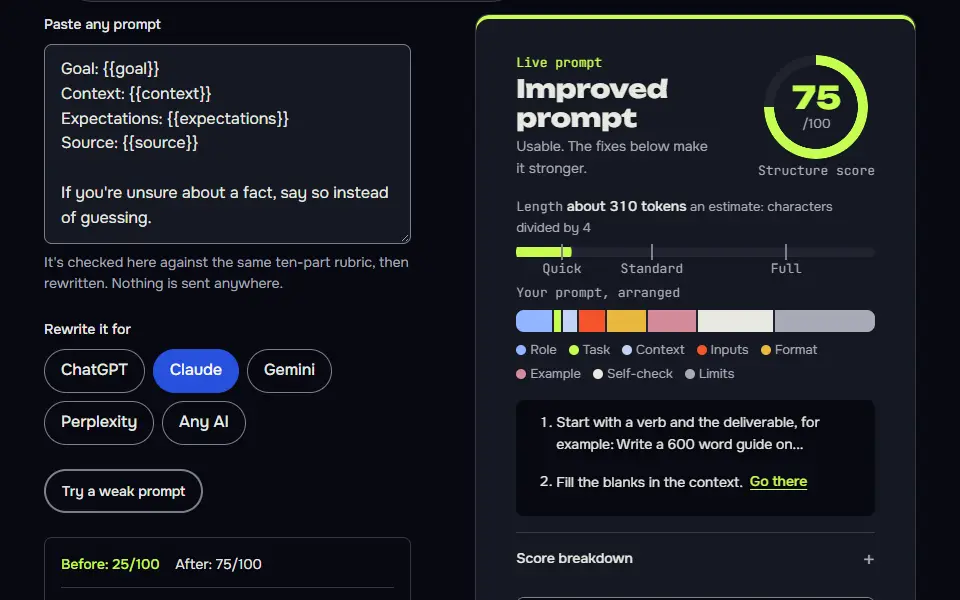
The shared prompt in goal, context, expectations, source form
One content set, adapted to each tool's habit: outcome-first for ChatGPT, context-then-task for Gemini, and search-aware for Perplexity.
Any model
Goal: {{goal}}
Context: {{context}}
Expectations: {{expectations}}
Source: {{source}}

If you're unsure about a fact, say so instead of guessing.
ChatGPT
Help me with this: {{goal}}.
What you should know: {{context}}.
What I'd like back: {{expectations}}.
Use these sources: {{source}}. Ask me before assuming anything important.
Gemini
{{context}}

{{source}}

Task: {{goal}}. Give me {{expectations}}.
Perplexity
{{goal}}. Context: {{context}}. Return {{expectations}}. Search for current information, and tell me if nothing relevant turns up or if a result is for a different year or place. Source guidance: {{source}}.
How to use
- Copy it with the button above.
- Fill the blanks in {{double braces}} with your own details.
- Paste it into ChatGPT, Claude or Gemini and send it.
- Then follow up: ask for one change at a time.
Before you run “The shared prompt in goal, context, expectations, source form” for the first time, the lesson on how to use AI prompts step by step walks through copying, filling and sending it.
The same task for a reasoning model
It states the task, constraints and format directly with no reasoning coaching, which is what vendor docs advise for reasoning models.
Decide between these options and give a recommendation.

Options: {{options}}
Constraints: {{constraints}}
Output: a one-paragraph recommendation (under {{words}} words), then a table of each option against the constraints with yes, no or unclear in each cell. If a constraint can't be judged from what I've given, mark it unclear and list what you'd need.
The same task for a search-based chatbot
It caps the output, sets scope and gives permission to find nothing, the three habits Perplexity's docs recommend.
Compare {{items}} for {{use_case}} in {{region}}. Give exactly {{count}} points, each with a short reason. Prefer sources from the last {{months}} months, and put the link next to each point. State only specs and prices you found in a source; if a spec isn't in a source, say so instead of assuming. If nothing relevant turns up for an item, say so. If a result is for a different year, brand or country than I asked about, flag it as a near-miss instead of presenting it as a match.
How to use
- Copy it with the button above.
- Fill the blanks in {{double braces}} with your own details.
- Paste “The same task for a search-based chatbot” into an AI with web search switched on, such as ChatGPT with search, Perplexity or Gemini.
- Then open the sources it cites before you trust a claim.
When should you rewrite a prompt for a different chatbot?
Rewrite a prompt for a different chatbot when it keeps ignoring a format, when it searches the web or when results change after a move. Don't rewrite one that already works in a plain, clear form; the differences are small, and you won't gain much.
For twelve patterns you can keep open while you work, there's a one-page prompt cheat sheet. Students who use chatbots for coursework often need the other kind of prompt first, and how to read an essay prompt covers it.
ChatGPT prompts guide FAQ
Still stuck? Build it in Prompt Studio. It'll score each part as you go.
What is the best prompt guide for ChatGPT users?
The best prompt guide for ChatGPT users is OpenAI's own prompting guide, plus a short shared core you can carry to other chatbots. OpenAI's pages are current and written for the product; this page adds where it doesn't hold and the advice changes for Copilot, Perplexity, Grok and DeepSeek.
Do Grok, Copilot and Perplexity need different prompts from ChatGPT?
No, Grok, Copilot and Perplexity don't need fully different prompts from ChatGPT; the core stays and only a few habits change. Copilot likes a named source, Perplexity searches from your wording, and Grok's reasoning models need little coaching.
What are some good everyday prompts for ChatGPT?
Good everyday prompts for ChatGPT are outcome-first requests such as 'Plan a 3-day trip to Lisbon for two, mid budget, as a table'. Another: 'Turn these meeting notes into a five-bullet update for the project team.' Each one names the result, the context and the shape.