
ChatGPT prompt cheat sheet
Guide
3 min
- Plain English
The short answer
A ChatGPT prompt cheat sheet is a short list of reusable prompt patterns you can paste and fill in: set the goal, add context, fix the format, ask questions first, critique and revise, and say when unsure. This page has twelve, each with a copy button. They work in most chatbots, not only ChatGPT.
What are the 12 ChatGPT cheat sheet patterns?
The 12 ChatGPT cheat sheet patterns are single-purpose templates, including goal first, set limits, ask me first and critique then revise. Each prompt pattern has a name, a "use it when" line and a fill-in template with a copy button in the worked prompts. The table maps each one to the guide that explains why it works, so you aren't left guessing.
Pattern 1 to 12
| # | Pattern | Use it when | Learn more |
|---|---|---|---|
| 1 | Goal first | Starting any request | Why goal first works |
| 2 | Audience and tone | The answer sounds generic | Why a named reader helps |
| 3 | Fix the format | You keep reformatting answers | Why a set format sticks |
| 4 | Set limits | Answers ramble or invent | Why limits cut rambling |
| 5 | Ask me first | The task is unclear | Why questions come first |
| 6 | Show an example | Style or format is hard to describe | Why one sample beats rules |
| 7 | Work step by step | Maths, logic, multi-part tasks | Why steps help on logic |
| 8 | Critique then revise | A draft is nearly there | Why a second pass works |
| 9 | Compare in a table | Choosing between options | Why scored options help |
| 10 | Summarise with a shape | Long text, short readers | Why shape beats length |
| 11 | Say when unsure | Facts matter | Why a way out cuts guesses |
| 12 | Reusable template | You run the same job often | Why blanks save time |
How do you use a ChatGPT prompt cheat sheet?
To use a ChatGPT prompt cheat sheet, pick the pattern that matches what went wrong, fill in the blanks and paste it. You don't need to memorise anything; that's the point of a sheet. For a whole task instead of a fix, start from the ChatGPT prompts for work packs and add a pattern on top.
Patterns combine: a goal, a format and an "ask me first" line make a strong prompt, and you'll find three or four cover most days. Don't stack all twelve at once; you'll end up with a prompt nobody could follow.
Which five prompting habits matter more than a cheat sheet?
Five prompting habits matter more than a cheat sheet: start with the result, share the facts that change it, name two boundaries, set the format and revise after reading.
- Start with the outcome you want, not a list of steps.
- Share the context that could change the answer.
- Name the two boundaries that matter most, such as length and tone.
- Set the format: a table, bullets or a short draft.
- Read the result, then ask for the one change you want.
They echo OpenAI's ChatGPT prompting guidance, which notes that you don't need every part and that brief prompts often do the job. Where facts matter, ask for sources and check them yourself, since a chatbot can sound sure and still be wrong.
Do ChatGPT cheat sheet patterns work in Copilot, Grok and DeepSeek?
Yes, ChatGPT cheat sheet patterns work in Copilot, Grok and DeepSeek, and only search modes need shorter, query-like wording. The patterns rely on goals, limits and formats that every chatbot reads, so each pattern carries over. Two notes: Perplexity searches the web from your wording, so it's worth keeping requests specific there, and reasoning models in Grok and DeepSeek don't need pattern 7, the step-by-step line.
What should you never paste into a ChatGPT prompt?
You should never paste passwords, private client data, ID numbers or health records into a ChatGPT prompt. Add one-time codes, card and bank numbers, and confidential work files your employer hasn't cleared for AI tools. These privacy limits come down to one test: don't paste anything you'd regret seeing in someone else's hands.
Check your data controls too, since chats can be stored and, depending on your settings, used to improve models.
ChatGPT prompts cheat sheet before and after
The same request, asked two ways. Read the second one slowly. Each line does a job.
Help me with an email to my landlord.
Goal: write an email asking my landlord to fix a leaking tap. Context: it's been leaking for two weeks and I reported it by phone on the 3rd. Tone: polite but firm. Format: subject line plus under 120 words. Ask me one question first if you need a detail.
Why it works
Four patterns (goal, context and tone, format, ask first) combine into a prompt that needs little editing.
ChatGPT prompts cheat sheet examples
1. Goal first
Leading with the outcome is the core of OpenAI's own guidance.
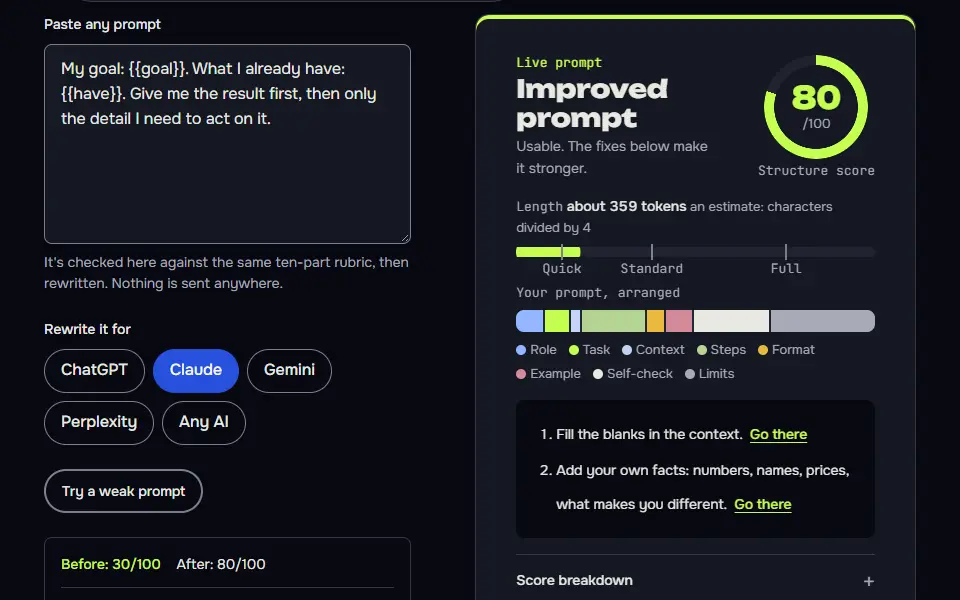
My goal: {{goal}}. What I already have: {{have}}. Give me the result first, then only the detail I need to act on it.
How to use
- Copy it with the button above.
- Fill the blanks in {{double braces}} with your own details.
- Paste it into ChatGPT, Claude or Gemini and send it.
- Then follow up: ask for one change at a time.
Before you run “1. Goal first” for the first time, the lesson on how to use AI prompts step by step walks through copying, filling and sending it.
2. Audience and tone
Audience and tone decide vocabulary and examples.
Explain {{topic}} to {{audience}} in a {{tone}} tone. Use one analogy from their world and no jargon they wouldn't know.
3. Fix the format
Naming the shape up front saves reformatting.
{{your_request}}

Answer as {{format}}. No introduction, no closing summary. If a field has nothing to say, write n/a.
4. Set limits
One or two firm limits beat a long list of soft wishes.
Keep it under {{words}} words, use plain words, and don't include anything I haven't asked for. Don't add examples or caveats unless they change the answer.5. Ask me first
It turns hidden assumptions into questions you can answer in ten seconds.
Before you start, ask me up to {{questions}} questions about anything you'd have to guess. Wait for my answers, then do the task: {{task}}.
6. Show an example
One example fixes the format and tone better than a paragraph of description.
Match the style of this example exactly.

Example input: {{ex_in}}
Example output: {{ex_out}}

Now do the same for this input: {{new_in}}
7. Work step by step
Useful on standard models for maths and logic; reasoning models may not need it.
Work through this step by step, checking each step before you move on. Put the result on the last line, starting with "Final answer:".

{{problem}}8. Critique then revise
Splitting critique from repair keeps the good parts untouched.
Read your answer again as {{critic}}. List the three weakest points, each with the sentence it's about. Then revise only those sentences and show the changes.9. Compare in a table
Fixed criteria make the comparison fair and quick to scan.
Compare {{options}} for {{purpose}}. Use a table with rows for each option and columns for {{criteria}}. Finish with a one-sentence recommendation and the single fact that would change it.
10. Summarise with a shape
A fixed shape makes summaries consistent across documents.
Summarise the text below for {{reader}} as: one sentence with the main point, three bullets of key detail, and one line starting "Decision needed:" or "No decision needed". Don't add anything that isn't in the text.

{{text}}
11. Say when unsure
It makes uncertainty visible, which is where wrong answers hide.
If you aren't sure of a fact, a number or a source, say "not sure" next to it instead of guessing. List anything I should check myself at the end.
12. Make it reusable
Saves the version that worked, so you stop retyping it.
Turn the prompt below into a reusable template. Replace anything specific to this job with a short blank name in double curly braces, keep the rules and the format fixed, and list the blanks with an example fill for each.

Prompt:
{{your_prompt}}When is a prompt cheat sheet the wrong tool?
A prompt cheat sheet is the wrong tool when the task needs thinking about the goal first, such as a new project or a hard decision. It's built for quick everyday prompts. A pattern that doesn't fix the problem usually points at your context or goal, not your wording, and it's often something you haven't told the model yet.
School assignments are their own kind of prompt, and decoding the task comes before any chatbot pattern; that side is covered in what an essay prompt means.
ChatGPT prompts cheat sheet FAQ
Still stuck? Build it in Prompt Studio. It'll score each part as you go.
What are some cheat prompts for ChatGPT beginners?
Some cheat prompts for ChatGPT beginners are 'Ask me 3 questions before you answer' and 'Critique your draft, then revise it'. Add 'Answer as a table with these columns' and 'Say not sure instead of guessing', and you've got four of the twelve patterns.
Is there a ChatGPT prompt cheat sheet PDF?
No, this ChatGPT prompt cheat sheet isn't a Portable Document Format (PDF) file; each pattern has a copy button, and the page prints cleanly. Use your browser's print dialog and choose 'Save as PDF' if you'd like a file.
What are the 5 things you shouldn't tell ChatGPT?
The 5 things you shouldn't tell ChatGPT are passwords, bank details, ID numbers, private client data and medical records. Work files your employer hasn't cleared for AI tools belong on that list too.